


What is SharePoint? How IT Teams Leverage the Microsoft Tool

For the last few years, enterprises need more than just file storage—they need a secure and collaborative platform to manage documents, workflows, and knowledge effectively. Microsoft provides this through SharePoint, a web-based framework designed to centralize content, streamline processes, and boost teamwork across departments. If you are an IT manager, enterprise leader, or project coordinator curious about what is SharePoint or what is Microsoft SharePoint used for, this article will help you unveil the tool’s main features, advantages, real-world applications, and how to apply it effectively in your business.
What is Microsoft SharePoint?
To answer what is SharePoint in short, it is a web-based collaboration and document management platform that helps enterprises store, organize, share, and access information securely. Its core components include team sites, document libraries, lists, workflows, and integration with Microsoft 365, enabling businesses to streamline communication and manage content at scale.
Example: Coca-Cola has used SharePoint to centralize internal communication and document management across global teams, resulting in improved collaboration, reduced duplication of work, and faster decision-making across regional offices.
How does SharePoint work?
SharePoint works by combining cloud and on-premises options, structured storage, and security mechanisms to deliver enterprise collaboration at scale. Its architecture can be summarized as follows to answer what is SharePoint workflow:
- SharePoint Online vs SharePoint Server: Online is a cloud-based service hosted in Microsoft 365, while Server provides on-premises deployment for businesses needing more control.
- Centralized Libraries: Files, lists, and structured data are stored in document libraries and lists, ensuring everything is accessible in one place.
- Role-Based Permissions: User access is defined by roles and groups, helping organizations maintain compliance and data security.
- Office and API Integration: SharePoint connects seamlessly with Microsoft Office apps (Word, Excel, Outlook) and APIs to enable automation, reporting, and third-party integrations.
Explore what Microsoft Azure Development is and its insights to understand related services from Microsoft.
What is SharePoint used for?
SharePoint can be applied to multiple enterprise tasks that go beyond just storage, like:
- Document collaboration – Teams can co-author, edit, and track version history of documents in real time.
- Knowledge management – Organizations build knowledge bases and wikis to preserve expertise and improve onboarding.
- Workflow automation – Businesses design custom approval processes and task flows to speed up routine operations.
- Project management – Teams manage project documents, schedules, and updates within centralized SharePoint sites.
- Internal communication – Enterprises build intranets and portals to share company news, policies, and announcements.
- Regulatory compliance – SharePoint supports audit trails, permissions, and records retention policies for industries with strict compliance needs.
8 Core Features of SharePoint
Since SharePoint can offer a variety of features for users, we only focus on the core functions that every business should utilize below:
- Seamless Document Collaboration – Teams can co-author files in real time, with version history and rollback options that make enterprise document control simple and secure.
- Advanced Search Capabilities – AI-driven search understands context and user intent, allowing employees to quickly locate files, people, or workflows across the enterprise.
- Comprehensive Content Management – SharePoint organizes business data with lists, libraries, metadata, and retention rules. Features like auto-tagging and content translation reduce manual effort.
- Integrated Collaboration Tools – It works natively with Microsoft Teams, Outlook, and Yammer, enabling companies to connect chat, email, video, and documents in a single ecosystem.
- Workflow and Process Automation – Through Power Automate, businesses can set up approval processes, notifications, and task automation without the need for coding expertise.
- AI-Powered Assistance – Copilot in SharePoint helps generate pages, summarize reports, and answer employee questions about site content, boosting productivity and decision-making.
- Customizable Site Design and Branding – Organizations can tailor intranet sites with layouts, themes, and a central Brand Center to ensure brand consistency across departments.
- Robust Security and Compliance – Enterprises benefit from encryption, data loss prevention, access policies, and automated compliance monitoring to meet industry regulations.
Pros & Cons of SharePoint
The pros & cons table below will reveal the actual strengths & weaknesses that SharePoint can deliver to users’ experiences. From that information, you can decide whether to sign up for the toolset or not.
| Pros |
Cons |
| Enterprise scalability – SharePoint scales easily from small teams to global enterprises, handling millions of documents and users with reliability. | Steep adoption curve – The platform requires user training and change management, as adoption can be slow for teams unfamiliar with Microsoft ecosystems. |
| Built-in compliance tools – Its governance features help organizations meet industry regulations such as GDPR, HIPAA, or SOX with audit trails and retention policies. | Customization complexity – Customizing SharePoint beyond standard features often demands specialized skills, which can increase implementation effort. |
| Microsoft ecosystem integration – Deep integration with Teams, Outlook, and Power BI creates a seamless productivity and collaboration environment. | Licensing and cost factors – Advanced features and enterprise licensing can be costly, especially for SMEs, compared to lighter solutions. |
| Centralized knowledge sharing – Employees across geographies can access the same version of documents, reducing duplication and improving accuracy. | Performance limitations – Poor configuration or overloaded sites with unstructured data may lead to slower performance. |
| Enterprise-grade security – Role-based access control, MFA, and intelligent threat detection safeguard sensitive business information. | |
| Flexible deployment options – Organizations can choose cloud, on-premises, or hybrid setups to meet IT and regulatory requirements. |
Verdict: SharePoint is best suited for mid-to-large enterprises requiring a secure, scalable, and integrated collaboration platform with strong compliance support. Smaller organizations or teams may find lighter tools like Google Workspace or Slack more practical and cost-effective.
4 Popular Use Cases of SharePoint
1. Legal Firms
SharePoint provides law firms with secure document storage, version tracking, and collaboration tools to manage sensitive client data. It also enables firms to build client portals where case documents, contracts, and legal references can be shared securely.
For example, Clifford Chance, one of the world’s leading law firms, has used SharePoint to streamline internal document workflows and ensure compliance with strict data governance requirements. The result was faster case preparation and improved collaboration across multiple offices.
2. Manufacturing
In manufacturing, SharePoint is often used to centralize supply chain documentation, quality manuals, and production workflows. It creates dashboards where stakeholders can track processes, manage compliance documents, and access critical operational data in one place.
Siemens leverages SharePoint to unify supply chain documentation and automate workflows across its global factories. This has helped reduce delays, maintain compliance, and enhance visibility for management teams.
3. Retail & E-commerce
SharePoint helps retail and e-commerce companies build employee intranets, product information libraries, and collaboration sites that connect frontline workers with corporate teams. It ensures everyone has access to accurate product details, marketing materials, and operational guidelines.
Marks & Spencer implemented SharePoint to create an employee portal that connects store staff with headquarters. This improved communication, reduced duplication of training resources, and sped up product launch processes.
4. Government & Public Sector
Governments and public agencies use SharePoint to build compliance-ready document repositories, digital forms, and internal knowledge bases. It allows them to manage sensitive data while meeting strict regulatory and transparency requirements.
The U.S. Department of Defense has utilized SharePoint for secure knowledge management and internal communication across its divisions. The system has enhanced information sharing while maintaining compliance with federal security standards.
How to Set Up & Use SharePoint
From our experience working with enterprises deploying SharePoint, we understand that a clear usage & setup guide can help businesses overcome setup complexity and start seeing results faster. If you have been unsure how to set up SharePoint or how to use SharePoint effectively, here is the basic registration and setup instruction:
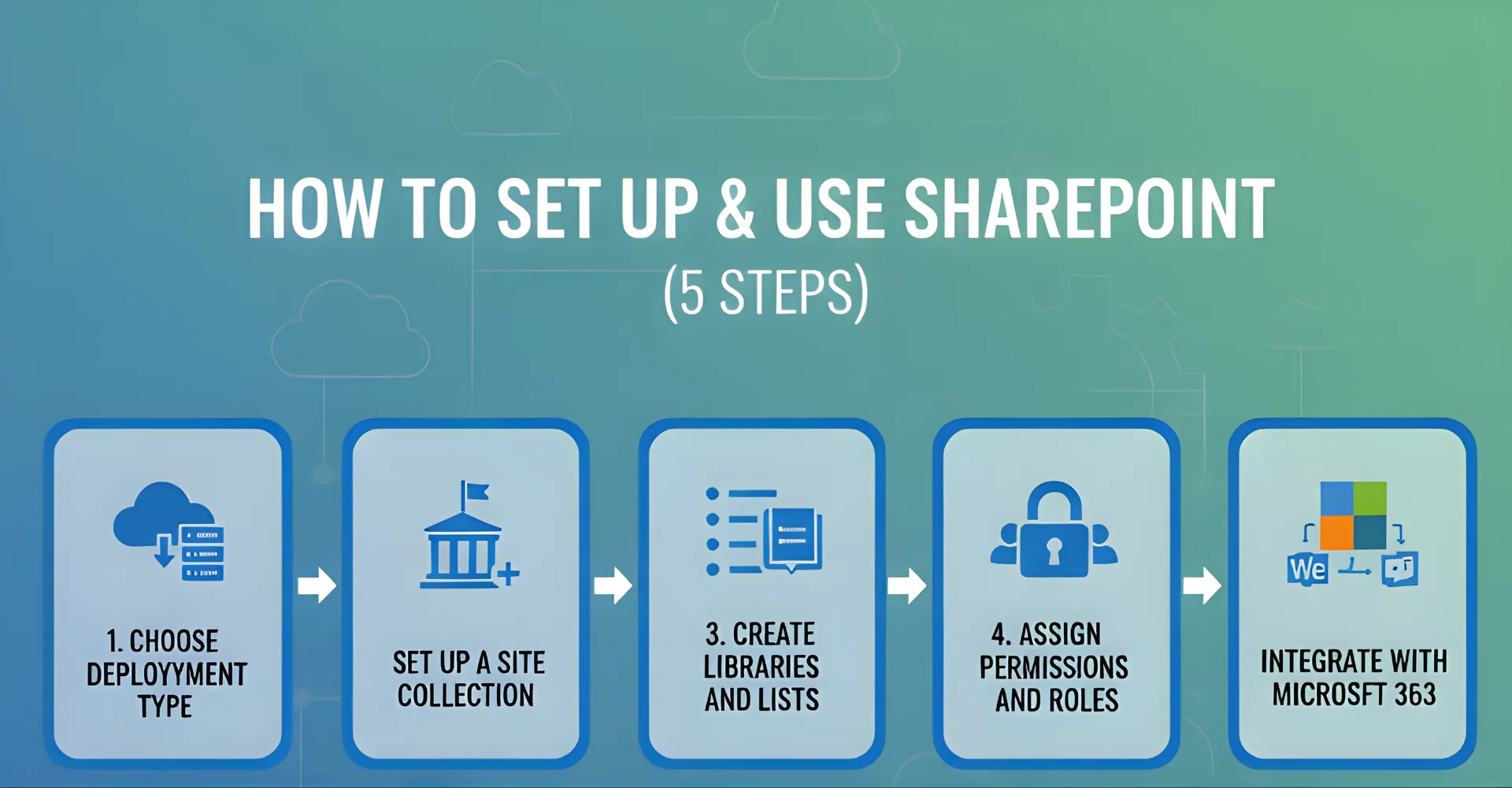
- Step 1: Choose deployment type – Decide between SharePoint Online for cloud-based flexibility or SharePoint Server for full on-premises control, depending on your IT strategy and compliance needs.
- Step 2: Set up a site collection – Create a site collection for your organization to act as the central hub for teams, projects, or departments.
- Step 3: Create libraries and lists – Organize your files, structured data, and workflows by setting up document libraries and custom lists tailored to your business processes.
- Step 4: Assign permissions and roles – Configure role-based access control to ensure secure collaboration, making sure only the right users can access sensitive content.
- Step 5: Integrate with Microsoft 365 – Connect SharePoint with Teams, Outlook, and Power BI to enable seamless workflows, communication, and analytics across your enterprise.
SharePoint vs. Other Collaboration Tools
Since other tools can perform the same functions as SharePoint, like Google Workspace or Atlassian Confluence, it is best to compare them together to evaluate which best fits their needs for productivity, compliance, and scalability. While each tool has unique strengths, many organizations also explore combining them strategically to maximize collaboration and efficiency across teams.
The table below will show an overview comparison between SharePoint and other collaboration tools:
| Criteria | SharePoint | Google Workspace |
Confluence |
| Document collaboration | Real-time co-authoring with version history and integration into Microsoft Office. | Excellent real-time editing in Docs, Sheets, and Slides, but limited metadata control. | Strong wiki-style documentation, but weaker structured document management. |
| Security | Enterprise-grade security with encryption, role-based permissions, and compliance features. | Good security with Google Drive, but less granular compliance controls. | Adequate security, but less suited for industries with strict regulations. |
| Scalability | Highly scalable for enterprises handling millions of files and users. | Scales well but is designed primarily for smaller teams and cloud-native firms. | Suitable for team knowledge bases but less robust for massive content repositories. |
| Integration | Deep integration with Microsoft 365, Power BI, and enterprise apps. | Strong integration with Google’s ecosystem, but limited to third-party enterprise apps. | Integrates well with Jira and other Atlassian tools but is weaker outside the ecosystem. |
| Cost | Licensing can be higher, but bundled value with Microsoft 365 justifies the cost for enterprises. | Flexible and affordable for SMEs, but may lack enterprise-grade depth. | Moderate cost, strong for documentation, but requires add-ons for broader use. |
| Adoption | Requires training and change management for best results. | Quick adoption for small businesses already using Google tools. | Easy adoption for dev teams but less intuitive for business-wide rollout. |
Comparison Verdict:
- SharePoint is the strongest choice for mid-to-large enterprises requiring secure document management, compliance, and integration with Microsoft’s ecosystem.
- Google Workspace is ideal for SMEs seeking lightweight, cloud-native collaboration.
- Confluence excels in development-heavy teams that need knowledge-sharing and project documentation.
Some businesses even combine these platforms—for example, using SharePoint for governance and compliance, and Google Workspace or Confluence for lightweight collaboration.
SharePoint’s Role in Digital Transformation
SharePoint is a cornerstone of enterprise digital transformation, enabling organizations to move away from paper-based or manual processes and toward automated, streamlined workflows. By integrating approval systems, notifications, and task management, it reduces human error and speeds up business cycles.
Through SharePoint Online and Microsoft 365, enterprises can embrace cloud-first collaboration, ensuring teams work together in real time regardless of geography. This not only boosts productivity but also provides scalability and resilience for growing organizations.
Another critical role is creating unified intranets that serve as the digital workplace hub. These intranets support enterprise culture, enhance employee engagement, and centralize access to documents, tools, and organizational news—all within a secure, branded environment.
5 Best Practices for Enterprises Adopting SharePoint
- Start with a proof-of-concept pilot – Launch a small project to validate use cases, gather feedback, and fine-tune SharePoint before scaling enterprise-wide.
- Train employees effectively – Educate staff on how to use document libraries, lists, and permissions to ensure adoption and reduce mismanagement.
- Use governance policies – Establish metadata standards, version control, and access rules to maintain compliance and consistency across departments.
- Leverage managed services or expert support – For complex or large-scale deployments, working with experienced SharePoint consultants ensures smoother implementation and optimized performance.
- Regularly monitor usage analytics – Track adoption metrics, identify bottlenecks, and adjust site structures or workflows to continuously improve user experience.
SharePoint’s Future Outlook
Microsoft continues to position SharePoint as a central pillar of its digital workplace ecosystem, with ongoing investments in Microsoft 365, Teams integration, and AI-powered features such as Copilot and intelligent search. These advancements ensure enterprises can rely on SharePoint for long-term collaboration, compliance, and automation needs.
With its robust roadmap and adaptability, SharePoint remains a trusted platform for organizations seeking confidence in their digital transformation strategies.
FAQs
1. What is Microsoft SharePoint software?
Microsoft SharePoint software is a web-based platform that helps organizations manage, share, and collaborate on documents, data, and processes across teams and departments.
2. Is SharePoint free?
No, SharePoint is not free. It is licensed as part of Microsoft 365 subscriptions or through SharePoint Server for on-premises deployments.
3. Can SharePoint replace file servers?
Yes, SharePoint can replace traditional file servers by acting as a centralized, cloud-based document repository with version control, permissions, and remote access.
4. What industries use SharePoint the most?
SharePoint is widely adopted in industries such as government, legal, healthcare, finance, and manufacturing, where compliance, secure collaboration, and content management are critical.
5. How secure is SharePoint Online?
SharePoint Online includes enterprise-grade security such as encryption, role-based permissions, compliance certifications, and advanced threat protection, making it highly secure for sensitive business data.
6. What is the difference between SharePoint and OneDrive?
SharePoint is designed for team collaboration, intranet sites, and enterprise content management, while OneDrive is focused on personal file storage and individual sharing.
7. What is a content type in SharePoint?
A content type in SharePoint is a reusable collection of metadata, templates, and workflows that define how a specific type of content (such as a contract, invoice, or policy) should be managed within the platform.
8. What is SharePoint website?
A SharePoint website, often called a SharePoint site, is a web-based workspace where teams can store documents, share information, collaborate on tasks, and build intranet portals tailored to their organization’s needs.
Conclusion
SharePoint is a powerful Microsoft platform that enables businesses to manage documents, knowledge, and enterprise workflows in a secure and centralized environment. Its ability to integrate collaboration, compliance, and process automation makes it especially valuable for IT teams and decision-makers managing large-scale operations. To maximize the output of this Microsoft tool, you should carefully evaluate what is SharePoint list is and how lists, libraries, and workflows can be combined with other collaboration tools like Teams or OneDrive for seamless productivity.
Should your business be challenged by SharePoint adoption or related technology implementation, Newwave Solutions can support you with a team of highly capable developers, designers, and QA engineers who bring extensive expertise with Microsoft tools. In addition to providing high-quality IT staffing, we deliver a wide range of in-house development solutions including software development services, mobile app services, UI/UX design services, and long-term maintenance to ensure comprehensive coverage.
Let us assist you in applying SharePoint and other strategic IT solutions effectively and seamlessly.
To Quang Duy is the CEO of Newwave Solutions, a leading Vietnamese software company. He is recognized as a standout technology consultant. Connect with him on LinkedIn and Twitter.



Read More Guides




Get stories in your inbox twice a month.
Let’s Connect
Let us know what you need, and out professionals will collaborate with you to find a solution that enables growth.
Leave a Reply