


What Is Sketch Software: Web & Mobile UI Design Solution

In the last few years, many design-related businesses and teams have been seeking powerful tools to create seamless and visually engaging user interfaces for web and mobile platforms – especially on macOS. Among the most widely adopted solutions like Figma, Adobe XD, and InVision, Sketch stands out for its precision, simplicity, and professional-grade performance. Designed specifically for macOS, Sketch software helps designers build interactive prototypes, manage design systems, and collaborate efficiently across teams. In this Newwave Solutions’ article, we will explore what is Sketch software, its key features, core technologies, and how it can help your business enhance its UI/UX design process.
What is Sketch software?
Sketch is a professional vector-based design software Sketch built exclusively for macOS, widely used for creating user interfaces, mobile applications, and responsive web designs. Unlike raster-based tools such as Photoshop, Sketch allows designers to build scalable, resolution-independent assets with precision and flexibility.
Over the years, it has evolved from a standalone design tool into a fully integrated ecosystem that supports real-time collaboration, cloud sharing, and component-based workflows, making it one of the most popular platforms among professional UI/UX designers and product teams worldwide.
Example:
Airbnb’s design team uses Sketch to create consistent, pixel-perfect UI components for its mobile and web platforms. By leveraging shared libraries and real-time collaboration features, Airbnb ensures that its design system remains unified across all digital touchpoints while accelerating the prototyping process.
How Sketch Works for UI/UX Design?
The software Sketch design operates through a structured workflow that guides designers from concept to prototype with precision and efficiency. It provides an intuitive workspace where each element can be adjusted, reused, and synchronized for team collaboration.
Typical Sketch Workflow:
- Artboard Creation: Designers start by defining frames for different screens or devices (e.g., mobile, tablet, desktop).
- Vector Editing: Each UI element is drawn using scalable vector shapes that maintain quality at any resolution.
- Component & Symbol Setup: Reusable elements such as buttons, icons, or navigation bars are created and managed in shared libraries.
- Prototyping & Linking: Designers connect screens and add interactive flows to simulate user navigation.
- Feedback & Collaboration: Using Sketch Cloud, teams review, comment, and iterate on designs in real-time for faster approval and consistency.
What is Sketch software used for?
- User Interface Design: Sketch is used to design clean, scalable, and pixel-perfect interfaces for mobile and web applications, ensuring a consistent user experience across devices.
- Wireframing & Prototyping: Designers can quickly visualize ideas and connect screens to build interactive prototypes that simulate real app behavior.
- Design System Management: Teams use Sketch to create, store, and share reusable components and style guides to maintain visual consistency across products.
- Collaboration & Review: With Sketch Cloud, design teams and stakeholders can collaborate, provide feedback, and track changes efficiently without manual file sharing.
- Developer Handoff: Sketch integrates with tools like Zeplin and Abstract, allowing seamless export of design specifications, assets, and CSS for developers.
10 Core Features of Sketch for Professional Design Teams
The Sketch design software provides an advanced set of tools that help enterprises and creative teams streamline design production, collaboration, and scalability. Below are the most essential features professionals rely on daily:
- Vector Editing Tools provide designers with precision control to create sharp, scalable graphics and UI components that remain consistent across different screen sizes and resolutions.
- Smart Layout System automatically adjusts spacing, alignment, and component size when content changes, allowing teams to maintain responsive designs efficiently without repetitive manual edits.
- Reusable Components and Symbols allow enterprises to create shared UI elements that automatically update across projects, ensuring brand consistency and reducing redundant design work.
- Shared Libraries enable global teams to access and reuse approved assets, design tokens, and components, fostering a unified design language across large-scale product ecosystems.
- Sketch Cloud Collaboration offers real-time co-editing, version history, and commenting features that connect designers, developers, and stakeholders within a single workspace.
- Prototyping and Interactive Linking allow users to connect artboards, simulate navigation flows, and preview user journeys directly within the Sketch environment before handing off to development.
- Extensive Plugin Ecosystem integrates tools like Zeplin, Abstract, and Lottie to automate handoff, animation, and documentation tasks, helping enterprises optimize their end-to-end design-to-development pipeline.
- Version Control and Change Tracking give teams the ability to monitor file history, compare versions, and restore previous iterations, which strengthens governance and reduces errors in design updates.
- Design System Libraries act as a central hub for managing color palettes, typography, icons, and UI kits, enabling scalable and consistent visual standards across multiple products.
- Native macOS Optimization ensures faster performance, minimal lag, and seamless integration with macOS tools, making Sketch a preferred solution for professional design teams operating in Apple-based environments.
Benefits & Limitations of Sketch
Just like other UI/UX tools, Sketch software for UX design comes with its own strengths and weaknesses. Understanding these factors will help you decide whether Sketch aligns with your company’s workflow, team structure, and design requirements.
Benefits of Sketch
| Pros | Explanation |
| 1. Native macOS Performance | Sketch runs natively on macOS, delivering fast performance, minimal lag, and excellent stability when handling large enterprise-scale design files. |
| 2. Precision Vector Editing | The advanced vector editing tools allow designers to create pixel-perfect layouts and scalable UI elements that maintain clarity across all resolutions. |
| 3. Reusable Components and Symbols | Shared components and symbols let teams reuse design elements efficiently and apply global updates instantly, ensuring consistent design systems. |
| 4. Smart Layout Automation | Smart Layout automatically adjusts spacing, padding, and element size when content changes, significantly reducing manual layout adjustments. |
| 5. Real-Time Cloud Collaboration | Sketch Cloud supports live co-editing, version tracking, and in-app commenting, which improves communication and accelerates design approvals. |
| 6. Extensive Plugin Ecosystem | The large selection of plugins—such as Zeplin, Abstract, Avocode, and Lottie—enables automation and integration with development tools for smoother workflows. |
| 7. Pre-Built UI Kits for Major Platforms | Sketch provides ready-to-use UI kits for iOS, macOS, and Material Design, allowing designers to build compliant and visually cohesive interfaces faster. |
Limitations of Sketch
| Cons | Explanation |
| 1. macOS-Only Availability | Sketch supports only macOS, which can create barriers for cross-platform teams using Windows or Linux environments. |
| 2. Limited Web-Based Collaboration | Although Sketch Cloud enables collaboration, it does not offer fully web-based editing like Figma, restricting flexibility for remote contributors. |
| 3. Complex Library Management at Scale | Managing large design systems requires strict versioning and naming conventions to prevent library fragmentation and inconsistencies. |
| 4. Reliance on External Tools for Advanced Prototyping | Some complex prototyping or developer handoff capabilities depend on third-party integrations, requiring additional setup and tool management. |
5 Common Use Cases of Sketch
Enterprises should consider Sketch when they require scalable, component-driven design workflows that ensure brand consistency and enable smooth collaboration between design and development teams.
1. SaaS & Collaboration Platforms
SaaS software development companies use Sketch to design complex dashboards, admin consoles, and multi-user interaction flows. Teams leverage Symbols and Shared Libraries to standardize components while using Smart Layout to dynamically adapt interfaces for different data states.
Example: Atlassian relies on Sketch to maintain its unified design system across products like Jira and Confluence. By implementing centralized Sketch libraries, its designers and partners can reuse consistent UI components, reducing turnaround time for new features and minimizing UI inconsistencies.
2. E-commerce & Retail Platforms
E-commerce teams use Sketch to create seamless shopping experiences, optimizing navigation flows, product listings, and checkout screens across devices. Shared styles and responsive grids enable the team to scale design templates quickly for seasonal campaigns.
Example: Shopify developed its Polaris Design System entirely in Sketch format. This allows Shopify’s internal design teams and external partners to build new storefronts and dashboards faster while maintaining a cohesive brand and user experience across all digital touchpoints.
3. Enterprise CRM & Business Applications
Enterprises use Sketch to design CRM interfaces, form layouts, and data-heavy dashboards with reusable UI states (e.g., enabled, disabled, error). This reduces the maintenance workload for large-scale business systems and improves the clarity of complex workflows.
Example: Salesforce provides its Lightning Design System in Sketch format, enabling its global product teams and partners to rapidly design and prototype CRM modules that comply with Salesforce’s design guidelines and accessibility standards.
4. OS-Native & Mobile App Experiences
Sketch is the go-to solution for designing native iOS and macOS applications thanks to its built-in UI kits, precision alignment tools, and component-based layouts. Designers can create interactive prototypes that mirror real app flows for early-stage testing.
Example: Apple offers official Human Interface Resources for Sketch, helping developers and design partners build interfaces that comply with Apple’s Human Interface Guidelines (HIG), thus improving approval rates and shortening development cycles.
5. Enterprise Platforms & Design Systems at Scale
Large organizations rely on Sketch to manage multi-brand component libraries, synchronize design tokens, and control versioning across distributed teams. This helps enforce visual and functional consistency across an entire suite of enterprise solutions.
Example: IBM uses Sketch to maintain its Carbon Design System, which supports dozens of internal product teams. The centralized system enables IBM to uphold accessibility standards and deliver a unified look and feel across all its digital platforms.
Sketch vs Other Design Tools (Figma, Adobe XD, InVision)
The design software market is filled with many high-quality tools beyond Sketch, including Figma, Adobe XD, and InVision. Each platform offers unique strengths and limitations, catering to different types of teams, workflows, and business needs. Let’s explore how Sketch compares with these major competitors to help you determine which tool best fits your company’s design strategy and development goals.
| Criterion | Sketch | Figma | Adobe XD | InVision | Verdict |
| Platform Availability | Native macOS app optimized for high performance. | Web and desktop (Windows/macOS). | Cross-platform desktop app. | Fully web-based. | Teams using macOS benefit most from Sketch’s performance; multi-OS teams prefer Figma. |
| Real-Time Collaboration | Real-time co-editing via Sketch Cloud, limited to macOS users. | Seamless real-time web collaboration. | Functional but limited real-time updates. | Primarily comment-based collaboration. | Figma leads in real-time collaboration; Sketch suits smaller Mac-based teams. |
| Offline Performance | Excellent stability and responsiveness offline. | Requires a constant internet connection. | Strong offline support. | Online-only experience. | Sketch offers the best experience for offline workflows. |
| Design System Scalability | Advanced Symbols and Libraries for complex enterprise design systems. | Robust component management with variants and tokens. | Moderate component reuse capabilities. | Not suited for design system management. | For enterprise-scale systems, Sketch and Figma both excel. |
| Plugin Ecosystem & Integrations | Extensive plugins for automation, animation, and developer handoff. | Expanding plugin API with strong community support. | Limited plugin availability. | Focused mainly on prototyping. | Sketch and Figma dominate in plugin versatility. |
| Developer Handoff & Code Export | Strong integrations with Zeplin, Avocode, and Abstract for asset export. | Built-in Inspect mode with automatic CSS and specs. | Moderate handoff tools. | Prototype inspection only. | Figma is better for simple built-in handoff; Sketch excels in flexible pipelines. |
| Prototyping & Interactions | Basic in-app prototyping with plugin-based extensions. | Rich interactive prototyping with transitions and variants. | Moderate prototyping functionality. | Specialized in interactive prototyping and user testing. | For advanced animation and user flows, Figma and InVision are stronger. |
| Version Control & Governance | Abstract integration supports Git-like versioning. | Built-in version history with branching. | Basic version history. | Prototype-based versioning. | Sketch with Abstract provides enterprise-grade governance. |
| Security & Data Management | Offers both local storage and secure Cloud hosting. | Fully SaaS-based; dependent on Figma’s infrastructure. | Local project files by default. | Cloud storage only. | Enterprises needing data control should prefer Sketch or Adobe XD. |
| Total Cost of Ownership (TCO) | Lower long-term costs for Mac-only teams, and additional plugin expenses. | Subscription-based model with all-in-one access. | Affordable for Windows-heavy enterprises. | Add-on cost for prototyping only. | Sketch remains cost-effective for Apple environments; Figma is ideal for large distributed teams. |
Quick Verdict:
- Sketch is best for macOS-based enterprises that need high performance, detailed version control, and advanced library management for large-scale UI/UX projects.
- Figma is best for globally distributed teams that prioritize real-time collaboration and browser-based workflows.
- Adobe XD is best for organizations within the Adobe ecosystem or Windows environments seeking an affordable, desktop-focused tool.
- InVision is best for creative teams that focus on prototyping, user testing, and visual storytelling during design presentations.
How to use Sketch from scratch?
Because Sketch includes several advanced features that may feel complex for beginners, we’ve outlined a simple step-by-step guide to help you set up and start designing efficiently using the software’s core functions:
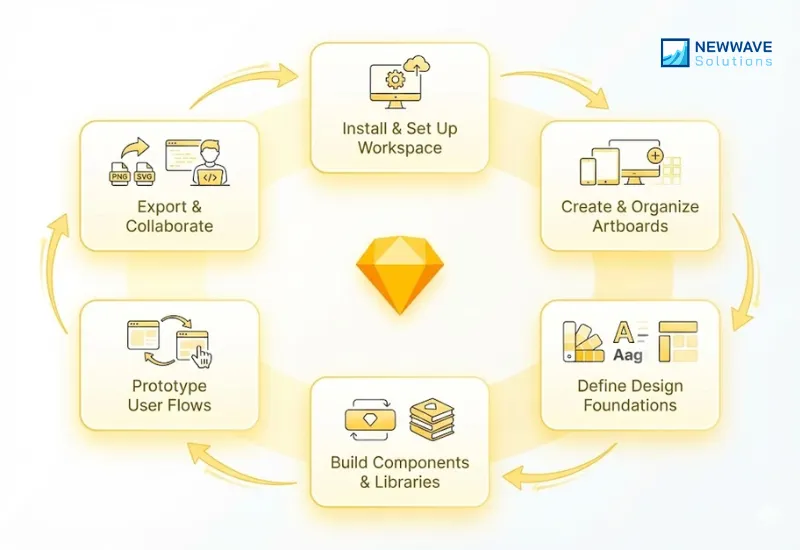
Step 1 — Install and Set Up Your Workspace
Install Sketch on your macOS device and sign in with your Sketch account or organizational workspace. Configure your workspace access levels so designers, developers, and reviewers can collaborate through Sketch Cloud.
Step 2 — Create a New Project and Organize Artboards
Start a new Sketch document and set up your artboards based on target devices such as mobile, tablet, or desktop. Organize your pages into sections like “Components,” “Screens,” and “Assets” to maintain a clean, scalable structure.
Step 3 — Define Design Foundations (Colors, Typography, Styles)
Set up brand color variables, text styles, and layer styles to ensure visual consistency across your design system. Establish grid layouts and spacing guides to standardize alignment and proportions across all artboards.
Step 4 — Build Components and Shared Libraries
Create reusable Symbols for buttons, icons, and UI elements with Smart Layout to handle different content sizes automatically. Publish these assets as a Shared Library so other team members can access and reuse approved design components.
Step 5 — Prototype and Connect User Flows
Link artboards together to simulate navigation flows and basic interactions within the Sketch interface. Use built-in prototyping tools or export to platforms like Zeplin for collaborative feedback and handoff preparation.
Step 6 — Export Assets and Collaborate with Developers
Generate production-ready assets by setting export presets for various screen resolutions and file formats. Share designs through Sketch Cloud or integrations like Zeplin and Jira to enable developers to inspect specifications and implement designs accurately.
FAQs
Is Sketch software only for macOS users?
Yes, Sketch is a native macOS application, meaning it can only be installed and used on Apple devices. However, non-Mac users can still review, comment, and inspect designs through Sketch Cloud in any web browser. This makes collaboration possible even if not everyone on the team uses macOS.
Can Sketch be used for web design as well as app design?
Absolutely. Sketch is widely used for both web interface and mobile app design because of its vector-based precision and responsive layout tools. Designers can create scalable UI components that adapt to multiple devices and screen resolutions seamlessly.
What are the main differences between Sketch and Figma?
Sketch is macOS-native and offers offline performance, deep plugin customization, and powerful library management, while Figma runs in the browser and focuses on real-time web-based collaboration. Sketch suits design-heavy teams within Apple ecosystems, whereas Figma is better for cross-platform, distributed teams.
How secure is Sketch Cloud for enterprise collaboration?
Sketch Cloud uses encrypted communication (SSL/TLS) and secure authentication to protect shared files. Access permissions are role-based, allowing enterprises to control who can view, comment, or edit. Files remain stored in secure cloud environments that meet industry data protection standards.
Can Sketch integrate into existing design workflows with other tools?
Yes, Sketch integrates seamlessly with tools like Zeplin, Abstract, Jira, Notion, and Git to support end-to-end design and development workflows. These integrations enable smooth handoff, automated documentation, and version control. As a result, teams can embed Sketch directly into their existing agile or CI/CD pipelines without disruption.
How to your UI/UX Design Quality with Newwave Solutions?
Design tools like Sketch are powerful, but tools alone do not guarantee great user experiences. Many organizations struggle to turn design files into cohesive, user centered products due to gaps in research, design strategy, or cross team execution. To unlock the true value of Sketch, businesses need a structured UI UX process backed by experienced designers and engineers who understand how design translates into real world software.
Newwave Solutions provides that expertise. With a dedicated UI UX and engineering team based in Vietnam, we deliver full cycle UI UX design services that leverage Sketch to create scalable, consistent, and conversion focused digital experiences. Our approach combines user research, wireframing, high fidelity interface design, and design system development to ensure every Sketch file supports usability, brand alignment, and long term product growth.
What UI/UX Services Do Newwave Solutions Provide?
- Digital Product Design Services: Newwave Solutions offers end-to-end product design for software, apps, and enterprise platforms. The service combines user research, prototyping, and design system development to create intuitive, scalable, and business-aligned digital experiences.
- Landing Page Design Services: Newwave Solutions transforms landing pages into high-conversion experiences through engaging visuals, clear hierarchies, and persuasive CTAs. The team applies proven UX/UI principles to optimize SaaS, eCommerce, and enterprise pages for better engagement and ROI.
Beyond design, we bridge the gap between Sketch and production ready software. Newwave Solutions offers end to end offshore software development services, transforming Sketch based designs into high performance web and mobile applications. Our designers and developers collaborate closely throughout the process, ensuring design intent is preserved, development is efficient, and the final product delivers measurable business impact.
If you are looking to move from static design to fully realized digital products, Newwave Solutions is your trusted partner. We help global businesses use Sketch not just as a design tool, but as the foundation for exceptional UI UX and scalable software solutions built for the future.
To Quang Duy is the CEO of Newwave Solutions, a leading Vietnamese software company. He is recognized as a standout technology consultant. Connect with him on LinkedIn and Twitter.



Read More Guides



Get stories in your inbox twice a month.
Let’s Connect
Let us know what you need, and out professionals will collaborate with you to find a solution that enables growth.
Leave a Reply