


What is WordPress? The Complete Beginner’s Guide to Building Your Website
If you’re about to embark on a business project and need a website, understanding what WordPress is is your crucial first step. It’s the invisible engine behind millions of online ventures, and it can be for yours, too. This guide is designed to demystify everything. Whether you’re a tech wizard or just starting out, we’ll walk you through what WordPress is used for, how it works, and exactly how to create a website with WordPress. Let’s dive in and unlock the potential of the world’s most popular website builder.
What is WordPress?
WordPress is a free, open-source content management system (CMS) that allows anyone to build and manage a website without needing to write code. Think of it as the operating system for your website, just like Windows or macOS for your computer. It provides a user-friendly dashboard where you can create pages, write blog posts, upload images, and change your site’s entire look with just a few clicks. Originally launched as a simple blogging tool in 2003, its evolution has been nothing short of revolutionary, democratizing web development and empowering everyone from individuals to giant corporations to claim their space on the internet.
It comes in two primary forms:
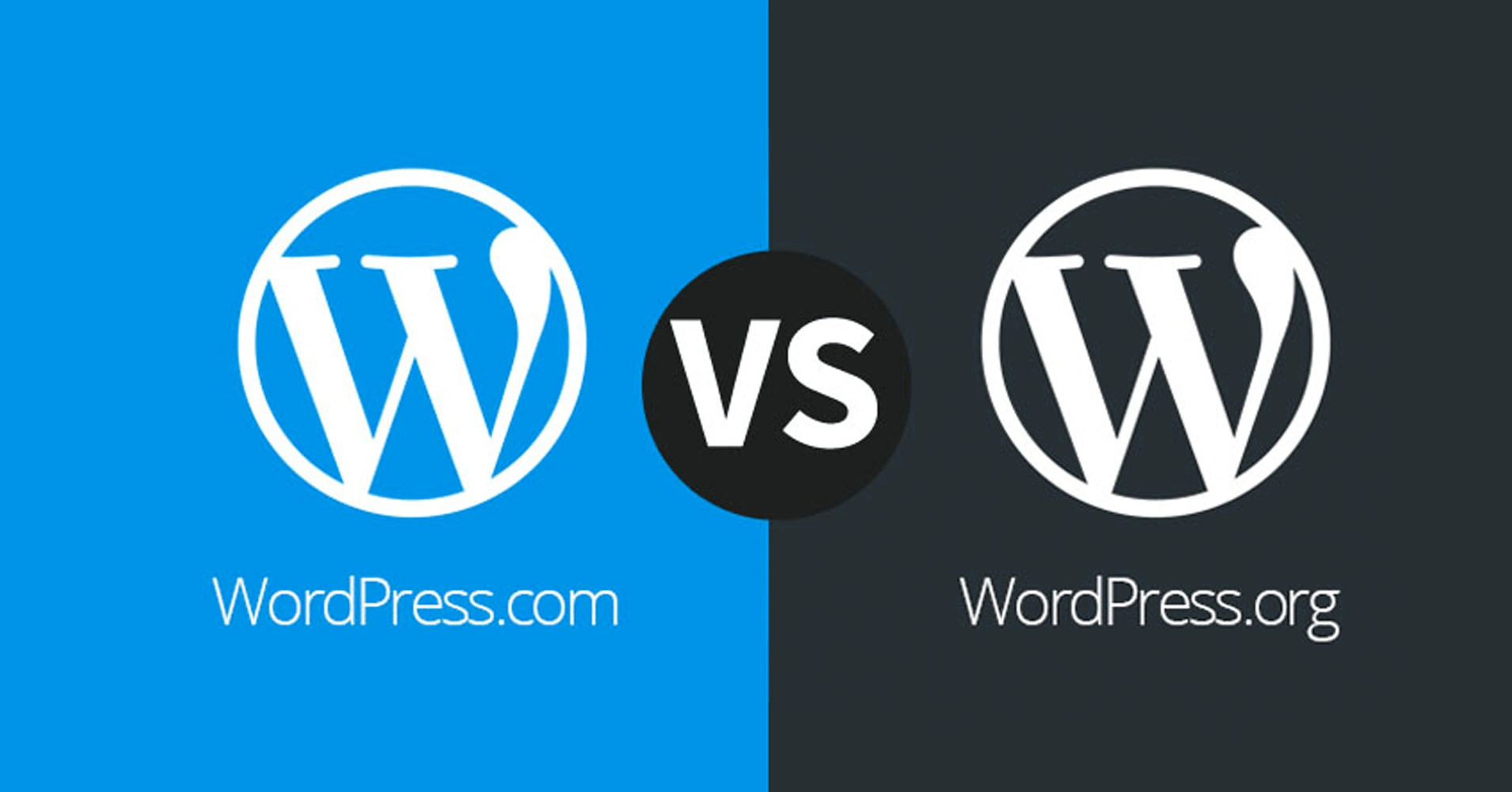
- WordPress.org (Self-Hosted): This is the powerful, open-source software you download for free. You need your own web hosting and domain name, giving you complete control and ownership. This is the version most people refer to when they talk about “using WordPress.”
- WordPress.com (Hosted Service): This is a for-profit, hosted service built by the co-founder of WordPress.org. It handles the technical setup for you, but with free and lower-tier plans, you have less flexibility and cannot install your own themes or plugins.
So, what is WordPress development? In simple terms, it’s the process of building and customizing a website using the WordPress platform. For a non-tech user, this might mean using the visual editor to arrange a page. From a technical point of view, it can involve writing custom PHP code to create a unique theme or plugin. It’s a spectrum of activities, all aimed at shaping the WordPress software to meet a specific need, making it a versatile skill set for creating everything from a simple blog to a complex e-commerce portal.
>>> Read more about another strong open-source CMS: What is Drupal? A complete details guide to get start
Why Choose WordPress?
You should choose WordPress because it offers an unmatched combination of ease-of-use, flexibility, and power, making it the ideal solution for virtually any type of website project. Its popularity isn’t an accident; it’s the result of providing everything a website owner needs to succeed. Here’s a breakdown of the key reasons it dominates the web.
1. Cost-Effectiveness
The core WordPress software is completely free. Unlike expensive proprietary website builders that lock you into monthly subscriptions, your main costs are web hosting (often as low as a few dollars a month) and a domain name ($10-15/year). There are thousands of free themes and plugins, meaning you can build a highly functional, professional website with a very minimal budget.
2. Ease of Use
You don’t need to be a coder to use WordPress. Its intuitive dashboard allows you to manage content easily. The Gutenberg block editor lets you build pages by simply adding “blocks” for text, images, buttons, and more, then dragging them into place. It’s as simple as putting together Lego blocks, which makes learning how to use WordPress software a smooth process for beginners.
3. Flexibility and Scalability
WordPress is incredibly adaptable. Out of the box, it’s great for blogs. But with plugins—add-ons that extend functionality—it can become anything. Need a store? Install WooCommerce. Need a forum? Install bbPress. This means your website can start small and grow as your business does, without ever needing to switch platforms.
4. Strong Community Support
With over 40% of the web using WordPress, you are never alone. A massive global community of users, developers, and designers creates endless free tutorials, forums, and documentation. If you have a question or run into a problem, the answer is almost certainly a quick Google search away.
5. SEO-friendly
WordPress is built with clean, standard-compliant code that search engines like Google love. Furthermore, plugins like Yoast SEO guide you through optimizing every page and post for your target keywords, helping you rank higher in search results and get more visitors to your site without paying for ads.
6. Mobile-Responsive Designs
Virtually every modern WordPress theme is built to be “responsive.” This means your website will automatically adjust its layout to look perfect and work flawlessly on any device like desktops, tablets, and smartphones. This is non-negotiable in today’s mobile-first world.
Who Uses WordPress?
WordPress is used by an incredibly diverse range of users, from absolute beginners and solo bloggers to the world’s largest brands and institutions. It is not just a “blogging tool”; it’s a robust enterprise-grade CMS. Its scalability means it’s just as capable of running a personal hobby site as it is powering a multinational corporation’s digital presence.
- Individuals: Bloggers, photographers, artists, and freelancers use it to share their work and ideas with the world.
- Small Businesses: Restaurants, shops, and local service providers use it to create affordable, effective business websites to attract customers.
- E-commerce Stores: Online retailers use it with the WooCommerce plugin to sell products globally.
- Large Corporations: Major brands use it for their corporate blogs, newsrooms, and main websites.
- Educational Institutions: Universities and schools use it to manage their complex sites and student portals.
- Governments: Even government entities use it for its security and accessibility.
In short:
- For beginners, it’s the easiest way to start.
- For businesses, it’s the most cost-effective solution.
- For developers, it’s a powerful and flexible framework.
- For large organizations, it’s a secure and scalable platform.
What is WordPress Used For?
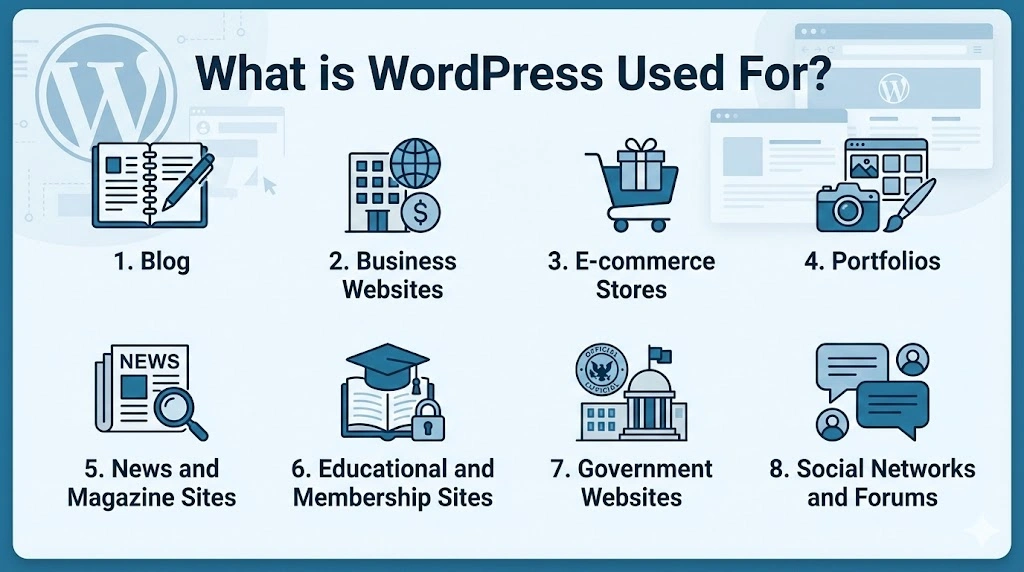
WordPress is used for creating virtually any type of website you can imagine, thanks to its extensible core and massive library of plugins and themes. Its core function is to manage content, and since the modern web is built on content, its applications are nearly limitless. Whether you’re sharing ideas, selling products, or building a community, WordPress provides the tools to do it effectively and efficiently. Here are the most common and powerful uses.
1. Blog
WordPress began as a blogging platform and remains its quintessential use case, offering an intuitive environment for writers and publishers. The platform’s core is built around the content creation process, featuring a powerful editor for drafting posts, a robust system for organizing content with categories and tags, and built-in tools for managing reader comments and scheduling future publications. This makes it the perfect tool for everyone from individual diarists to large corporations.
Core Benefits of Using WordPress for Blogging:
- Unmatched Publishing Tools: Built-in features like scheduling, revisions, and categories are perfectly tailored for bloggers.
- Built-in Audience Engagement: Native comment systems and easy integration with social media make it easy to build a community around your content.
- SEO Superiority: Clean code and plugins like Yoast SEO give your blog posts the best possible chance to rank high on Google, driving free, organic traffic to your site.
For example: The Microsoft Blog, which uses it to share tech insights and company news with a global audience.
2. Business Websites
Acting as a digital storefront, WordPress empowers businesses of all sizes to establish a professional online presence with ease. Companies utilize WordPress’s “Pages” functionality to build a stable website structure, including a Homepage, About Us, Services, and Contact sections, and select from thousands of professional themes to ensure the design perfectly reflects their brand identity.
Core Benefits of Using WordPress for Business Websites:
- Cost-Effective Professionalism: Access to thousands of professional themes allows even the smallest business to launch a site that looks like it was designed by a high-end agency, without the high-end cost.
- Easy Content Updates: You don’t need to hire a developer for every small change; you can instantly update business hours, add team members, or post announcements yourself.
- Central Marketing Hub: Your WordPress site becomes the foundation for all digital marketing efforts, from SEO and blogging to email list building.
For example: Airstream, which uses a visually stunning, user-friendly WordPress site to showcase its premium travel trailers and reinforce its market position.
>>> Need to build a complete website? View more of our Web development services.
3. E-commerce Stores
With the free WooCommerce plugin, WordPress transforms into a full-featured online store, capable of managing every aspect of selling online. Store owners can create detailed product pages, manage inventory, offer various payment and shipping options, and process orders securely, all from within the familiar WordPress dashboard.
Core Benefits of Using WordPress for E-commerce:
- Unbeatable Flexibility: Unlike all-in-one platforms, you can choose your own hosting for better performance and cost, and add any feature through plugins.
- Own Your Customer Data: You have complete ownership and control over your customer and sales data, which is crucial for long-term business strategy.
- Integrated Content Marketing: You can seamlessly blend a blog and SEO strategies with your store, creating a content-rich shopping experience that attracts customers.
For example: This flexibility is showcased by the Jetpack online store, which uses WooCommerce to sell plugin subscriptions directly to its customers.
>>> Explore more of what we can offer in e-Commerce web development services
4. Portfolios
For creatives, a portfolio is their most important marketing tool, and WordPress provides a stunning and elegant canvas to showcase visual work. Portfolio-specific themes offer gallery, masonry, and carousel layouts that emphasize imagery, allowing projects to be presented in a clean, full-screen, and distraction-free manner.
Core Benefits of Using WordPress for Portfolios:
- Visual Storytelling: Themes are designed specifically to make images and videos the hero, ensuring your work makes the strongest possible impact.
- Easy to Curate and Update: You can easily add new projects, rearrange your work, and organize it into categories to show different sides of your talent.
- Built-in Contact Integration: Potential clients can easily find your contact information or use integrated forms to reach you directly, turning viewers into leads.
For example: Photographers like Ryan Cameron leverage this capability, using minimalist WordPress themes to ensure their photography remains the absolute focal point.
5. News and Magazine Sites
High-volume publishers need a robust system capable of handling frequent updates from multiple content creators, and WordPress excels in this demanding environment. Its powerful taxonomy system allows editors to meticulously organize thousands of articles into logical sections and categories, while granular user roles ensure a secure and efficient editorial workflow.
Core Benefits of Using WordPress for News/Magazines:
- Scalable Content Management: It can handle thousands of articles and multiple contributors without breaking a sweat, growing as your publication grows.
- Workflow and Editorial Control: User roles ensure writers, editors, and admins have the right level of access, creating a secure and efficient publishing pipeline.
- Monetization Ready: Easily integrate advertising networks, paywalls, and subscription models to generate revenue from your content.
For example: The platform of choice for major publications like TechCrunch, which relies on WordPress to manage its breaking news and reviews for a global audience.
6. Educational and Membership Sites
WordPress is a powerful platform for Edtech software development solutions, which creating and selling knowledge through online courses or exclusive member-only content. By extending its functionality with specialized plugins, you can create a complete learning management system (LMS) that restricts content access, drips lessons out over time, manages student progress, and processes payments securely. This functionality allows online educators and coaches to build a sustainable business around their expertise directly on their own branded website.
Core Benefits of Using WordPress for Education/Memberships:
- Complete Monetization Control: You set the price, keep the majority of the revenue (no hefty platform fees), and own the customer relationship.
- Create a Community: Integrated forums and comment systems help students or members interact, increasing the value of your offering and reducing churn.
- Brand Your Academy: Your learning platform is a seamless part of your branded website, not a generic third-party page, which builds trust and authority.
7. Government Websites
Government entities require a platform that offers utmost security, accessibility, and transparency, and WordPress’s strong codebase meets this high bar. Its commitment to web standards ensures vital public information is accessible to all citizens, while its simplicity allows for easy content updates across various departments.
Core Benefits of Using WordPress for Government:
- Commitment to Accessibility: The core software and many themes are built with WCAG guidelines in mind, ensuring all citizens can access important information.
- Transparency and Openness: As open-source software, its code can be audited by anyone, aligning with the principles of transparent government.
- Cost-Efficiency for Taxpayers: Using a free, scalable platform is a fiscally responsible choice, freeing up budget for other critical services.
For example: The use of WordPress for Whitehouse.gov stands as a testament to its ability to meet the highest standards of security and public trust.
8. Social Networks and Forums
For those looking to build a dedicated community, WordPress can be extended to function as a social network or forum. By integrating plugins, you can add features like user profiles, private messaging, friend connections, and discussion threads to your site, fostering a community around a specific topic, brand, or interest. This approach is popular for niche hobbyist sites and B2B companies seeking to create private, engaged communities for their users.
Core Benefits of Using WordPress for Communities:
- Own Your Platform: Unlike a social media group, you own the data, the audience, and the rules. You’re not subject to changing algorithms or terms of service.
- Deepen Engagement: A dedicated community space keeps users coming back to your website, dramatically increasing engagement and loyalty to your brand.
- Monetize Engagement: A thriving community can be monetized through premium membership tiers, exclusive content, or sponsored sections.
How Does It Work?
At its core, WordPress works by dynamically pulling content from a database and assembling it into a web page every time a visitor arrives at your site. Here’s a simple breakdown of the process:
- The Core & The Database: The WordPress software itself (written in PHP) and your MySQL database are stored on your web server. The database stores all your content (every page, post, comment), user data, and settings.
- The Request: When someone types your web address into their browser, their browser sends a request to your server.
- The Assembly: The WordPress core software on the server springs into action. It queries the database to find the requested content and grabs your active theme’s template files.
- The Delivery: WordPress combines the content and the templates, assembles them into a final HTML web page, and sends this page back to the user’s browser.
The magic is that you, the user, never have to touch this process. You simply log into your WordPress hosting dashboard, write your content in a visual editor, and click “Publish.” WordPress handles all the complex technical work in the background. Themes control how it looks, and plugins add new features to the process, like SEO optimization or security firewalls.
Advantages and Disadvantages
WordPress offers incredible benefits that make it the top choice for millions, but like any tool, it also has some drawbacks that users should be aware of.
Advantages
The pros of using WordPress are what have made it a global phenomenon.
- User-Friendly: Its dashboard is intuitive, and the block editor makes creating beautiful pages simple for non-coders.
- Highly Customizable: With over 59,000 free plugins and 9,000+ free themes, you can add any feature and change any design without coding.
- Cost-Effective: The software is free. You primarily pay for hosting and your domain, making it incredibly affordable to start. Many wonder “how much is WordPress?”—the software itself is $0.
- SEO Ready: Its clean code and SEO plugins give you the tools you need to rank highly on Google.
- Large Community: You have access to a world of free help, advice, and resources.
Disadvantages
The cons typically relate to the responsibility that comes with great power and flexibility.
- Security: Its popularity makes it a target for hackers. Security requires vigilance: keeping everything updated, using strong passwords, and potentially adding security plugins. This is often managed by your WordPress development team or host.
- Performance: Too many poorly-coded plugins or a cheap hosting plan can slow your site down. Performance optimization is key.
- Maintenance: It’s not entirely maintenance-free. You need to regularly update the core software, themes, and plugins to ensure security and compatibility.
- Learning Curve: While basic use is easy, mastering advanced customization can have a steeper learning curve.
How to Develop a WordPress Site?
Developing a WordPress site is a straightforward process that can be broken down into a series of clear steps. Here is a guide to WordPress development for your business project:
Step 1 – Plan Your Site: Define its purpose, target audience, and what pages it needs (Home, About, Contact, Services, etc.).
Step 2 – Secure a Domain Name & Hosting: Choose a memorable domain name and a reliable WordPress hosting provider. This is where your website’s files will live. How much does WordPress cost? Primarily, this is your hosting cost, which can start from $3-$10/month.
Step 3 – Install WordPress: Most hosts offer a “one-click install” for WordPress. This takes 5 minutes and requires no technical skill.
Step 4 – Choose and Install a Theme: Go to Appearance > Themes in your dashboard. You can browse free themes or upload a premium one. This defines your site’s visual design.
Step 5 – Install Essential Plugins: Start with basics like:
- Yoast SEO for search optimization.
- A security plugin like Wordfence.
- A contact form plugin like WPForms.
- WooCommerce if you need a store.
Step 6- Create Your Content: Use the Pages and Posts menus to build your site. Use the block editor to add text, images, and buttons.
Step 7 – Customize and Launch: Use the Customizer to set your site title, logo, colors, and menus. Preview everything, and then launch your site for the world to see!
For more complex needs, consider partnering with a professional agency for expert Web development or hire dedicated web developers services with WordPress to ensure a polished, secure, and high-performing result.
Why Partner with a Professional WordPress Development Agency?
While WordPress is user-friendly, building a site that truly stands out, performs flawlessly, and converts visitors into customers often requires expert knowledge. This is where partnering with a professional WordPress development agency becomes a strategic advantage. They handle the technical complexities, allowing you to focus on your business.
- Expertise and Experience: Agencies bring deep knowledge of best practices in design, development, security, and SEO.
- Time Savings: They can build a high-quality, custom site much faster than you could on your own.
- Custom Functionality: They can build custom features and plugins tailored to your unique business processes.
- Ongoing Support and Maintenance: They provide peace of mind by handling updates, backups, and security monitoring.
WordPress is more than just software; it’s the gateway to your digital success. It’s a powerful, flexible, and accessible platform that empowers you to build anything from a simple blog to a complex e-commerce empire. Understanding what WordPress is used for and how to use WordPress is the first step in taking control of your online presence.
At Newwave Solutions, we don’t just build websites; we build digital solutions that drive growth. Our team of expert developers and designers understands how to leverage the full power of WordPress to create sites that are not only beautiful but also fast, secure, and optimized for results. We handle everything from initial strategy and custom software development services with WordPress to ongoing maintenance and support, ensuring your website is a powerful asset for your business.
Ready to build a WordPress website that truly represents your business and delivers ROI? Contact us today for a free consultation, and let’s discuss your project!
To Quang Duy is the CEO of Newwave Solutions, a leading Vietnamese software company. He is recognized as a standout technology consultant. Connect with him on LinkedIn and Twitter.



Read More Guides



Get stories in your inbox twice a month.
Let’s Connect
Let us know what you need, and out professionals will collaborate with you to find a solution that enables growth.
Leave a Reply