


What is Xamarin? The Smart Path to iOS & Android Apps
You have a brilliant app idea poised to transform your business. But the excitement fades when you realize the daunting reality: you need to build it twice. The cost, time, and complexity of maintaining two separate native teams for iOS and Android can stop innovation in its tracks. This is the critical problem that explains what is Xamarin and why it matters. It’s a framework that lets you build native-quality apps for both platforms from a single, shared codebase, turning a paralyzing challenge into a streamlined, efficient strategy. To help you decide if it’s the right solution, Newwave Solutions will dissect how Xamarin works, its key benefits, and the practical challenges you need to know.
What is Xamarin?
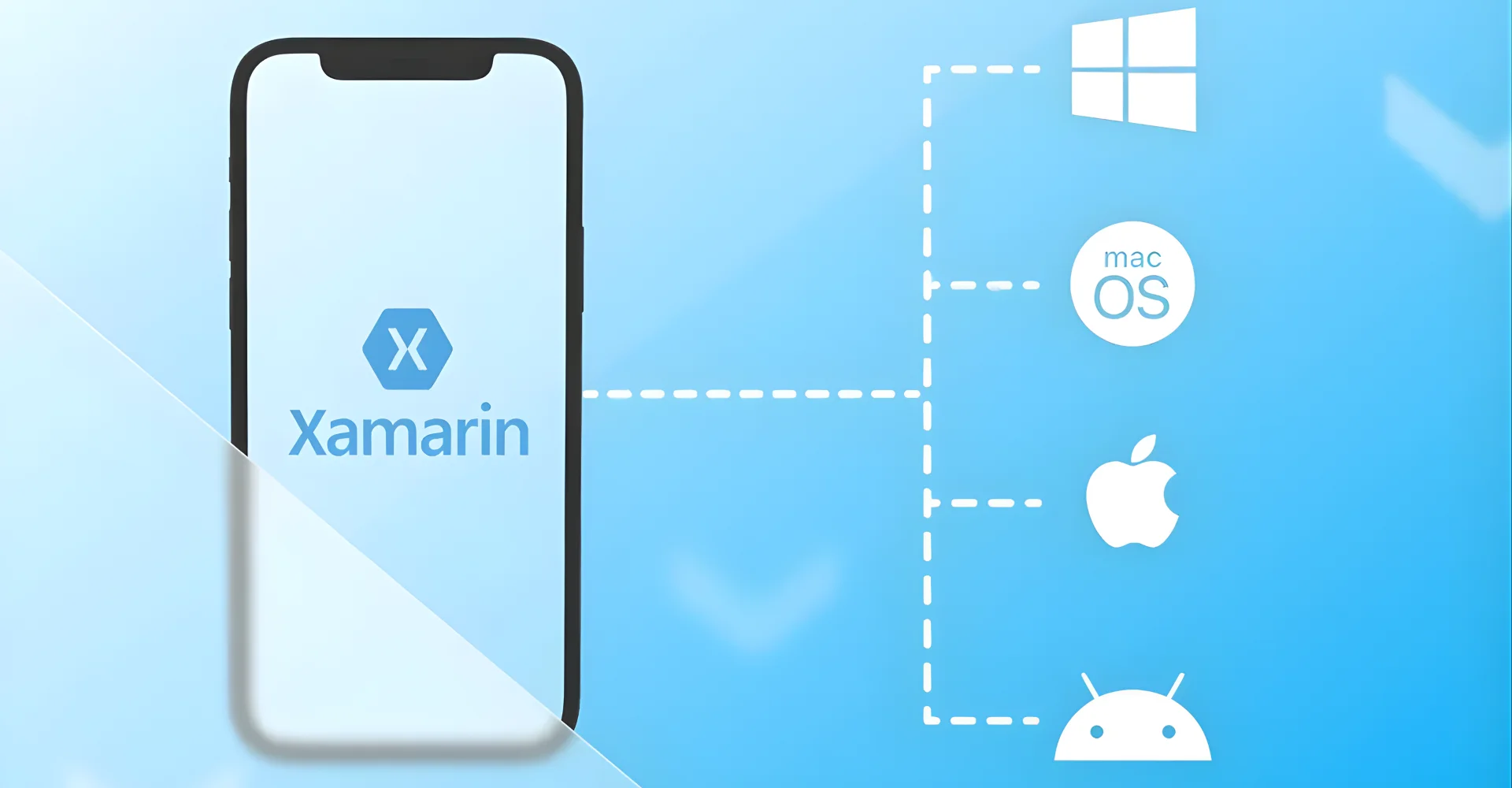
Xamarin is a cross-platform mobile application development framework that allows developers to build native iOS, Android, and Windows apps using a single shared C# codebase. Rather than forcing you to learn Swift for iOS and Kotlin for Android, Xamarin lets you write your business logic once and share it across platforms while still accessing native APIs and delivering platform-specific user experiences.
The framework emerged from the open-source Mono project in 2011, founded by engineers who wanted to bring Microsoft’s .NET framework to mobile platforms. Microsoft acquired Xamarin in 2016 and integrated it into Visual Studio, making it free for developers and positioning it as a core component of their mobile development ecosystem. This acquisition transformed Xamarin from an independent tool into a fully supported Microsoft product, backed by enterprise-grade resources and continuous updates.
Xamarin’s architecture is what enables its “write once, run anywhere” promise, but it does so in a uniquely flexible way. Its key features provide a complete toolkit for modern app development:
- Single Technology Stack with C#: The entire application—from business logic to data access—is written in C#. This means your development team can leverage a powerful, type-safe, and modern language, reduce context-switching, and streamline the entire development process.
- Native User Interface & Performance: Unlike hybrid frameworks that render a web view, Xamarin offers two paths to achieve a native look and feel. With Xamarin.Forms, you can create a unified UI in shared code, which is then translated at runtime into native iOS and Android controls. For applications requiring pixel-perfect design or platform-specific features, Xamarin.Native (Xamarin.iOS & Xamarin.Android) allows you to build the UI natively in each platform, while still sharing the core application logic.
- Full Hardware Access: A common misconception about cross-platform tools is that they limit access to device-specific features. Xamarin circumvents this by providing direct access to every native API and hardware component. Through plugins and dependency services, your app can seamlessly integrate with GPS, camera, accelerometer, and other sensors, ensuring no compromise on functionality.
- Seamless Integration with the Microsoft Ecosystem: For businesses invested in the Microsoft stack, Xamarin is a natural extension. It integrates flawlessly with Visual Studio, Azure cloud services, Azure DevOps for CI/CD pipelines, and Microsoft 365, creating a cohesive and powerful development environment.
The framework provides complete access to native APIs through C# bindings, which means that anything you can do in native development, you can accomplish in Xamarin. This isn’t a wrapper that limits your options—it’s a full bridge to native functionality.
Looking to build your next mobile app with cross-platform efficiency? Explore our cross-platform app development services to see how we can help you maximize code reuse while delivering native-quality experiences.
What are the Core Benefits of Using Xamarin?
While the promise of code sharing is alluring, the true value of Xamarin for a business leader or a developer lies in the tangible outcomes it delivers. Let’s dissect the core benefits and the strategic impact they create.
1. Significant Reduction in Development Time and Cost
The most immediate and quantifiable benefit is efficiency. By allowing up to 90% of your application’s core logic—data models, API calls, and business rules—to be written once and reused across platforms, Xamarin dramatically accelerates time-to-market. You are effectively building one application, not two. This translates directly into lower development costs, as you require a single, focused team proficient in C#, rather than separate, specialized teams for iOS (Swift/Objective-C) and Android (Kotlin/Java). The impact is a faster return on investment and the ability to deploy your product to a broader audience simultaneously.
2. Near-Native Performance and User Experience
Performance is non-negotiable in today’s competitive app market. Xamarin applications are compiled into native binaries. For iOS, it uses the Ahead-of-Time (AOT) compilation to produce ARM assembly code. For Android, it uses Just-in-Time (JIT) compilation. This means the final app is not running in an interpreter; it’s executing native code, resulting in performance that is often indistinguishable from an app built with platform-native languages. The user gets the fluid, responsive experience they expect from their device, which is critical for user retention and satisfaction.
3. Simplified Maintenance and Streamlined Updates
The long-term challenge of mobile app development isn’t just the initial build—it’s the maintenance. When you need to fix a bug, update an API endpoint, or add a new feature, you only need to make that change in one shared codebase. This eliminates the risk of platform-specific discrepancies and ensures that all your users, regardless of their device, receive a consistent experience and update simultaneously. This streamlined maintenance process significantly reduces long-term operational overhead.
4. Leverage a Robust and Mature Ecosystem
Choosing Xamarin means plugging into the stability and power of the .NET ecosystem and Microsoft’s support. You gain access to a vast library of NuGet packages for added functionality, powerful debugging tools within Visual Studio, and enterprise-grade security features. You are building on a platform backed by a technology giant, ensuring longevity, continuous improvement, and a clear path for future development.
Looking to speed up time-to-market and reduce costs? Our Mobile App Development experts help you build scalable, native-like apps with Xamarin.
What Challenges Should You Anticipate with Xamarin?
Transparency about limitations matters more than promotional enthusiasm when you’re making technological decisions that will affect your project for years. Xamarin brings specific challenges that don’t appear in the marketing materials but will appear in your development process.
1. Application Size and Memory Footprint
Xamarin apps tend to be larger than equivalent native apps, often adding 5-15MB to your download size even for simple applications. This occurs because your app bundles the Mono runtime and framework libraries necessary to execute C# code on mobile devices. For users on limited data plans or in regions with slow internet connectivity, this size difference creates a tangible barrier to app installation.
The mitigation strategy involves careful architecture:
- Use Xamarin.Forms strategically instead of embedding platform-specific libraries for features you don’t need, keeping your dependency footprint minimal
- Enable linker settings that strip unused code from your final binary, though you’ll need to test thoroughly since aggressive linking can sometimes break reflection-dependent code
- Profile memory usage early in development rather than discovering memory constraints during final testing, when architectural changes become expensive
However, you’re unlikely to match the lean efficiency of well-optimized native apps—that’s a tradeoff inherent to the cross-platform approach.
2. Platform Update Lag and Dependency
When Apple announces iOS 18 or Google releases Android 15, native developers can immediately access new APIs and features because they’re working directly with the platform SDKs. Xamarin developers wait for Microsoft to release updated bindings that expose these new APIs to C#. This lag can range from a few weeks to several months, depending on the complexity of the new features.
What amplifies this challenge is the dependency chain you’re actually managing:
- Microsoft’s binding updates for new platform APIs, which determine when you can access new iOS or Android features
- Third-party library maintainers in the Xamarin ecosystem who need to update their plugins for compatibility
- Your own codebase that may need architectural changes to accommodate breaking changes in either platform or framework
If your app relies on a community-maintained plugin for camera access or push notifications, and that maintainer becomes inactive, you face the choice of forking the library yourself or finding alternatives.
3. Learning Curve for Platform-Specific Optimization
The promise of “write once, run anywhere” obscures a reality that what is Xamarin developer teams discover quickly: building a genuinely excellent cross-platform app still requires understanding each platform’s conventions, performance characteristics, and user expectations. Your UI might technically run on both platforms, but iOS users expect navigation patterns, gesture behaviors, and visual hierarchies that differ fundamentally from Android conventions. This means effective Xamarin development requires developers who understand C# and comprehend iOS Human Interface Guidelines, and who grasp Android Material Design principles
The skill requirements break down into multiple layers:
- C# and .NET proficiency for writing shared business logic, understanding async/await patterns, and leveraging the framework ecosystem
- Mobile platform knowledge covering both iOS and Android design patterns, lifecycle management, and performance optimization techniques
- Xamarin-specific expertise including custom renderers, dependency services, effects, and the nuances of when shared code works versus when you need platform-specific implementations
This isn’t dramatically easier than learning Swift and Kotlin—you’re trading language diversity for framework complexity. The impact manifests when you hire Xamarin developers and discover that finding candidates with both solid C# expertise and deep mobile platform knowledge proves challenging.
What is Xamarin Used For?
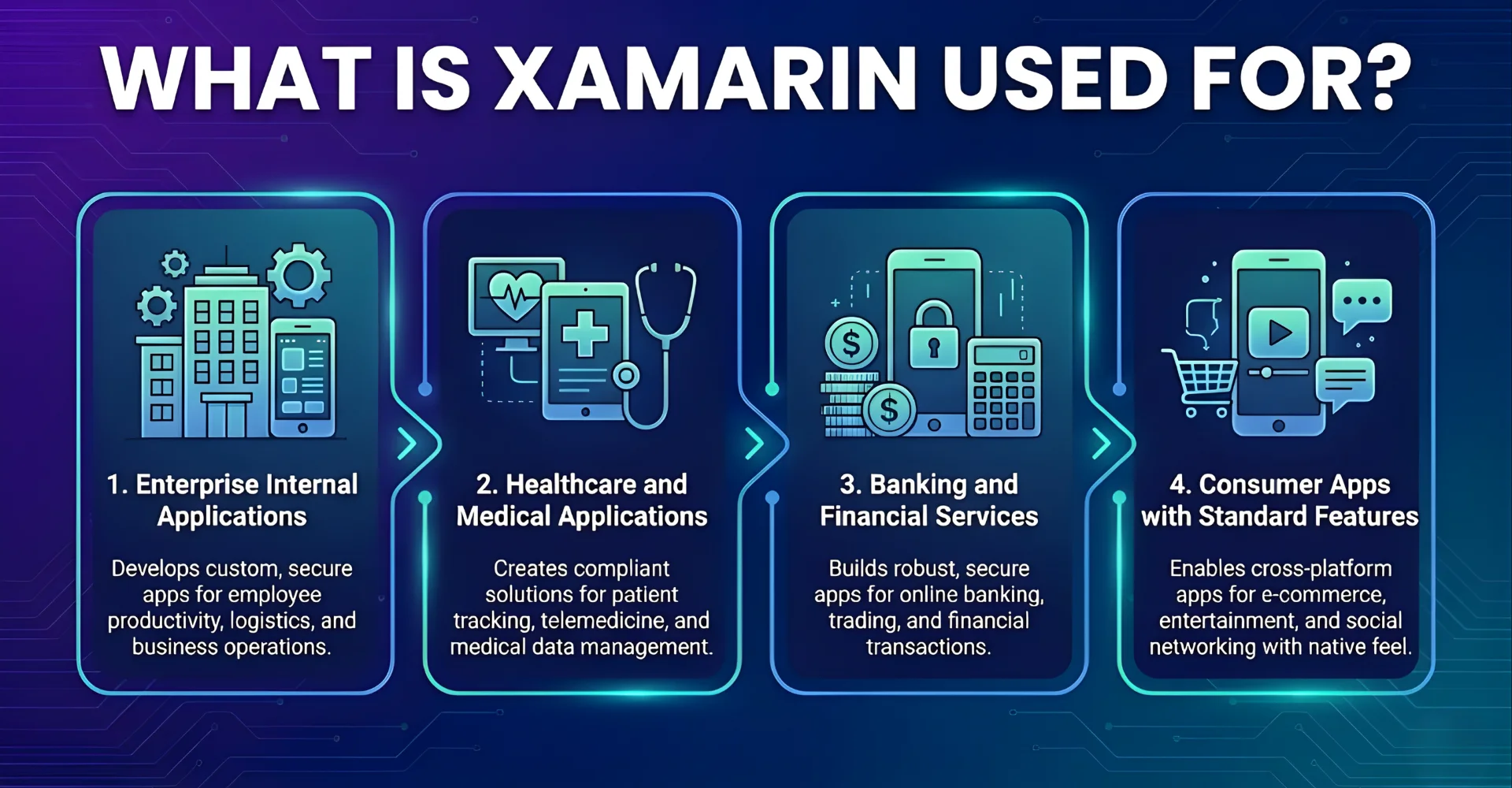
Xamarin’s versatility makes it suitable for a wide array of applications, but it truly shines in specific contexts where its strengths align perfectly with business objectives. The framework excels when the primary goals are development efficiency, consistency across platforms. Let’s explore the most common and impactful use cases.
1. Enterprise Internal Applications
Large organizations building apps for their own employees—sales force automation tools, inventory management systems, field service applications—represent Xamarin’s strongest use case. These apps prioritize functionality over cutting-edge UI trends, need to work across diverse device ecosystems, and require tight integration with existing enterprise systems like Active Directory, SharePoint, and SQL Server.
Alaska Airlines built its employee app for 13,000 workers using Xamarin, achieving 95% code sharing across platforms. The company needed rapid deployment across both iOS and Android while maintaining security compliance and integrating with their existing .NET backend infrastructure.
Why this works for enterprise scenarios:
- Existing infrastructure alignment – Extends your Active Directory, Exchange, and SQL Server investments directly to mobile
- Security and compliance continuity – Your security policies and authentication mechanisms extend to mobile without introducing new risk surfaces
- Internal user tolerance – Employees prioritize functionality over having the absolute latest design patterns
2. Healthcare and Medical Applications
Healthcare apps face stringent regulatory compliance (HIPAA, GDPR), need offline functionality in clinical settings, and require integration with medical devices. The UnitedHealthcare app leveraged Xamarin to deliver insurance card access, claims tracking, and provider search across platforms while maintaining the security architecture required for protected health information.
Moreover, healthcare software development services and organizations typically have substantial investments in Microsoft’s solutions and Azure cloud services, making Xamarin a natural extension:
- Single security audit path – Compliance teams review one implementation of HIPAA safeguards rather than verifying separate iOS and Android implementations
- Offline-first architecture – Shared C# code handles data synchronization, ensuring clinical staff have access to patient information even when connectivity fails
- Integration continuity – HL7 message parsing and FHIR API integration leverage existing .NET libraries that your backend team already trusts
3. Banking and Financial Services
Financial institutions choose Xamarin when they need to balance rapid multi-platform deployment with robust security. Olo, a digital ordering platform processing millions in transactions, used Xamarin.Forms for consistent payment processing logic across platforms while enabling rapid feature iteration without coordinating separate iOS and Android release cycles.
Why financial and banking software development services choose Xamarin:
- Transaction logic consistency – Payment processing, fraud detection, and regulatory compliance rules exist in one tested, audited codebase
- Audit efficiency – Financial regulators review your transaction handling once rather than requiring duplicate certification processes
- Backend integration – Most financial institutions run .NET backend systems, making shared data models and authentication libraries a natural fit
4. Consumer Apps with Standard Features
Apps requiring solid functionality without pushing platform boundaries—social networking, content delivery, e-commerce with standard features—can leverage Xamarin effectively. Storyo, which creates video stories from photos, used Xamarin to launch on both platforms simultaneously rather than losing market opportunity while building a second native app.
The strategic advantages:
- Simultaneous platform launch – Capture iOS and Android users from day one, rather than ceding half your potential market
- Faster iteration cycles – Feature updates and bug fixes deploy to both platforms from a single codebase
- Resource allocation flexibility – Smaller teams compete with larger competitors without spreading talent across separate codebases
The pattern across these implementations reveals Xamarin’s sweet spot: applications where business logic complexity exceeds UI complexity, where integration with existing .NET infrastructure provides value, and where time-to-market across platforms matters more than access to the absolute latest platform features.
Xamarin vs Other Cross-Platform Frameworks
Choosing between cross-platform frameworks requires understanding their fundamental architectural differences, not just comparing feature checklists. Understanding Xamarin’s position in this landscape is crucial for making a strategic decision.
| Aspect | Xamarin | React Native |
Flutter |
| Language | C# | JavaScript/TypeScript | Dart |
| UI Rendering | Native controls | Native components via bridge | Custom rendering engine |
| Performance | Near-native (compiled code) | Good (JavaScript bridge adds overhead) | Excellent (compiled to native, no bridge) |
| Code Reusability | 75-95% (Forms), 60-75% (Native) | 80-90% | 95%+ |
| Learning Curve | Moderate (C# + mobile patterns) | Low (JavaScript familiarity widespread) | Moderate (Dart is new for most) |
| Community Size | Large but smaller than alternatives | Very large, active | Rapidly growing, very active |
| Backed By | Microsoft | Meta (Facebook) | |
| Hot Reload | Limited support | Excellent | Excellent |
| Enterprise Integration | Excellent (.NET ecosystem) | Good (many libraries available) | Growing |
| App Size | Larger (includes Mono runtime) | Moderate | Larger (includes Flutter engine) |
| Maturity | Mature (2011, acquired 2016) | Mature (2015) | Newer (2017, stable 2018) |
| Best For | Microsoft stack, enterprise apps | Consumer apps, rapid development | UI-intensive apps, high performance |
The insight is that there is no single “best” framework. The optimal choice depends on your team’s existing skills, the specific project requirements, and your long-term technology strategy. Xamarin stands out as the most natural and robust choice for organizations deeply embedded in the Microsoft ecosystem.
FAQs
What is the difference between Xamarin.Android and Xamarin.iOS?
Xamarin.Android and Xamarin.iOS are the foundational building blocks of the framework. They allow developers to build applications that look and feel completely native to their respective platforms by providing direct bindings to every Android and iOS API. You use them when you need full, unfiltered control over the user interface and platform-specific features.
Can Xamarin apps be published on the Apple App Store and Google Play
Absolutely. Xamarin applications compile into native application packages (IPA for iOS and APK/AAB for Android) that are fully compliant with the respective app store guidelines. The submission and review process is identical to that of a native application.
What kind of apps should not be built with Xamarin?
While versatile, Xamarin may not be the ideal choice for apps that require extremely complex, game-like graphics (for which a dedicated game engine like Unity is better) or for apps that must use a brand-new native API the very day it is released by Apple or Google, as there can be a short integration delay.
What skills should I look for when I want to hire Xamarin developers?
You should seek developers with strong C# and .NET fundamentals, a clear understanding of the Model-View-ViewModel (MVVM) architectural pattern, and experience with either Xamarin.Forms or Xamarin.Native. Knowledge of RESTful API integration, mobile app lifecycle, and platform-specific UI/UX guidelines is also crucial.
Is Xamarin being phased out by Microsoft?
No, but it is evolving. Microsoft’s strategic future for cross-platform mobile development is .NET MAUI (Multi-platform App UI), which is the next evolution of Xamarin.Forms. MAUI unifies the tooling and project system. However, Xamarin.Android and Xamarin.iOS remain the foundational pillars of this new framework, and existing Xamarin apps are fully supported.
Conclusion
Navigating the world of mobile development is a strategic exercise in balancing ambition with pragmatism. After exploring what is Xamarin, we acknowledge this is more than just a technical framework; it is a strategic enabler that allows you to translate a single vision into a universal mobile presence without the traditional burdens of cost, complexity, and fragmented maintenance. It proves that the choice between reaching a broad audience and delivering a high-quality, native experience is a false dichotomy.
Are you ready to explore how mobile app development services like Xamarin can bring your application idea to life on every screen? Contact Newwave Solutions today to build a powerful roadmap and deliver a cross-platform mobile solution that drives real business results. Let’s build what’s next, together.
To Quang Duy is the CEO of Newwave Solutions, a leading Vietnamese software company. He is recognized as a standout technology consultant. Connect with him on LinkedIn and Twitter.



Read More Guides



Get stories in your inbox twice a month.
Let’s Connect
Let us know what you need, and out professionals will collaborate with you to find a solution that enables growth.
Leave a Reply