


Cloud Migration Cost: Full Breakdown, Factors & Estimates
Cloud migration cost is rarely a single predictable number. A relatively small migration may require around $20,000 to $100,000, while large enterprise programs can reach millions once engineering effort, integration, compliance, parallel environments, and post migration cloud spending are included.
The bigger challenge is understanding what actually drives those differences before committing to a budget or migration strategy. In this guide, we’ll examine typical cost ranges, major one time and ongoing expenses, and practical ways to build and control a realistic cloud migration budget.
Key Takeaways
|
How Much Does Cloud Migration Cost?
Cloud migration cost can range from about $20,000 for smaller workloads to several million dollars for large enterprise programs. The final amount depends on the scale and complexity of the migration, so these figures should be treated as planning benchmarks rather than fixed prices.
|
Migration size |
Estimated cost | First year run cost impact |
Key drivers |
| Small workload migration | $20,000 to $100,000 | Moderate and easier to model | Labor, tooling, data transfer |
| Mid market migration | $100,000 to $500,000+ | Meaningful run rate change | Integration depth, hybrid period, refactoring |
| Enterprise cloud migration | $500,000 to several million | Large and often multi wave | Compliance, double run, ownership, portfolio complexity |
Small workloads: under 100 servers
For environments with fewer than 100 servers, the cost of cloud migration typically falls between $20,000 and $100,000. These projects tend to involve fewer dependencies and lower coordination overhead, with most spending concentrated on setup, data transfer, and validation.
Costs can still vary depending on the quality of the workload inventory and whether applications can move without major changes. A shorter hybrid period can also make the overall cloud migration cost easier to estimate.
Mid-market migrations: 100 to 500 servers
For migrations involving 100 to 500 servers, typical costs rise to around $100,000 to $500,000 or more. At this scale, integration requirements and workload dependencies become more significant, while hybrid environments may need to remain active for longer.
The final cloud migration cost estimate is particularly sensitive to the amount of refactoring required, the duration of overlapping environments, and how quickly workloads are stabilized after cutover.
Enterprise cloud migration: 500+ servers
Enterprise migrations involving more than 500 servers can cost $500,000 to several million dollars. These programs are often delivered in multiple waves and may require parallel work across security, compliance, audit, and technical migration activities.
At this level, cost variability becomes more important than a single benchmark. Governance, portfolio complexity, ownership across teams, and prolonged double run environments can all materially affect the final budget.

Key Factors Driving Cloud Migration Cost
The cloud migration cost can vary substantially between organizations, even when their size appears similar. These cost-driving factors can significantly affect the overall cost of cloud migration and should be considered when preparing a migration budget.
1. Scope of migration: Full vs. partial
The first cost consideration is how much of the existing IT environment will move to the cloud.
- Full migration: Moving applications, workloads, and data while retiring existing data centers generally requires a higher upfront investment. However, it can simplify the resulting IT environment and operations.
- Partial or hybrid migration: Keeping some workloads on-premises while moving others to AWS, Azure, or Google Cloud can reduce initial migration spending. However, maintaining both environments can introduce additional complexity, including duplicated tools, integration requirements, and dual maintenance costs.
2. Current infrastructure complexity
The condition and architecture of existing systems can have a major impact on a cloud migration cost estimate. Modern SaaS applications may be relatively straightforward to move, while older and highly customized environments can require substantially more work.
Costs can increase when the environment includes custom-built applications, monolithic systems, on-premises ERP or CRM platforms. Plus, legacy applications may require refactoring or re-architecting before they can operate effectively with cloud-native technologies. In these situations, the project involves modernization as well as migration, thus increasing the overall effort and budget.
3. Data volume and transfer
The amount and sensitivity of data being moved can significantly influence migration costs. A larger data estate can require greater spending on storage, data transfer, and compliance requirements.
Key cost considerations include:
- Storage: Different storage tiers, including hot, cold, and archival storage, can affect ongoing costs.
- Data transfer: Bandwidth requirements can increase when large datasets are moved, particularly across regions.
- Compliance: Regulated data may require additional compliance considerations, including requirements associated with HIPAA or GDPR.
- Data egress: Moving large volumes of data between regions or cloud environments can create substantial transfer charges.
These factors are important when calculating cloud migration cost because an initial estimate may not fully reflect data transfer or egress requirements.
4. Cloud provider choice
The selected cloud provider can also influence the overall cost structure. AWS, Azure, and Google Cloud have different pricing models, service portfolios, discounts, and reserved-instance options.
- AWS: Its broad service portfolio can be relevant to organizations using services such as machine learning, IoT, and AI analytics.
- Azure: Its cloud environment suits organizations who have already invested in Microsoft technologies such as Office 365 or Dynamics.
- Google Cloud: Its pricing and capabilities may appeal to organizations developing data-intensive or AI-focused products.
Comparing providers requires more than comparing the headline price of an individual virtual machine. Equivalent workloads may have different costs across AWS, Azure, and Google Cloud once discounts, reserved instances, and other pricing considerations are included.

Cloud Migration Costs by the 7Rs Strategy Strategies
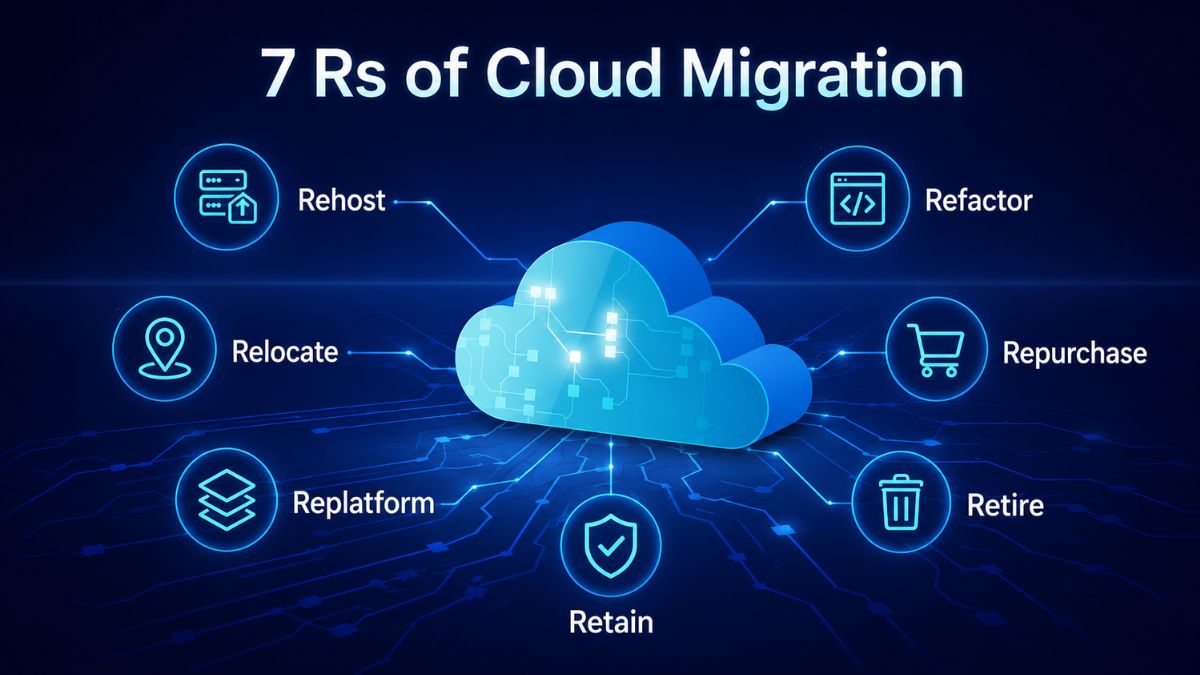
The total cost of migrating to the cloud varies significantly based on the chosen strategy for each workload. The 7Rs framework outlines several approaches, ranging from minimal application changes to complete cloud-native redesigns, with each option differing in cost, timeline, and business objectives.
Refactor / Re-architect
Refactoring involves substantially redesigning applications for cloud-native operation, which can include microservices, containers, and serverless technologies.
- Cost estimate: $200,000–$400,000+ for enterprises, making it the highest upfront investment among the strategies listed.
- Best for: Systems that need significant scalability, faster innovation, or deep integration with technologies such as AI and IoT.
Replatform
Replatforming moves applications to the cloud with limited modifications, such as replacing on-premises databases with managed cloud database services.
- Cost estimate: $100,000–$200,000, depending on application volume.
- Best for: Organizations seeking cloud efficiencies and greater agility without completely rewriting existing applications.
Repurchase
Repurchasing replaces an existing application with a SaaS alternative rather than migrating the original software.
- Cost estimate: Typically under $100,000 for the migration itself, although subscription costs become an ongoing operating expense.
- Best for: Commodity applications that do not provide a significant competitive advantage.
Rehost
Rehosting, commonly known as lift-and-shift, moves applications to the cloud with little or no code modification.
- Cost estimate: Approximately $40,000–$100,000 for startups.
- Best for: Organizations that need to leave a data center quickly or want to begin their cloud migration with minimal application changes.
Relocate
Relocation moves entire workloads into cloud infrastructure at the hypervisor level with little refactoring.
- Cost estimate: Generally similar to rehosting, although the strategy is typically applied at enterprise scale.
- Best for: Large legacy workloads where migration speed is more important than optimization.
Retain
Retention means keeping selected workloads in their existing environment rather than moving them to the cloud.
- Cost estimate: No migration spend, but the organization continues to incur the costs of maintaining its existing data center environment.
- Best for: Systems that may not be suitable for cloud migration because of compliance, latency, or cost considerations.
Retire
Retirement removes redundant or outdated applications instead of migrating them.
- Cost estimate: Net savings, because retiring unnecessary applications reduces migration scope and future spending.
- Best for: Applications that are no longer critical, can be replaced, or no longer provide business value.
One-time Cloud Migration Cost Breakdown
The one-time cloud migration cost is a critical factor to evaluate when planning a move to the cloud, as it directly impacts the overall project budget and timeline. Understanding these upfront expenses helps organizations prepare for a smoother and more predictable migration process.
1. Readiness assessment and architecture design
Before migration begins, organizations need to understand their current technology environment. This stage involves reviewing applications, dependencies, data flows, and cloud security requirements to determine the right migration approach.
Key cost considerations include:
- Inventorying existing applications and workloads
- Assessing dependencies between systems
- Reviewing security and compliance requirements
- Determining which workloads require refactoring or replatforming
A detailed assessment can help identify potential challenges early and reduce unexpected costs during later migration phases.
2. Migration tools, licensing, and software costs
Cloud migration often requires additional tools and software to support workload movement and application compatibility. While some migration tools may be available at no cost, organizations may need to invest in third-party solutions, cloud-based application licenses, or software upgrades.
Common expenses may include:
- Data migration tools
- Third-party migration platforms
- Cloud application licenses
- Required software upgrades for cloud compatibility
These costs can vary depending on the migration approach and the existing technology environment.

3. Data transfer and initial cloud setup
Moving data to the cloud involves more than considering the amount of data being transferred. Organizations also need to account for how quickly and securely data must be moved, as well as potential data transfer charges from cloud providers, such as egress fees. Initial setup expenses may also include configuring storage, establishing networks, and setting up VPN connections to ensure the cloud environment operates smoothly after migration.

4. Labor and training costs
Cloud migration requires specialized technical skills to plan and execute successfully. Organizations may need cloud architects, engineers, and other specialists to support the migration process. Internal teams may also require training to manage new cloud tools and services effectively after migration.
For smaller organizations using a relatively straightforward lift-and-shift approach, one-time cost of cloud migration may range from $40,000 to $200,000. Enterprise migrations involving complex legacy systems, custom applications, or regulated data can exceed $200,000–$400,000 in initial costs.
Ongoing Costs after Cloud Migration
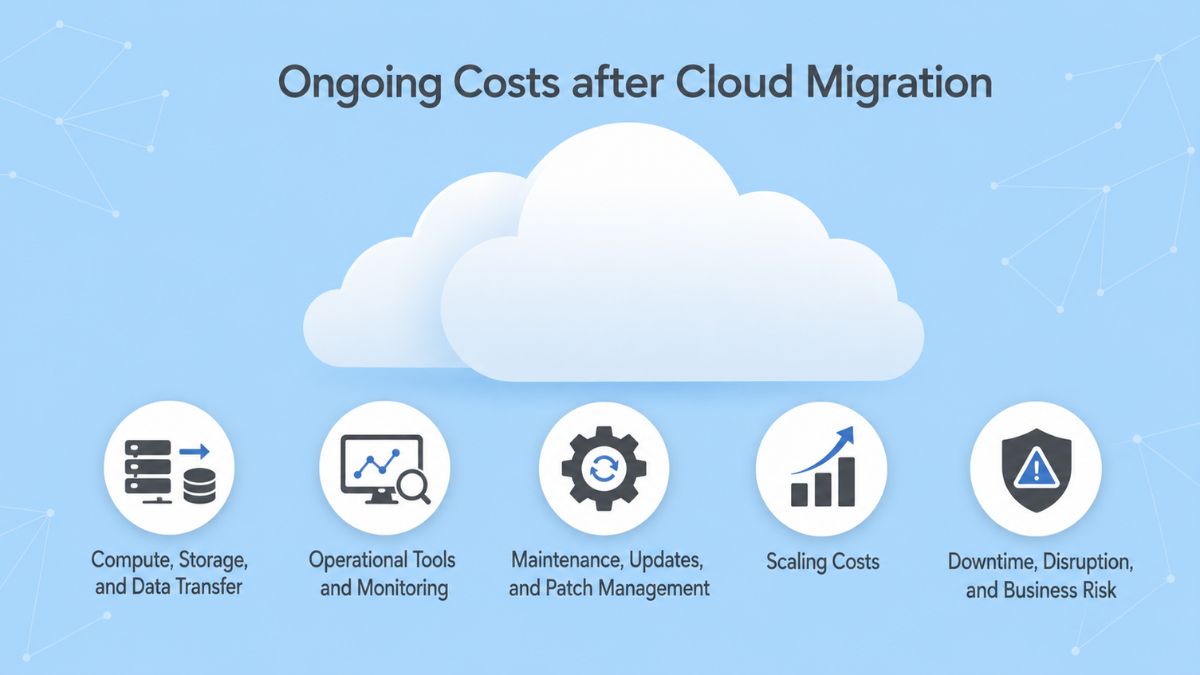
The cloud migration cost does not end once workloads are moved. After migration, organizations continue to pay for running, maintaining, monitoring, and scaling their cloud environments. These ongoing expenses vary depending on usage patterns, infrastructure requirements, and operational needs.
Common ongoing costs include:
- Compute, Storage, and Data Transfer: Cloud environments require continuous spending on virtual machines, managed compute services, storage options, and data movement. Costs can increase when applications exchange data across regions or when information moves outside the cloud environment.
- Operational Tools and Monitoring: Organizations often need ongoing investment in observability, logging, security scanning, backups, and other operational tools to maintain visibility and reliability around the clock.
- Maintenance, Updates, and Patch Management: Cloud systems still require regular maintenance, including operating system patches, dependency updates, and performance optimization to keep applications running effectively.
- Scaling Costs: Increased traffic, new feature releases, or business growth can raise cloud spending. While auto-scaling can help manage changing demand, incorrect configurations may result in unnecessary resource consumption.
- Downtime, Disruption, and Business Risk: Migration-related changes may temporarily affect system availability or performance. If these disruptions impact users or customers, they can create additional business costs related to revenue and reputation.
The estimated annual cost after migration depends on the organization’s size, infrastructure complexity, and operational requirements:
|
Business size / Complexity |
One-time migration costs |
Ongoing annual costs |
| Small business / simple apps (few services, minimal legacy) |
~$40,000 – $100,000 |
$10,000 – $30,000 |
| Mid-sized business / mixed legacy & custom apps |
~$100,000 – $300,000 |
$40,000 – $100,000 |
| Large enterprise / regulated data / full refactoring & global scale |
$300,000 – $600,000+ |
$100,000 – $200,000+ |
Hidden Costs in Cloud Migration That Can Exceed Your Budget
A cloud migration cost estimate can miss significant expenses when overlap, dependencies, validation, and internal effort are not modeled clearly from the start. These costs may not appear in the initial cloud bill, but they can extend timelines, increase engineering effort, and delay expected savings.
1. Extended double run periods
Running legacy and cloud environments in parallel is one of the most common sources of budget pressure. Testing, approvals, performance validation, and business sign off can take longer than planned, extending the period when both environments remain active.
Each additional week can add duplicated spending across:
- Compute and storage
- Legacy and cloud licensing
- Support and operational work
- Temporary networking and data transfer
Without clear ownership and cutover criteria, a temporary overlap can become a prolonged expense.
2. Integration and dependency costs
Undocumented dependencies can significantly change the cost of cloud migration after execution begins. A workload initially planned for a simple rehost may still rely on identity systems, shared databases, reporting platforms, batch jobs, shared libraries, or temporary network connections.
Once these dependencies surface, engineering work may expand across identity, networking, data, and security. This makes integration one of the less predictable areas of migration spending.
3. Training and productivity loss
Migration also requires teams to learn new operating models, validate unfamiliar tools, and support legacy and cloud environments at the same time. Although this effort may not appear as a direct cloud charge, it can increase total project effort and slow delivery.
Partner involvement, migration tooling, and internal enablement introduce additional early-stage effort. These expenses are temporary, but if it is not explicitly accounted for, it can extend timelines and postpone when cloud benefits become visible.
4. Compliance and security validation
Security and compliance requirements can also create costs that are easy to underestimate. Encryption validation, PCI evidence, audit trails, and security approvals may require substantial coordination across multiple teams and systems.
If a control gap delays approval, cutover may also be delayed. This can extend the double run period and increase both project costs and ongoing operating expenses.
How to Set a Realistic Cloud Migration Budget
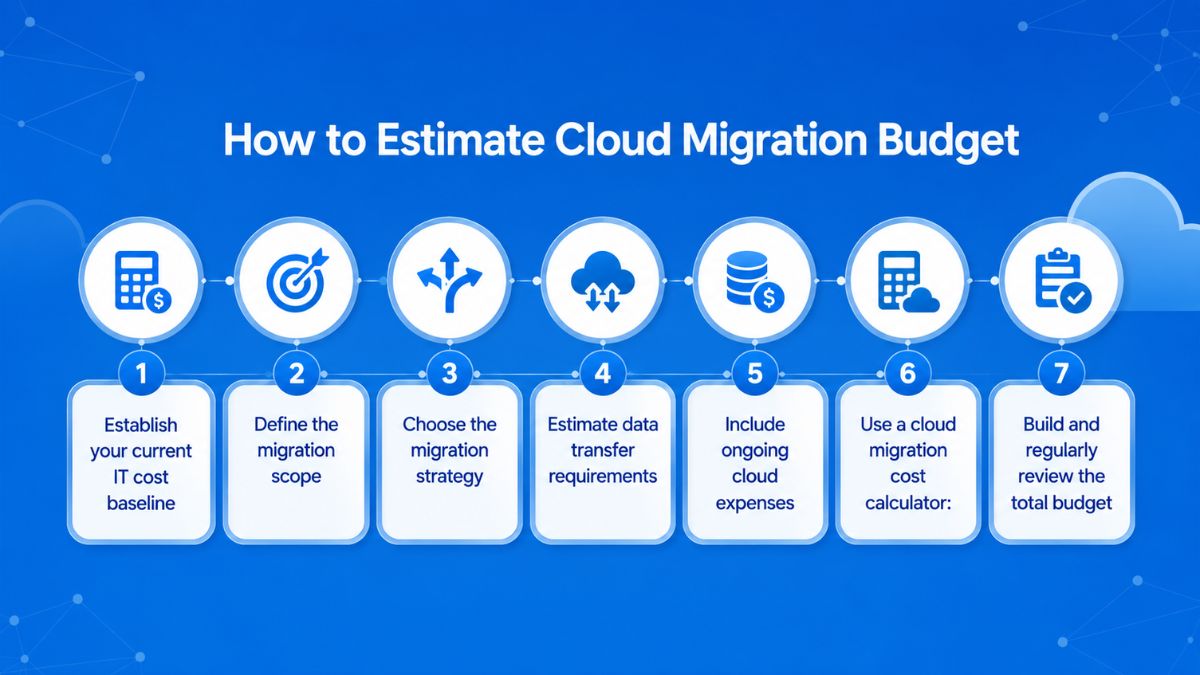
A realistic cloud migration budget should account for the full transition, from current infrastructure and migration execution to ongoing cloud operations. Follow the steps below to build a comprehensive estimation for your project:
- Establish your current IT cost baseline: Review existing hardware, software, maintenance, and operational expenses. This provides a baseline for comparing current spending with projected cloud costs.
- Define the migration scope: Identify which applications, data, and services will move to the cloud. Consider their complexity and interdependencies, as more complex environments may require additional time and resources.
- Choose the migration strategy: Determine whether workloads will be rehosted, replatformed, or refactored based on business requirements. Each approach has different cost implications, with refactoring typically requiring greater upfront investment because applications need more modification.
- Estimate data transfer requirements: Calculate the volume of data that needs to move and account for applicable transfer costs. These charges can vary between cloud providers and may become significant for large data migrations.
- Include ongoing cloud expenses: Factor in cloud subscriptions, maintenance, monitoring, and potential staff training. These costs contribute to the total cost of ownership after migration.
- Use a cloud migration cost calculator: Provider tools can help develop a more specific cloud migration cost estimate based on migration requirements. For example, Google Cloud’s Migration Center includes cloud migration cost calculator for estimating migration-related expenses.
- Build and regularly review the total budget: Combine pre migration planning, migration execution, and post migration operating costs into one budget. Review and adjust the estimate as project requirements change during the migration.
Common Mistakes in Estimating Cloud Migration Cost
Even a detailed cloud migration cost estimate can be misleading when it focuses only on the initial project price. The most common mistake is failing to account for the full lifecycle of migration, including the ongoing and post-migration costs that ultimately shape the true total.
1. Budgeting only for the migration project
The project fee is only one part of the total cost. Over a three to five year period, ongoing monthly cloud expenses can represent a larger financial commitment and should be included in the budget.
2. Making an incomplete on premises comparison
Comparing monthly cloud charges with current infrastructure spending can be misleading if hardware refreshes, electricity, backup equipment, and patching labor are excluded.
3. Leaving data egress out of the estimate
For heavy data workloads, outbound data charges can become a substantial expense. Estimates should therefore reflect actual outbound data volumes rather than overlooking this cost.
4. Choosing a platform by hourly price alone
The lowest per hour rate does not provide a complete cost comparison. Licensing benefits, support quality, and team familiarity can have a greater influence on the overall decision.
5. Ignoring cost management after migration
Cloud spending can increase when resources are not regularly reviewed. Ongoing cost reviews can help identify unused virtual machines and keep spending more predictable.
6. Treating migration as a single cutover event
Migration includes planning, execution, validation, decommissioning, and post project review. Leaving out the final stages can make the initial estimate appear lower while allowing additional costs to remain.
7. Accepting a fixed price with no contingency
A fixed price estimate that leaves no room for changes may lead to additional change orders when unforeseen requirements emerge.
How to Control and Optimize Cloud Migration Costs
It’s clear that the total cost of cloud migration is not fixed and shaped by a range of decisions made before, during, and after migration. The following strategies can help keep costs under control without losing the operational benefits expected from cloud adoption.
Rightsize workloads before and after migration
Moving oversized on premises resources directly to the cloud can carry unnecessary capacity and cost into the new environment. A smarter move is rightsizing, which involves reviewing actual workload demand and adjusting resources accordingly.
For example, an environment running 10 virtual machines continuously may only require six, with autoscaling used during periods of higher demand.
Moving every workload at once can expose hidden dependencies, increase downtime risk, and put additional pressure on the migration budget.
A staged approach is generally more effective, beginning with less critical workloads before progressing to more complex systems. This enables teams to learn from each migration phase, refine their approach, and distribute costs over a longer period while minimizing unforeseen challenges as the program advances.
Use managed services and automation
Managed databases, serverless platforms, and container orchestration can reduce manual operational work. Services such as Amazon RDS and Azure SQL Database can automate patching, scaling, and failover. While these services add subscription costs, they may reduce the labor and downtime associated with handling these activities internally.
Negotiate cloud provider pricing
Cloud providers may offer discounts through reserved capacity, multi-year commitments, promotional credits, partner programs, or bundled agreements. Businesses should therefore compare AWS, Azure, and Google Cloud pricing alongside available commercial terms to have a more complete cloud migration cost estimate.
Choose the right cloud migration partner
An experienced migration partner can help control cloud migration costs by identifying risks such as over provisioning and overlooked data transfer fees before they increase the budget. They can also guide workload sizing and migration decisions, helping businesses avoid costly choices and use cloud resources more efficiently throughout the transition.
How Newwave Solutions Supports Businesses in Cloud Migration
Newwave Solutions supports businesses in moving legacy and on-premise systems to modern cloud environments, with capabilities across AWS, Microsoft Azure, Google Cloud, cloud native architectures, API integration, and system modernization.
Our cloud migration approach connects technical migration decisions with business requirements while helping control unnecessary spending and operational risk throughout the transition.
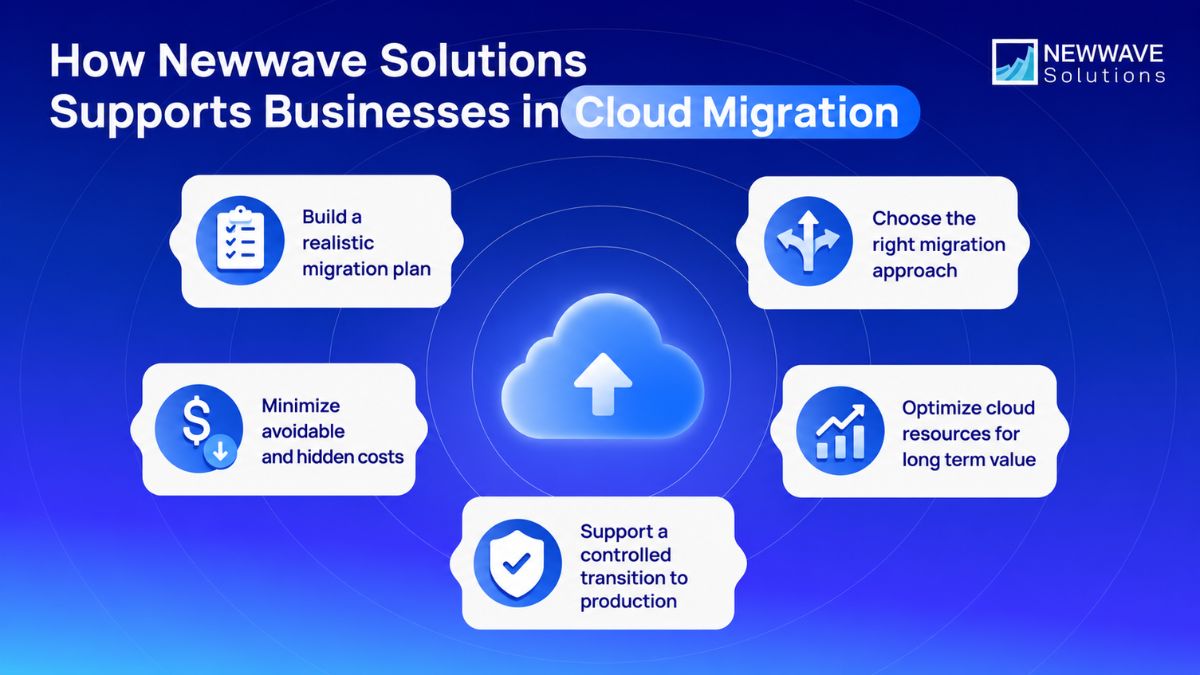
- Build a realistic migration plan: We assess existing systems, migration requirements, and target architecture to establish a clearer scope before execution, helping reduce unexpected changes that can increase cloud migration cost.
- Choose the right migration approach: We support modernization and migration decisions based on the requirements of the existing system and its future operating environment.
- Minimize avoidable and hidden costs: Careful planning around legacy dependencies, integrations, cloud resources, and migration execution can help reduce unnecessary infrastructure spending and costly rework during the transition.
- Optimize cloud resources for long term value: Our cloud and cloud native capabilities support scalable architectures across AWS, Azure, and Google Cloud, helping businesses align infrastructure with changing operational requirements instead of carrying inefficient legacy configurations forward.
- Support a controlled transition to production: Newwave Solutions provides deployment guidance, documentation, knowledge transfer, and launch support to help teams move from migration execution into live operations with greater continuity and visibility.
Conclusion: Plan Your Cloud Migration Cost with Confidence
Managing cloud migration cost effectively starts with building a realistic view of the total investment. Rather than relying on a single estimate, businesses should consider how migration choices, project complexity, and future operating needs can influence the budget over time.
A stronger migration plan balances immediate spending with long-term efficiency and business value. Newwave Solutions helps businesses through this process by aligning cloud decisions with practical business needs, helping reduce avoidable cost pressure and create a clearer path toward long term value from the cloud.
Schedule a consultation with our team to explore a tailored cloud strategy that fits your business goals.
FAQs
1. How long does a cloud migration take?
A cloud migration can take anywhere from 2 weeks to more than 24 months, depending on the project scope and complexity. Small migrations may take 2 to 6 weeks, mid-sized environments around 2 to 6 months, while large enterprise migrations can require 6 to 24 months or longer.
2. What are the 7 types of cloud migration?
The 7Rs of cloud migration are rehost, replatform, refactor or rearchitect, repurchase, relocate, retain, and retire. Each strategy involves a different level of application change, cost, and migration effort.
3. How much does 100 TB of cloud storage cost?
The cost of 100 TB of cloud storage typically ranges from around $500 to $2,300 per month. The actual price depends largely on the cloud provider, storage tier, and how frequently the data needs to be accessed.
4. How much does a website migration cost?
A website migration can cost anywhere from $0 to $25,000+, depending on the scope and complexity of the move. Simple hosting migrations may be free or cost under $100, while complex platform changes, large e-commerce databases, and migrations requiring professional SEO preservation can range from $2,500 to $75,000+.
5. Which tool is best for data migration?
There is no single best tool for every migration because the right option depends on the source environment, destination cloud, workload type, and data volume. For example, Google Cloud provides Storage Transfer Service for moving data from other clouds or on premises environments, while Azure Migrate supports assessment and migration across servers, databases, web apps, and other workloads.
To Quang Duy is the CEO of Newwave Solutions, a leading Vietnamese software company. He is recognized as a standout technology consultant. Connect with him on LinkedIn and Twitter.



Read More Guides


Get stories in your inbox twice a month.
Let’s Build Something Extraordinary
Sign up for a 30 min no-obligation strategic session with us. Transform your Ideas into scalable reality.
Leave a Reply