


ERP AI Chatbot: How It Works, Benefits & Best Use Cases
Your ERP may already contain the data your teams need, but getting to it can still involve too many steps. Employees may have to switch between modules, search through dashboards, wait for approvals, or rely on another team for simple updates. An ERP AI chatbot reduces that friction by letting users retrieve information and handle routine actions through natural language, making everyday ERP interactions faster and more direct.
Before investing in an ERP AI chatbot, businesses need to understand where it can create real value, what capabilities it should have, and how well it will fit existing ERP processes. This guide covers the main benefits and use cases of this chatbot, the types available, and key considerations for building and integrating one.
Key Takeaways
|
What is an ERP AI Chatbot?
An ERP AI chatbot is a virtual assistant integrated with an enterprise resource planning (ERP) system. It uses technologies such as natural language processing, machine learning, and AI to understand user requests, interact with employees or customers, and automate ERP-related tasks.
Rather than requiring users to work directly through complex ERP interfaces, an AI ERP chatbot acts as a bridge between people and the system. It connects with ERP data and workflows to retrieve information, perform tasks, provide real-time analytics, and reduce manual data entry and related errors.
How Do ERP AI Chatbots Work?
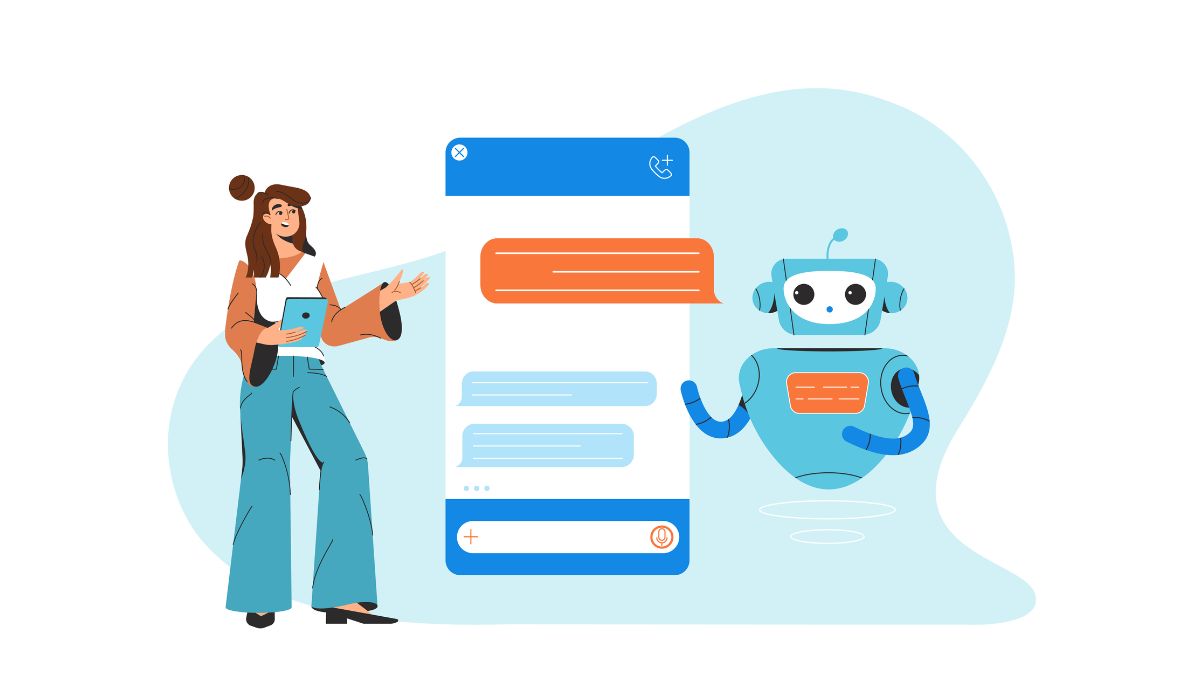
An ERP AI chatbot connects directly with ERP modules, interprets user requests through natural language processing (NLP), and performs the requested actions within the system. This process can be broken down into 4 main stages:
- Connect with ERP data: The chatbot integrates with ERP modules such as Finance, HR, Sales, Procurement, and Inventory. This gives it access to live ERP data when responding to requests or performing tasks.
- Understand user requests: NLP enables the chatbot to interpret queries written in everyday language. For example, users can ask to view pending invoices or approve a purchase order without navigating the ERP system manually.
- Execute ERP tasks: After interpreting the request, the chatbot can carry out actions such as approving workflows, generating reports, updating records, or sending notifications in real time.
- Learn over time: Machine learning allows the chatbot to improve its predictions and responses as it continues to operate, supporting more effective interactions with the ERP system over time.
How ERP AI Chatbots Benefit Your Business
An ERP AI chatbot can help businesses get more value from ERP systems by making routine work faster and data easier to act on. When AI is applied to repetitive and information-heavy processes, it can improve how teams operate without requiring the same level of manual effort.
1. Improve operational efficiency
AI can dramatically reduce the time needed for repetitive processes. It can automate rule-based actions, eliminate manual data entry, and execute workflows instantly across systems. This reduces delays caused by human handoffs and improves overall processing speed.
G&J Pepsi, for example, turned an equipment-move process involving 180,000 manual tasks and several days of work into a digital workflow completed in under 35 seconds.
2. Support better decision-making
AI can analyze large ERP datasets and identify patterns across many variables at once. This can help businesses forecast inventory needs and anticipate supply chain disruptions using operational data alongside factors such as weather, geopolitical events, and historical shipping patterns.
3. Enable real-time data access
ERP AI chatbots can retrieve live information from modules such as Finance, HR, Sales, and Inventory. This gives employees faster access to current data, making it easier to monitor KPIs, track performance, and respond to emerging issues without waiting for manual updates.
4. Increase employee productivity
By taking over routine and repetitive work, ERP AI chatbots allow employees to spend more time on higher-value activities such as problem-solving, strategic initiatives, and innovation. Research published by Salesforce and Vena Solutions found that 88% of employees reported higher job satisfaction when automation reduced manual workloads.
5. Provide smart reporting and insights
Beyond executing tasks, ERP AI assistants can analyze the information they handle and surface trends, performance metrics, and potential opportunities. This gives teams more timely visibility into business performance and supports more proactive decision-making.
6. Provide 24/7 automated support
ERP AI chatbots can operate around the clock, providing continuous assistance to employees and customers. This allows questions to be handled outside regular office hours and helps teams maintain access to ERP support whenever it is needed.
7. Reduce Operational Costs
Automating repetitive activities and reducing manual intervention can help lower operational costs. Fewer manual steps can also mean fewer errors and less rework, allowing businesses to use time, budget, and internal resources more efficiently.
8. Scale enterprise support
As operational demands increase, ERP AI chatbots can handle larger volumes of queries, support multiple departments, and adapt to changing workflows. This helps businesses expand ERP support without relying entirely on additional manual processes.
9. Detect and resolve routine issues
ERP AI chatbots can monitor operations, identify anomalies, and flag potential problems. They may also resolve routine issues automatically before they escalate, helping reduce disruption and keep workflows moving.
ERP AI Chatbot – Real-World Use Cases
An ERP AI chatbot can be applied to everyday ERP tasks where employees need faster access to information or support with routine processes. These use cases show how conversational AI can make ERP interactions simpler and more efficient.
Order status tracking
An ERP AI chatbot can help employees check order status without navigating complex ERP dashboards. Sales and customer support teams can ask about shipment progress, expected delivery dates, pending approvals, or delays. This reduces manual follow-ups between departments and can improve communication with customers.
Example: H&M uses ERP AI chatbots to track global supply chain movements and provide real-time order updates to internal teams and customers, supporting more accurate delivery information and faster communication.
Inventory management assistance
ERP AI chatbots can make inventory information easier to access through conversational queries. Procurement and warehouse teams can check stock levels, monitor consumption, receive low-stock alerts, and get restocking reminders. The chatbot can also notify teams about inventory discrepancies or incoming shipments.
Example: Unilever uses AI chatbots within ERP processes to give procurement teams visibility into stock levels across multiple warehouses, supporting faster replenishment decisions and reducing supply chain disruption.
Automated invoice status queries
Finance teams can use an AI ERP chatbot to retrieve information about invoice approvals, payment schedules, outstanding amounts, and vendor details. Automating these routine queries reduces the need for manual tracking and can help finance teams handle payment-related issues more efficiently.
Example: GE Vernova integrated ERP AI chatbots to handle invoice queries at scale, helping finance operations resolve vendor issues faster and reduce internal approval delays.
Leave and HR requests
ERP AI chatbots can support common HR requests through employee self-service. Employees can check leave balances, submit leave requests, view upcoming holidays, and ask questions about policies without relying on HR teams for every routine inquiry.
Example: Coca-Cola uses AI chatbots within its ERP environment to automate HR-related queries, helping employees access information through self-service while reducing routine HR ticket volumes.

Procurement Status Updates
Purchase order status, supplier confirmations, delivery timelines, and pending approvals can all be accessed through an ERP AI chatbot in a single conversation. Procurement teams therefore spend less time checking multiple modules or chasing email updates, helping purchasing activities move forward with fewer delays.
Example: Siemens adopted ERP AI chatbots for procurement status tracking, improving communication between sourcing teams and vendors while reducing manual follow-ups.
Production planning insights
For manufacturing teams, ERP AI chatbots provide quick access to production schedules, raw material availability, maintenance status, and capacity constraints. Having this information readily available helps teams adjust production plans faster and respond to potential disruptions before they affect operations.
Example: Bosch uses ERP chatbots on production floors to provide access to manufacturing schedules and inventory data, helping plant managers make faster operational decisions.
Sales forecasting support
Instead of waiting for manually prepared reports, sales managers can use ERP AI chatbots to retrieve forecasts, revenue data, regional performance, and customer order histories. Faster access to these insights can support demand planning, inventory decisions, and more timely sales actions.
Example: PepsiCo uses ERP AI chatbots to provide sales managers with forecasting data, supporting demand planning and product availability across regions.

Expense management
Employees can use ERP AI chatbots to check expense claim status, clarify policies, or submit new expenses. Automating these routine interactions can reduce manual checks, emails, and approval delays for finance teams.
Example: IBM uses ERP AI chatbots to support employee expense tracking, allowing teams to monitor claim status and receive policy guidance without escalating routine questions.
Real-time KPI monitoring
ERP AI chatbots can surface key performance indicators such as sales targets, order fulfillment rates, overdue invoices, and profit margins. With the appropriate setup, managers can access these metrics through conversational queries instead of waiting for detailed reports.
Example: Philips integrates ERP AI chatbots with leadership dashboards, allowing managers to access KPIs through conversational interfaces and improve visibility into business performance.
IT support for ERP navigation
ERP AI chatbots can also guide employees through ERP navigation, explain workflows, and help troubleshoot common errors. This gives users immediate support for routine system issues and can reduce the number of ERP-related requests sent to IT teams.
Example: Honeywell uses ERP AI chatbots to assist employees with ERP-related questions and common navigation issues, helping reduce IT helpdesk workloads.

Types of ERP AI Chatbot for Business
ERP AI chatbots can be grouped by how they interact with users and what they are designed to do inside an ERP environment. Some focus on retrieving information, while others can execute tasks, manage complex conversations, or support hands-free access.
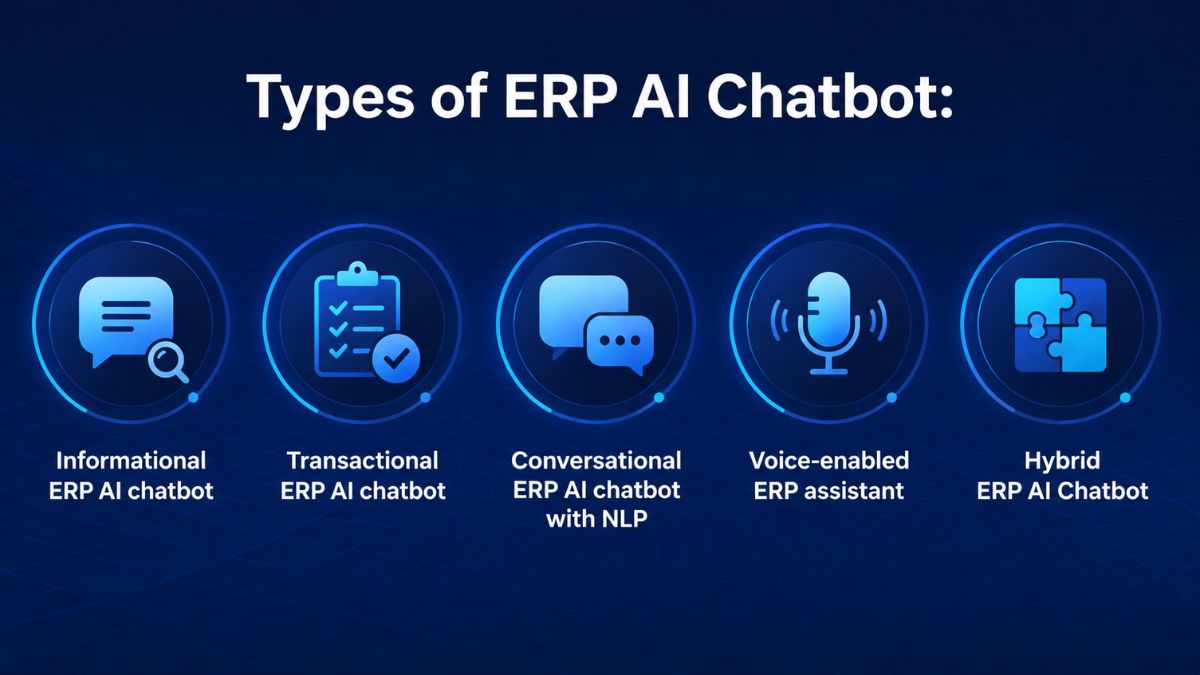
1. Informational ERP AI chatbot
An informational ERP AI chatbot is designed to retrieve live data from the ERP system. Users can ask about order progress, stock availability, delivery schedules, payment deadlines, or other routine information without opening multiple dashboards.
Example query: “Which customer orders are still awaiting shipment today?”
The chatbot checks the relevant ERP data and returns the current order status directly in the conversation.
2. Transactional ERP AI chatbot
A transactional chatbot goes beyond answering questions by carrying out actions inside the ERP system. It can support tasks such as approving purchase orders, submitting leave requests, updating inventory records, or generating invoices.
Example query: “Submit my leave request for next Monday and Tuesday.”
The chatbot processes the request through the ERP workflow and completes the action within the same interaction.
3. Conversational ERP AI chatbot with NLP
This type uses natural language processing to understand context and manage more complex, multi-step requests. It can support workflows that involve several conditions, approval levels, or information from different parts of the ERP system.
Example query: “Find all unpaid invoices from this month that are still waiting for approval.”
The chatbot interprets the time period and status requirements, filters the relevant ERP records, and presents the matching results for review.
4. Voice-enabled ERP assistant
A voice-enabled ERP chatbot allows users to interact with ERP data through spoken commands. This can be useful in environments such as plants, warehouses, or remote sites where typing may be less practical.
Example query: “How much stock is left for Item A in Warehouse 2?”
The assistant retrieves the current ERP data and returns the stock information through a voice response.
5. Hybrid ERP AI Chatbot
A hybrid ERP AI chatbot combines informational and transactional functions in one interface. It can answer ERP-related questions, carry out supported actions, and pass more complex requests to human agents when needed.
Example query: “Has Vendor B’s invoice been approved? If yes, start the payment process.”
The chatbot checks the invoice status, initiates the payment when the approval condition is met, and records the transaction in the ERP system.
Top AI Chatbots to Enhance ERP Operations
Choosing the best ERP AI chatbot depends largely on the ERP environment, integration needs, and the type of support users require. Some solutions are built directly into major ERP ecosystems, while others provide a more flexible conversational layer across different platforms.
SAP Joule
SAP Joule is SAP’s native AI copilot for products including S/4HANA and SAP Business One. It uses natural language processing to help users query business data and automate routine tasks within the SAP environment. Joule is well suited to organizations that already rely heavily on SAP and want an embedded AI assistant rather than a separate third-party tool.

Oracle NetSuite AI
Oracle NetSuite includes built-in AI capabilities that let users query business data, analyze trends, and generate reports through natural language. Its agentic workflows can also execute multi-step processes, such as creating sales quotes or rebalancing inventory based on predictive insights.
ChatERP
ChatERP is designed to connect with multiple ERP systems and provide a single conversational interface for business data. Users can generate charts and reports from text prompts, retrieve information from connected ERP databases, and automate business workflows.
Its cross-ERP compatibility makes it particularly relevant for organizations that operate more than one ERP system or want greater flexibility if their ERP environment changes over time.

Kaily
Kaily provides a conversational layer over ERP systems to simplify real-time data access. It supports natural language queries, enterprise customization, and security controls while remaining compatible with a range of ERP platforms.
Its main focus is making complex ERP systems easier to use across the organization, which can help reduce the amount of training users need to access everyday ERP information.
Key Features of an Effective ERP AI Chatbot
An effective ERP AI chatbot should make ERP interactions simpler, faster, and more useful in day-to-day operations. The features below determine how well the chatbot can support users, adapt to business needs, and work within existing ERP processes.
1. Natural Language Understanding (NLU)
Understands everyday language even when users phrase the same request in different ways.
2. Contextual Conversation Handling
Remembers previous messages and ongoing tasks so users can complete multi-step interactions without repeating information.
3. Real-Time Data Access
Retrieves live ERP information such as inventory levels, order status, and financial updates when users need it.
4. Intent Recognition
Identifies whether a user is asking a question, requesting information, or trying to complete a transaction.
5. Seamless ERP Navigation
Guides users through complex ERP modules and workflows step by step, reducing the need for deep system knowledge.
6. Multi-System Integration
Connects with platforms such as CRM, HR, and supply chain management systems to support broader data access.
7. Transactional Capabilities
Allows users to perform actions such as approving orders, updating inventory, or submitting leave requests directly through the chat interface.
8. Role-Based Access and Security
Restricts data and actions based on user permissions while supporting secure authentication.
9. Voice-Enabled Functionality
Supports spoken commands for hands-free ERP interaction, especially in plants, warehouses, or other on-site environments.
10. Predictive and Proactive Insights
Provides alerts and forecasts related to issues such as low inventory, delayed approvals, or financial risks.
11. Continuous Learning
Uses past interactions to refine responses and improve how efficiently it handles recurring tasks over time.
12. 24/7 Availability
Gives users access to ERP information and assistance at any time, including outside standard working hours.
13. User-Friendly Customization
Supports changes to workflows, permissions, and conversation paths without requiring deep technical expertise.
14. Multi-Language Support
Handles conversations in multiple languages for organizations with teams across different regions.
15. End-to-End Workflow Orchestration
Coordinates complete workflows across departments, including approvals and escalations, within a connected process.
Step-by-step Guide to Develop an ERP AI Chatbot
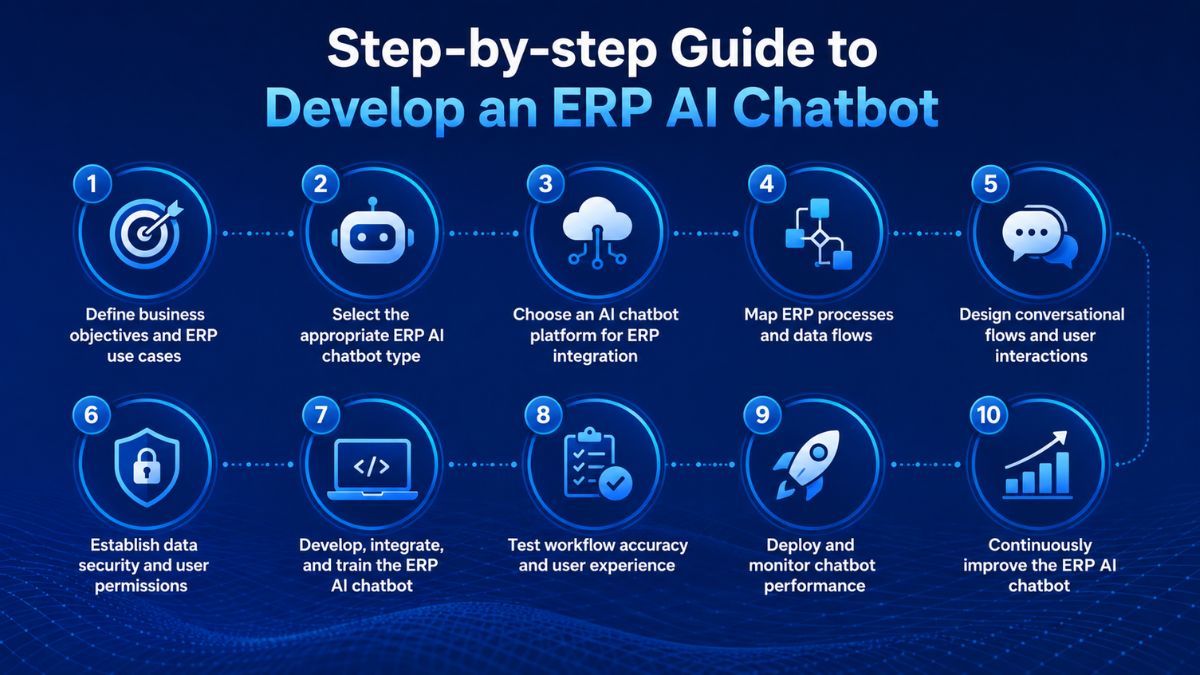
Developing an ERP AI chatbot involves more than building a conversational interface. The following steps provide a practical development path from defining the initial use case to improving the chatbot after deployment.
Step 1: Define business objectives and ERP use cases
Start by identifying the specific ERP processes the chatbot should support. Rather than pursuing broad automation, define operational use cases such as tracking orders, processing invoice approvals, or checking procurement status.
Clear objectives provide direction for later decisions around chatbot functionality, integration, conversational design, and training. They also help ensure that the solution addresses actual business processes instead of providing generic chatbot capabilities.
Step 2: Select the appropriate ERP AI chatbot type
Next, determine which chatbot model matches the workflows you want to support. Depending on the intended use cases, an organization may choose:
- An informational chatbot for retrieving ERP information.
- A transactional chatbot for supporting ERP transactions.
- A conversational, NLP-powered chatbot for more natural interactions.
- A hybrid chatbot that combines different interaction capabilities.
The selection should reflect the complexity and requirements of the ERP workflows identified in the first step.
Step 3: Choose an AI chatbot platform for ERP integration
Evaluate an AI chatbot platform based on its ability to work with the existing ERP environment. Compatibility is particularly important because the chatbot may need to retrieve ERP information in real time, securely process transactions, and accommodate future scaling requirements.
Selecting a platform that integrates with the current system can also support chatbot development without requiring major changes to the underlying ERP environment.
Step 4: Map ERP processes and data flows
Before development begins, document how the relevant ERP workflows operate and identify where the required data resides.
This process mapping establishes which ERP data sources the chatbot needs to access and where it may need to retrieve or update information. A detailed view of these dependencies also helps prevent disconnected workflows and supports more reliable chatbot interactions.
Step 5: Design conversational flows and user interactions
Translate the mapped ERP processes into structured conversations. The AI ERP chatbot should accommodate straightforward information requests as well as workflows that require users to complete several steps.
Interactions should guide users clearly through each process while keeping conversations natural and easy to follow. The objective is to make interaction with ERP workflows more intuitive without losing the structure required to complete the underlying task.
Step 6: Establish data security and user permissions
Security requirements should be incorporated into the chatbot architecture rather than addressed after development. Because the chatbot connects users with ERP information and processes, its access must follow the permissions already established within the ERP environment.
The design should account for:
- Role-based access to ERP functions and information.
- Encryption for protecting sensitive business data.
- Audit trails for recording relevant chatbot activities.
- Data access protocols that restrict users to authorized information and actions.
These controls help protect sensitive ERP data while supporting organizational compliance requirements.
Step 7: Develop, integrate, and train the ERP AI chatbot
With workflows, permissions, and conversational logic defined, development can move into implementation. Build the chatbot and connect it with the required ERP APIs so that it can interact with relevant business data and processes.
Training should incorporate appropriate business terminology, workflows, and datasets. The goal is to configure the chatbot to interpret user commands accurately, retrieve the correct ERP information, and execute supported transactions as intended.
Step 8: Test workflow accuracy and user experience
Before organization-wide deployment, test both the chatbot’s ERP functionality and its conversational experience.
Verify that it can retrieve the correct ERP data, process transactions accurately, and respond appropriately when it encounters edge cases. Testing should also evaluate whether multi-step conversations are clear and intuitive for users.
Results from this stage can be used to refine conversational flows and correct workflow issues before launch.
Step 9: Deploy and monitor chatbot performance
Once testing is complete, deploy the ERP AI chatbot and monitor how it performs in actual use. Key areas to track include chatbot usage, response times, and error rates.
Ongoing monitoring can reveal operational issues that need attention and provide information for refining chatbot responses. It also helps maintain the reliability of the chatbot as it interacts with ERP workflows.
Step 10: Continuously improve the ERP AI chatbot
Development does not end at deployment. Use chatbot analytics, user feedback, and ERP system logs to identify opportunities for refinement.
Iterative updates can improve chatbot responses and help the solution remain aligned with changing business requirements. This continuous improvement cycle is therefore an integral part of maintaining an ERP AI chatbot after implementation.
Common Challenges of ERP AI Chatbots and How to Overcome
Implementing an ERP AI chatbot comes with several technical and operational challenges that can affect its effectiveness. Addressing them early helps organizations build a solution that integrates smoothly with existing ERP environments and supports reliable, secure use over time.
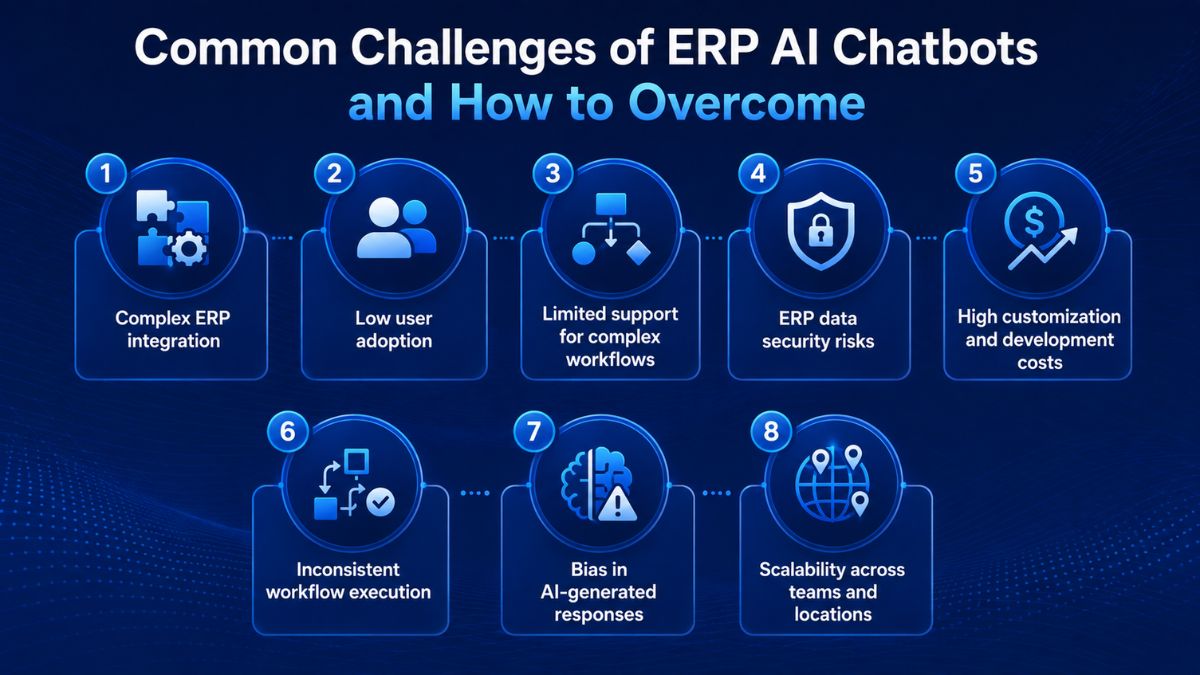
1. Complex ERP integration
Connecting an AI ERP chatbot to legacy ERP systems or environments that combine platforms from multiple vendors can be difficult. Poor integration may create disconnected data or disrupt existing workflows.
Organizations can address this by selecting a chatbot platform with flexible API support that can adapt to complex ERP environments without requiring a complete system overhaul.
2. Low user adoption
Employees may be reluctant to adopt an ERP AI chatbot when the technology feels unfamiliar or difficult to use. Development should therefore emphasize intuitive interfaces and straightforward conversational flows. Guided onboarding can further help users become familiar with the chatbot and encourage adoption.
3. Limited support for complex workflows
Some ERP chatbots may struggle with more complex processes, including multi-level approvals and workflows spanning multiple departments. Instead of relying on generic chatbot templates, organizations should first define the specific ERP use cases they need to support and develop chatbot capabilities around those business processes.
4. ERP data security risks
ERP chatbot automation requires access to sensitive business information, creating potential concerns around unauthorized access and security breaches.
Role-based access controls should restrict ERP functions and data according to user permissions, while encryption can help protect sensitive information. Real-time activity logs can also provide a record of chatbot interactions and transactions.
5. High customization and development costs
Initial development costs can become a concern when an ERP AI chatbot requires extensive customization. A modular, scalable development approach can help manage this challenge. Organizations can begin with high-impact use cases and expand the chatbot gradually rather than implementing all intended capabilities at once.
6. Inconsistent workflow execution
An ERP AI chatbot may respond incorrectly to unstructured queries or fail to follow the required process when its training is insufficient. Detailed ERP workflow mapping and thorough training datasets can improve how the chatbot handles these interactions. Its features should also be regularly optimized to improve response accuracy over time.
7. Bias in AI-generated responses
Bias within training data may be reflected unintentionally in chatbot responses, potentially producing inaccurate or unfair results in ERP interactions. Using diverse, high-quality training datasets can help address this issue. Organizations should also audit chatbot interactions regularly to identify and correct biased response patterns.
8. Scalability across teams and locations
As organizational requirements expand, an ERP AI chatbot may need to operate across additional departments or regions. Scalability should therefore be considered during system design. A robust backend architecture can support expansion across multiple locations as well as multi-language deployments.
Future Trends of ERP AI Chatbots: What to Expect in 2026
The next phase of ERP AI chatbot development is expected to move beyond basic query handling toward more personalized, proactive, and connected interactions with enterprise systems. As these capabilities develop, businesses can prepare by considering how their chatbot architecture, integrations, and workflows can accommodate more advanced use cases.
More personalized ERP interactions
ERP AI chatbots are expected to provide more tailored interactions based on factors such as an employee’s role, previous conversations, and task preferences. Instead of providing the same experience to every user, the chatbot can adapt responses to individual working contexts.
To prepare for this direction, businesses can consider ERP AI chatbot solutions that support user profiling and integration with employee activity data.
Voice-based ERP interactions
Voice capabilities are expected to become a more prominent part of ERP chatbot interactions. Employees could use voice commands to submit ERP queries or perform transactions, supporting hands-free access when they are on the move.
Businesses preparing for voice-based use cases can explore AI chatbot platforms for ERP that provide native support for voice assistants such as Google Assistant or Alexa.
Proactive chatbots with predictive insights
Rather than waiting for users to initiate every interaction, future ERP AI chatbots are expected to become more proactive. By incorporating predictive analytics, they could alert users to issues such as low inventory, outstanding approvals, or potential financial risks.
Supporting these capabilities requires integrating the chatbot with predictive data models so it can provide real-time, forward-looking information based on ERP data.
Broader integration across enterprise systems
ERP AI chatbots are also expected to expand beyond ERP-only interactions. Future implementations could connect simultaneously with CRM, supply chain, and HR platforms. This helps to create a more unified interface for accessing information and managing processes across enterprise systems.
Flexible API structures can support these multi-system connections. When developing such integrations, businesses also need to consider private versus public LLM infrastructure in relation to integration requirements and data security.
Greater use of low-code and no-code development
Low-code and no-code platforms are expected to make ERP chatbot development, modification, and scaling less dependent on technical teams. This approach could allow businesses to deploy and customize chatbot capabilities more quickly as their requirements change.
Enterprises can therefore consider low-code options when planning AI ERP chatbot development, particularly when deployment speed and ongoing customization are priorities.
More advanced workflow orchestration
Future ERP AI chatbots are expected to handle more sophisticated workflow orchestration across enterprise processes. Their role could extend to cross-department workflows, multi-level approval processes, and complex task routing rather than focusing only on individual ERP queries or actions.
Businesses preparing for these capabilities should map their process flows in detail. Doing so can help ensure that the chatbot’s features can later be extended to support more advanced workflow orchestration.
Partner with Newwave Solutions to Build and Integrate AI Chabots in ERP System
Building an effective ERP AI chatbot requires more than connecting a language model to business data. The chatbot must understand user intent, work with existing ERP workflows, protect sensitive information, and remain reliable as usage grows.
Newwave Solutions helps businesses design and build custom ERP AI chatbots around real operational needs. We can support conversational assistants for data access, transactional bots for routine actions, and AI-powered interfaces that connect with existing ERP modules and business systems.
Our focus is on making chatbot interactions practical, secure, and easy to use. From conversation design and ERP integration to testing, deployment, and ongoing support, we help ensure the chatbot fits naturally into daily workflows rather than becoming another disconnected tool.
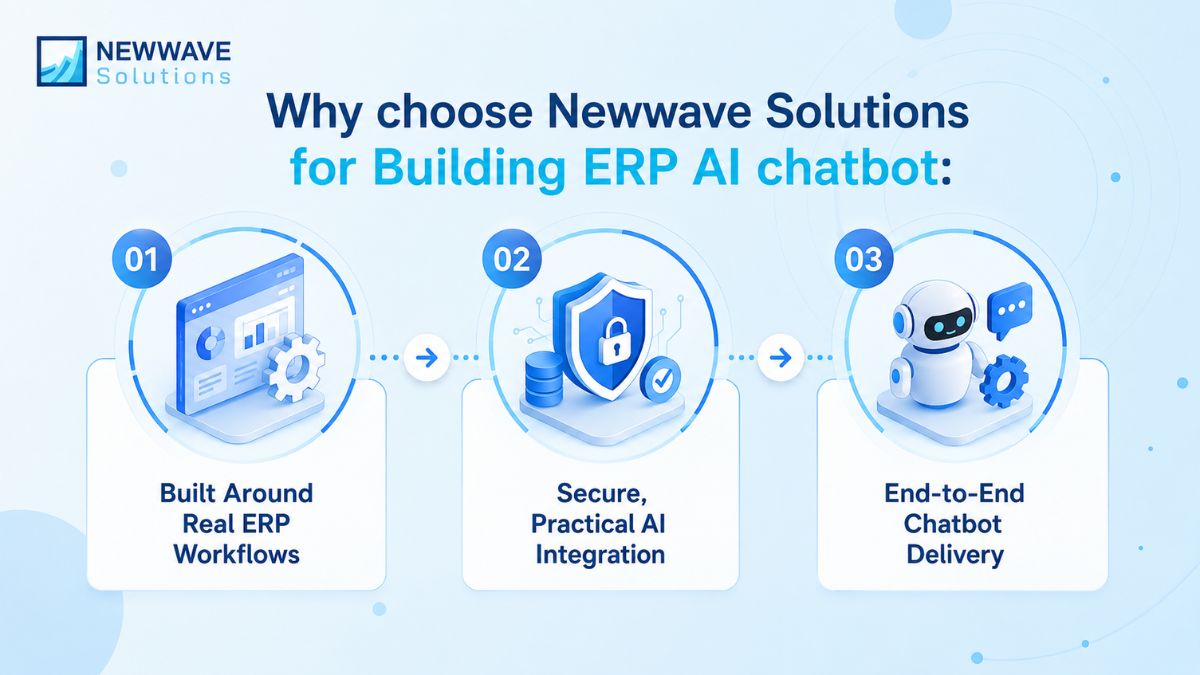
If you are looking to add AI-driven assistance to your ERP environment, let’s connect. Newwave Solutions can help turn that goal into a solution aligned with your processes, users, and long-term operational needs.
Build an ERP AI Chatbot That Fits Your Business
The value of an ERP AI chatbot comes from how well it fits the way your teams already work. A well-planned solution should simplify ERP interaction, reduce unnecessary manual effort, and support more efficient day-to-day operations without adding another layer of complexity.
Before choosing a chatbot, consider which processes should be supported first and how the solution will connect with your existing ERP setup. Newwave Solutions can help turn those requirements into a practical implementation plan tailored to your business. Schedule a consultation with our team to explore the right ERP AI chatbot approach.
FAQs
1. How does a chatbot integrate with ERP systems?
An AI chatbot connects with ERP data and modules to retrieve information and perform supported actions through a conversational interface. Depending on the setup, it can work across functions such as finance, inventory, sales, procurement, and HR.
2. How do AI chatbots simplify ERP workflows?
AI chatbots let users access ERP information and complete routine tasks using natural language instead of navigating complex modules. They can support activities such as data retrieval, approvals, record updates, notifications, and reporting.
3. What is the difference between an AI Agent vs Chatbot for ERP?
An ERP chatbot primarily interacts with users through conversation to answer questions or execute requested tasks. An AI agent can operate with greater autonomy, handling multi-step workflows and taking actions toward a defined goal with less direct user input.
4. How long does it take to launch a fully functional AI chatbot?
Launching a fully functional AI chatbot can take anywhere from a few hours to several months, depending on its complexity. Basic no-code bots may take 1–3 days, standard business chatbots around 2–6 weeks, and advanced custom enterprise solutions roughly 2–6 months.
5. Which AI chatbot is best for ERP?
The best ERP AI chatbot depends on your existing ERP environment and required capabilities. SAP Joule may suit SAP-based environments, Oracle NetSuite AI is designed for NetSuite users, while options such as ChatERP and Kaily can support organizations that need broader ERP compatibility.
To Quang Duy is the CEO of Newwave Solutions, a leading Vietnamese software company. He is recognized as a standout technology consultant. Connect with him on LinkedIn and Twitter.



Read More Guides
Get stories in your inbox twice a month.
Let’s Build Something Extraordinary
Sign up for a 30 min no-obligation strategic session with us. Transform your Ideas into scalable reality.
Leave a Reply