


EHR Software Development: A Complete Guide for 2026
EHR software development starts with a difficult choice: build a system around your clinical workflows or adapt those workflows to an existing product. The wrong approach can create integration gaps, compliance issues, higher maintenance costs, and extra work for medical staff. A well-planned EHR must balance usability with secure patient data management and reliable information exchange across connected systems.
Before committing budget, organizations need a clear view of what the system should include and how it will be built. This guide covers EHR features and development steps, custom versus off-the-shelf options, interoperability and compliance requirements, and cost factors to help you make a better-informed development decision.
Key Takeaways
|
What is EHR Software?
Electronic Health Record (EHR) software is a digital version of a patient’s paper chart that stores health information collected and maintained by healthcare providers over time. It creates a comprehensive, longitudinal record of a patient’s health history, including diagnoses, lab results, medications, physician notes, and other clinical information.
Because this data can be accessed in real time, it can support clinical decision making, coordination across departments, and fewer errors caused by fragmented records.
EHR software also allows patient information to move securely between hospitals, clinics, laboratories, pharmacies, and telehealth platforms. Adoption is already widespread in the U.S., where 95.0% of office based physicians had adopted EHR systems and 83.6% were using a certified EHR system.
EHR vs. EMR: What are the Key Differences?
EHR and EMR systems both store digital patient information, but they differ mainly in scope, data sharing, and how widely the records are used. An EHR is designed to provide a broader view of a patient’s health across multiple providers and care settings, while an EMR is generally used within a single practice or healthcare organization.
|
Comparison |
EHR |
EMR |
| Definition | Digital record covering a patient’s broader health information across multiple providers. | Digital record focused on a patient’s medical history within one provider or organization. |
| Scope | Covers health information across different healthcare settings. | Centers on care delivered within a specific practice or facility. |
| Interoperability | Supports data exchange between different healthcare systems and providers. | Usually has more limited interoperability outside the organization where it is used. |
| Data sharing | Allows patient information to be shared across multiple providers and facilities. | Sharing is generally restricted to the original healthcare organization. |
| Purpose | Provides a broader view of a patient’s health across care environments. | Tracks and manages patient care within a specific provider or practice. |
| Functionality | Can include medical history, lab results, medications, immunizations, and other health information. | Focuses more on diagnoses, treatment plans, and clinical notes within one practice. |
| Patient access | Often allows patients to view their health information through online portals. | Patient access is typically more limited or may not be available. |
Why EHR Systems Matter for Healthcare Organizations
EHR can centralize patient information, reduce dependence on paperwork, and make health data easier to access across care activities. Their value extends beyond clinical record keeping, with distinct benefits for healthcare businesses, hospitals, and patients.
For hospitals
1. Better operational efficiency
EHR systems reduce reliance on paper-based bills, reports, and patient records. Doctors can retrieve patient information more quickly, receive lab data, prescribe medication, and review medical histories through the same digital system.
2. Reduced medical errors
Detailed patient records and data-driven medical insights can alert healthcare providers to issues such as incorrect dosages, adverse reactions, and possible drug interactions. This can help reduce the risk of medical errors.
3. Stronger data security
EHR systems can include security controls such as session termination, digital signatures, encryption, and multi-factor authentication. These measures are designed to protect patient information and reduce unauthorized access.
4. Cost efficiency in the long term
EHR development and implementation can require substantial upfront investment. Over time, however, hospitals may reduce transcription expenses, patient record storage costs, and the effort involved in claims management.
5. Better patient-doctor interaction
EHR applications can simplify administrative tasks such as appointment scheduling and hospitalization procedures. They can also allow patients to access their records, review clinician notes, and communicate electronically with their doctors.
For patients
1. Easier access to health information
Patient-facing EHR platforms can provide access to medical records, test results, and documents needed for insurance claims or future medical appointments.
2. Fewer duplicate tests
When previous test results are available in the EHR, healthcare providers can review existing information instead of asking patients to repeat the same tests unnecessarily.
3. Easier communication with providers
Patients can use EHR systems to send secure messages, schedule appointments online, and receive health updates from their care providers.
4. Faster emergency response
During emergencies, quick access to medical history, allergies, and current treatments can give healthcare professionals the information they need to respond more promptly and accurately.

For businesses
1. New business opportunities
EHR requirements vary across healthcare organizations, regions, and organization sizes. This creates room for businesses to develop solutions around different operational and clinical needs rather than relying on a single standard model.
2. Multiple monetization models
EHR products can use different revenue models, including subscriptions, free versions with paid features, and pay-per-use pricing. This gives healthcare software businesses several options for structuring how customers pay for the system.
Types of EHR Software Often Used in Healthcare
Healthcare organizations do not all need the same EHR model. The right choice depends on factors such as organization size, budget, security requirements, and how clinicians need to access and use patient data.
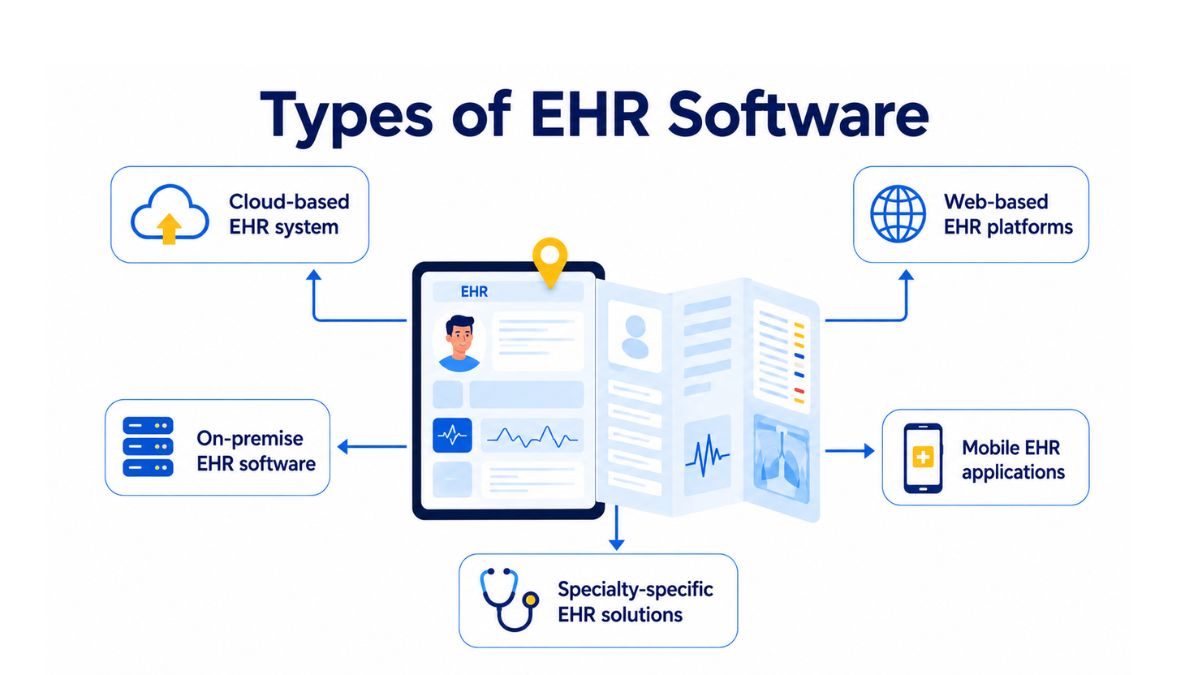
Cloud-based EHR system
Cloud-based EHR systems run on infrastructure managed by a cloud provider rather than on servers maintained by the healthcare organization. The provider is responsible for system availability, data protection, and regular software updates delivered over the internet.
These systems are commonly offered through subscription models, so healthcare organizations do not need to make the same upfront investment in hardware, networking, and storage required by traditional on-premise systems. They also support remote access and can scale as operational needs grow.
Best fit for: Small to mid-sized hospitals, clinics, startups, and growing healthcare networks that need lower upfront infrastructure costs, remote access, and scalability.
On-premise EHR software
On-premise EHR systems, sometimes called conventional or legacy EHRs, run locally in data centers owned or leased by the healthcare organization. The organization is responsible for maintaining the system, protecting patient data, managing upgrades, and keeping the infrastructure operational.
These systems can provide greater control over how information is stored and accessed, but they also place more responsibility on internal IT teams. They typically involve large upfront software license costs as well as recurring maintenance expenses, and organizations may need external consultants for technical support or upgrades.
Best fit for: Large hospitals, enterprise healthcare groups, and organizations with strict data residency, internal security, or regulatory requirements and the IT resources to manage their own infrastructure.
Web-based EHR platforms
Web-based EHR platforms are accessed through a browser and can operate across different devices without requiring users to depend on a specific operating system or workstation.
This model can make deployment faster and give clinicians more flexibility in how they access the system. It is particularly useful for organizations operating across multiple locations where browser access can reduce dependence on dedicated local hardware.
Best fit for: Multi-location clinics, outpatient centers, and healthcare providers that need flexible browser-based access and faster deployment.
Mobile EHR applications
Mobile EHR applications allow doctors and care teams to access patient records, update notes, and review alerts from mobile devices while working away from a fixed workstation.
This type of EHR access is suited to care settings where clinicians frequently move between locations or need patient information while delivering care outside traditional hospital or clinic environments.
Best fit for: Home healthcare providers, emergency care teams, telehealth services, and clinicians who need real-time access while on the move.
Specialty-specific EHR solutions
Specialty-specific EHR systems are designed around the requirements of particular medical practices rather than general healthcare workflows. They can reflect specialized documentation formats, clinical processes, and regulatory needs that a general-purpose EHR may not fully address.
Some specialized EHR systems may also be included as part of specific medical equipment. For example, a system used in oncology may be connected to equipment such as a radiation machine.
Best fit for: Specialty practices such as oncology, cardiology, pediatrics, mental health, diagnostic laboratories, and other medical fields with distinct workflows.
Essential Features for an EHR System
An EHR system should include features that support efficient patient care, accurate recordkeeping, and smooth healthcare operations. The specific capabilities may vary depending on the organization’s needs, users, and long-term goals.
1. Centralized patient information hub
A centralized patient information hub gives authorized users access to Protected Health Information (PHI) and electronic Protected Health Information (e-PHI) from one place. This can include demographics, medical history, allergies, medications, lab results, and other patient data.
Doctors can record, update, and review this information directly in the system. Because this function forms the foundation of the patient record, it is suitable for inclusion even in an MVP version of an EHR.
2. Prescription management
Prescription management allows physicians to issue electronic prescriptions remotely. It can reduce prescription processing time and help improve accuracy.
Patients can also track prescriptions through a portal, receive refill notifications, and monitor remaining medication quantities. When connected with pharmacy systems, the feature also supports the transfer of prescription information needed to obtain medication.
3. Clinical documentation management
Clinical documentation tools allow physicians to create, store, and manage electronic records of patient visits. Records can include medical history, physical examination results, and treatment plans.
Templates and libraries of pre-created records can reduce documentation time while keeping information consistent. Electronic signatures can also be used to maintain the legal validity of documentation and support regulatory compliance.
4. Lab integration
Lab integration allows healthcare providers to send and receive information between the EHR and laboratory systems. Doctors can access test results and use them when reviewing or adjusting treatment plans.
Connecting laboratory information with patient medical history also gives clinicians and lab technicians a shared source of data for ongoing procedures and test results.
5. Appointment scheduling and management
Appointment management allows patients to book, reschedule, or cancel visits online. Providers can manage available time slots, monitor staff availability, and reduce scheduling conflicts in real time.
When connected with patient records, the system can account for different appointment needs, such as additional time for follow-up visits or more involved procedures. Automated reminders can also be delivered through SMS, email, or in-app notifications. For multi-specialty or multi-location organizations, scheduling can cover several providers and facilities within the same system.
6. Billing and claims processing
Billing and claims functionality connects clinical records with financial workflows. The system can generate invoices, submit insurance claims, and use diagnosis and procedure codes such as ICD-10 and CPT/HCPCS from patient visits to reduce manual entry.
It can also check insurance eligibility, send claims electronically to clearinghouses or payers, track claim status, receive payment remittance, and manage denials. Patients can view billing details and payment schedules through the same workflow.
7. Reporting and analytics
Reporting and analytics functions allow healthcare providers and administrators to review clinical, operational, and financial data through dashboards and custom reports.
The system can be used to monitor patient outcomes, chronic disease trends, appointment metrics, and provider productivity across departments or locations. It can also support compliance reporting, including MACRA/MIPS, Meaningful Use, and regional health authority requirements.
More advanced analytics modules may include predictive capabilities for anticipating patient needs, allocating resources, and identifying bottlenecks in care delivery.
8. Health information exchange
Health Information Exchange (HIE) allows patient data to be shared securely between healthcare organizations and facilities. This can include medical records, test results, treatment plans, and other clinical information.
HL7 integration supports the transmission of this data between different healthcare systems, helping providers exchange information and maintain continuity of care across connected organizations.
Step-by-Step Process to Develop EHR Software
Once an organization decides that custom EHR development is the right approach, the next task is turning clinical, technical, and compliance requirements into a working system. This process outlines the mains steps to build a EHR software from scratch:
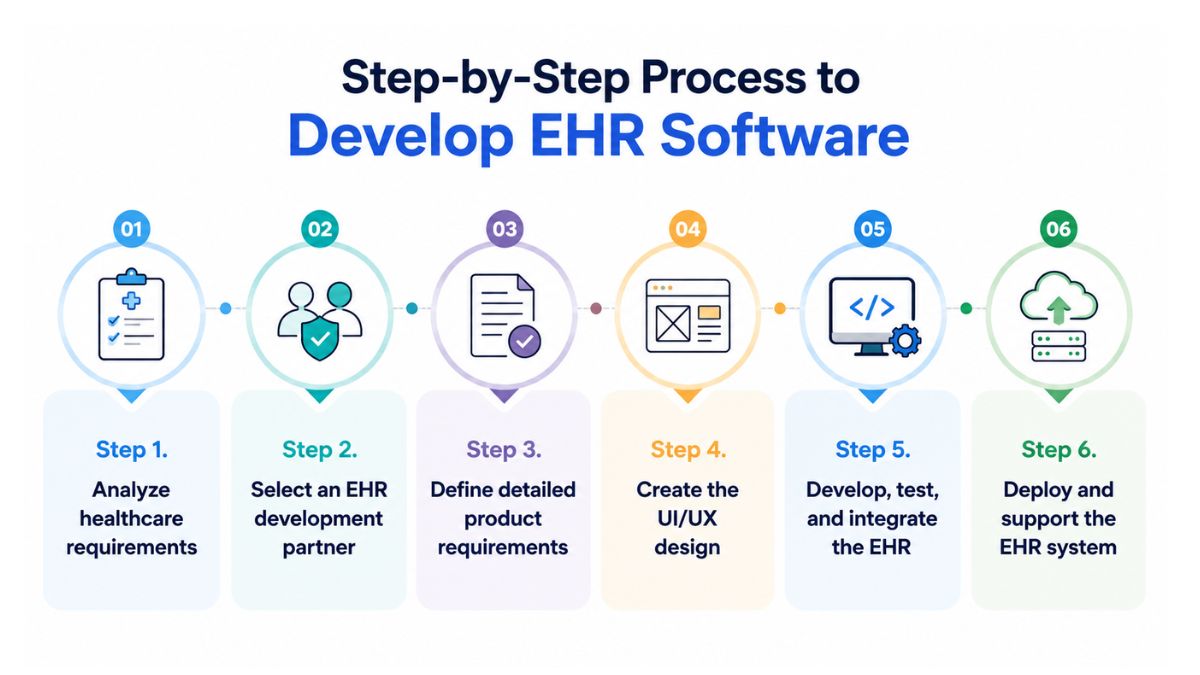
Step 1. Analyze healthcare requirements
Start by examining how the healthcare facility currently works and what the EHR needs to improve. Medical staff should be involved at this stage to identify daily workflows, operational pain points, and the functions the system must provide.
The result should be a clear set of requirements grounded in actual clinical and administrative needs. This gives the project a defined scope before detailed product planning begins.
Step 2. Select an EHR development partner
The next step is choosing a software development partner with relevant healthcare experience. The evaluation should cover both healthcare domain knowledge and the technical capabilities required for the planned EHR system.
Key areas to assess include:
- Healthcare software experience: Review whether the team has worked on EHR, EMR, or other healthcare solutions.
- Regulatory knowledge: Confirm familiarity with applicable requirements such as HIPAA, GDPR, PIPEDA, DCOM, and FHIR, depending on the region and system scope.
- Client feedback: Reviews on platforms such as Clutch and GoodFirms can provide information about previous customer experiences.
- Technical capability: Assess experience with the technologies, integrations, and development tools required for the project.
Step 3. Define detailed product requirements
After selecting a development partner, define the EHR system in greater detail. This includes its functionality, user roles, data flows, and integration points.
Compliance and health data protection requirements also need to be incorporated into the product specification. Depending on applicable regulations and technical requirements, this may include measures such as data encryption at rest and on client devices, access control, secure data transmission, HL7 integration, HTTPS, or encrypted WebRTC.
Step 4. Create the UI/UX design
The design phase determines how healthcare professionals will interact with the EHR. Designers work from the defined requirements, research user needs, create prototypes, and use feedback and usability testing to refine the interface.
EHR UI/UX design should account for several areas:
- Clear presentation of complex medical information
- Different workflows and permissions for healthcare roles
- Efficient interaction for healthcare professionals
- Data privacy requirements such as HIPAA
- Integration with other healthcare systems
- Accessibility needs and iterative user feedback
Step 5. Develop, test, and integrate the EHR
Once the design is approved, developers begin implementing the system functionality. Development can be organized into sprints, with individual functions built and reviewed incrementally.
QA engineers test the delivered functionality during this process. Identified defects are documented and returned to developers for correction.
Integration is also a major part of EHR software development. Depending on the defined requirements, the system may connect with:
- Health Information Exchange networks: Enable patient information sharing between healthcare organizations.
- Laboratory Information Systems: Import laboratory results directly into patient records.
- RIS and PACS: Provide access to radiology reports and diagnostic images.
- Patient portals and PHR systems: Give patients access to records, results, and provider communication.
- Medical billing and revenue cycle systems: Link clinical information with billing processes.
- Medication management applications: Track medication data and support patient safety.
Step 6. Deploy and support the EHR system
After development and testing are complete, the IT team installs and configures the EHR across the required servers and workstations. Existing data is then migrated from previous systems, and information exchange with connected platforms is configured.
The team also tests these connections to identify and resolve interoperability problems before the system becomes fully operational. Once deployment, migration, integration, and testing are complete, the EHR can be put into use within the healthcare organization.
EHR Interoperability and Data Governance
Integrations introduced during EHR development depend on a common way to exchange healthcare information across applications and organizations. Standards such as HL7 FHIR, SMART on FHIR, and HL7 CDA provide different mechanisms for sharing clinical data and connecting EHRs with other systems.
- HL7 FHIR: Fast Healthcare Interoperability Resources is a standard for exchanging healthcare information electronically through modern RESTful APIs. It organizes information into resources such as Patient, Observation, and Medication that correspond to clinical concepts, making API-based integration more predictable than older approaches.
- SMART on FHIR: This standards-based framework allows third-party applications to connect securely with EHR systems. It uses OAuth2 and OpenID Connect to manage authorization when applications access EHR data.
- HL7 CDA: Clinical Document Architecture is a document markup standard used to exchange clinical documents. It remains relevant in healthcare environments that exchange documents such as Continuity of Care records.
Technical interoperability alone does not define how healthcare data should be managed. EHR software development also needs clear governance rules for the information moving between connected systems.
Key areas include:
- Data ownership: Define which system or party owns information such as demographics, medications, allergies, and problem lists.
- Data quality: Establish required fields, code systems, and validation rules for exchanged information.
- Access control: Determine access according to factors such as user role, location, encounter, and data sensitivity.
- Retention and deletion: Set policies that align data retention and deletion with the regulatory requirements applicable in each region.
Regional privacy requirements
EHR systems operating across different markets may also be subject to regional privacy frameworks.
- GDPR (European Union): Health information is classified as a special category of data. Processing therefore requires an appropriate legal basis or condition together with relevant safeguards.
- PDPA (Singapore): The Personal Data Protection Act establishes requirements for collecting, using, disclosing, and protecting personal data. Healthcare guidance also covers areas such as data transfers and breach notification.
- APPs (Australia): The Australian Privacy Principles under the Privacy Act 1988 govern how covered entities handle personal information, including health information.
Regulatory Compliance & Security Standards for EHR Software Development
Interoperability determines how EHR systems exchange data, but compliance and security determine how that data must be protected. These requirements need to be considered from the beginning of EHR software development because a single data breach can cost healthcare organizations an average of $10.93 million (IBM’s 2023 Cost of a Data Breach Report).
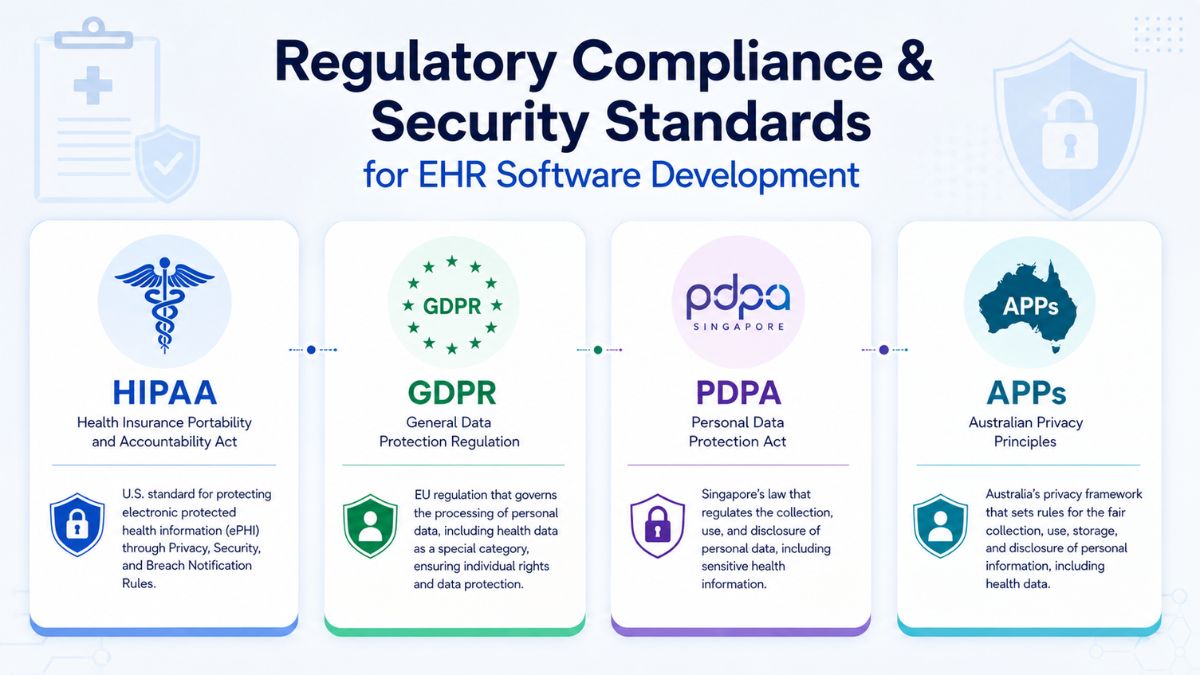
1. U.S. compliance: HIPAA
Under the HIPAA Security Rule, organizations must apply reasonable and appropriate administrative, physical, and technical safeguards to protect electronic protected health information (ePHI). NIST SP 800-66 Rev. 2 maps security activities to HIPAA requirements and can be used by development teams when implementing these controls.
Core safeguards to account for include:
- Access control: Apply role-based access controls and least-privilege principles so users only access information required for their responsibilities.
- Audit trails: Record who accessed data, when and where access occurred, and what information was changed.
- Data encryption: Protect ePHI both at rest and while it is being transmitted.
- Breach readiness: Maintain sufficient logging and incident response procedures to support breach notification processes.
2. Regional privacy requirements
EHR systems operating across different markets may also be subject to regional privacy frameworks.
- GDPR (European Union): Health information is classified as a special category of data. Processing therefore requires an appropriate legal basis or condition together with relevant safeguards.
- PDPA (Singapore): The Personal Data Protection Act establishes requirements for collecting, using, disclosing, and protecting personal data. Healthcare guidance also covers areas such as data transfers and breach notification.
- APPs (Australia): The Australian Privacy Principles under the Privacy Act 1988 govern how covered entities handle personal information, including health information.
3. Security controls to build into EHR software
Regulatory compliance also needs to translate into concrete technical and operational controls during development.
- RBAC and MFA: Role-based access control can limit permissions according to responsibilities, while multi-factor authentication can be required for privileged access. Roles should also be reviewed periodically.
- Environment separation: Production and non-production environments should remain separate. Real patient data should not be used in testing without a formal process.
- Threat modeling and secure SDLC: Development practices can include code reviews, dependency scanning, and penetration testing to identify security weaknesses.
- OWASP ASVS: The OWASP Application Security Verification Standard provides a defined set of security controls and testing requirements for web applications.
- Disaster recovery: Recovery Point Objective (RPO) and Recovery Time Objective (RTO) targets should be defined, with restore tests used to verify recovery rather than relying on backups alone.
Tech Stack for EHR Software Development
The tech stack for EHR software development typically includes tools for application development, data management, hosting, security, interoperability, and ongoing maintenance.
|
Component |
Recommended Technologies |
| Frontend | React.js, Angular, Vue.js |
| Backend | Node.js, Django, Ruby on Rails |
| Database | PostgreSQL, MongoDB, MySQL |
| Cloud Infrastructure | AWS, Microsoft Azure, Google Cloud |
| Authentication | OAuth 2.0, JWT, SAML |
| Real-time Data Sync | WebSockets, Firebase, GraphQL Subscriptions |
| Compliance Framework | HIPAA toolkits, GDPR modules |
| APIs & Integration | HL7, FHIR, RESTful APIs |
| DevOps & Monitoring | Docker, Kubernetes, Jenkins, Prometheus |
How Much Does EHR Software Development Cost?
EHR software development typically costs $50,000 to $300,000+, although the final amount depends on project complexity, customization, and technical requirements.
Here’s the EHR software development cost breakdown:
|
Service type |
Estimated time |
Estimated cost |
| UI/UX design, web |
80–100 hours |
$4,000–$5,000+ |
| UI/UX design, mobile, one platform |
100–150 hours |
$5,000–$7,500+ |
| EHR development, web |
800–1,400 hours |
$40,000–$70,000+ |
| EHR development, mobile, one platform |
600–1,600 hours |
$30,000–$80,000+ |
| Compliance adjustments |
100–1,000 hours |
$5,000–$50,000+ |
| Third-party integrations |
100–3,000 hours |
$5,000–$150,000+ |
EHR software development cost depends on several project-specific requirements that affect the amount of design, engineering, integration, and security work involved:
- Features and complexity: Advanced functions such as AI-driven analytics, telemedicine integration, and clinical decision support require additional development effort and increase overall costs.
- Scalability and integrations: Building a customizable, scalable system and connecting it with third-party healthcare applications or medical devices adds to development expenses.
- Compliance and security: Meeting HIPAA or other applicable regulatory requirements requires investment in secure data handling, encryption, and related compliance measures.
- UI/UX design: Creating intuitive interfaces requires experienced designers, which adds to project costs while supporting better user adoption.
Common Challenges in Developing EHR Software
Building an EHR system involves more than implementing features and integrations. Development teams also need to address data protection, regulatory requirements, interoperability, and user readiness to keep the system reliable in daily healthcare operations.
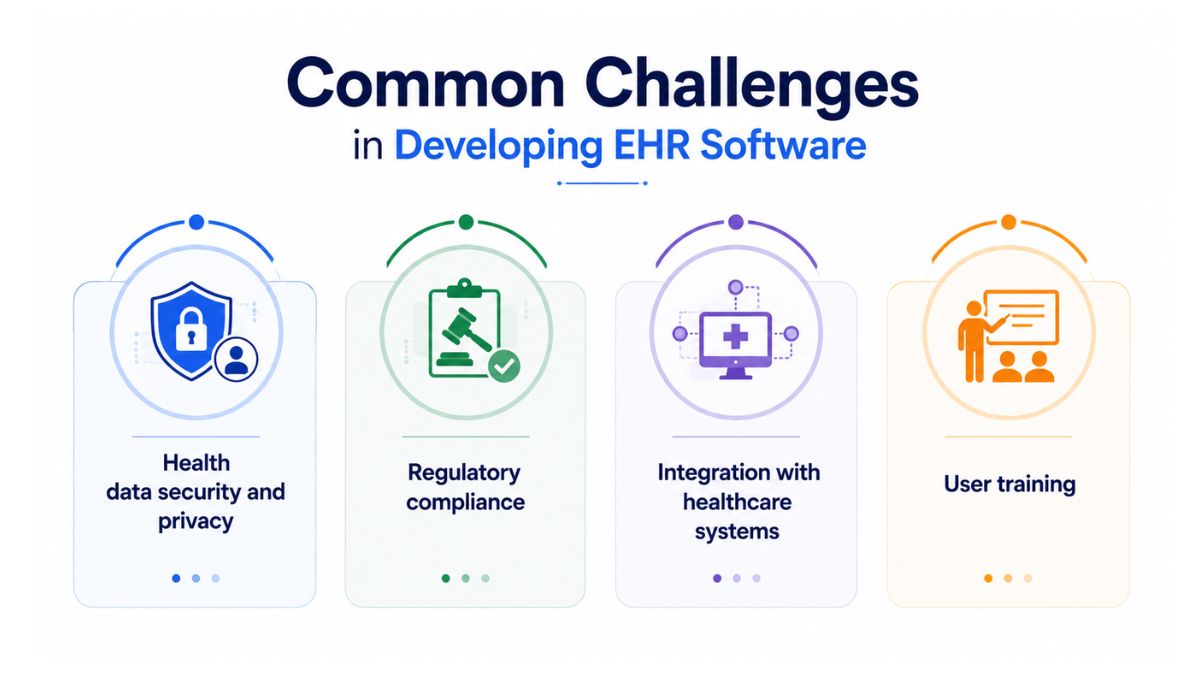
1. Health data security and privacy
EHR systems handle sensitive medical information, so protecting patient data from unauthorized access, data leakage, and hacking attempts is a major concern. The system also needs to withstand cyber threats such as phishing, malware, and denial-of-service attacks.
How to overcome it: Apply strong data protection practices throughout development and use secure methods for storing, processing, and exchanging healthcare information.
2. Regulatory compliance
EHR and EMR software may need to comply with healthcare and privacy regulations such as HIPAA in the U.S., GDPR in the EU, PIPEDA in Canada, CCPA in California, and HITECH in the U.S. Failure to meet applicable requirements can expose organizations to legal penalties and patient privacy risks.
How to overcome it: Work with a development team that understands the regulations applicable to the target market. Compliance practices should include appropriate data processing controls, regular compliance audits, and continued attention to regulatory changes.
3. Integration with healthcare systems
An EHR often needs to exchange information with other medical systems, including Laboratory Information Systems and prescription management platforms. These integrations must support secure and reliable data exchange between different healthcare applications and organizations.
How to overcome it: Use interoperability standards such as HL7 and FHIR together with standardized data formats. Secure data exchange methods should also be applied to protect data integrity and confidentiality between connected systems.
4. User training
Even a properly developed EHR can be difficult to use effectively if physicians, nurses, and other healthcare staff are not familiar with its workflows. Users need the skills to work with the software efficiently during everyday clinical activities.
How to overcome it: Prepare structured training that covers system navigation, data entry, patient information retrieval, and clinical documentation. Training should give staff the practical knowledge required to use the EHR as part of their regular workflows.
Custom EHR Development vs Off-the-Shelf Solutions
Once the required EHR features are defined, the next decision is whether to build them into a custom system or rely on an existing product. The right approach depends largely on workflow uniqueness, integration needs, implementation speed, and how much long-term flexibility the organization requires.
|
Option |
Best for | Strengths |
Risks |
| Off-the-shelf EHR/EMR | Organizations with standard workflows that need faster implementation | Established feature set, vendor support, and in some cases certification-ready capabilities | Limited customization, ongoing licensing fees, integration constraints, and dependence on the vendor’s product roadmap |
| Custom EHR development | Organizations with unique clinical workflows or differentiation requirements | Full product control, tailored user experience, and more flexible integrations | Longer implementation timelines, higher implementation risk, and responsibility for compliance, security, and ongoing operating costs |
| Hybrid approach | Mid-to-large organizations that need a standard core system plus tailored functionality | Combines a purchased EHR core with custom modules such as patient portals, analytics, or specialty workflows | Requires strong integration architecture and governance to prevent disconnected user experiences across systems |
When does custom EHR development make sense?
Custom EHR development is more suitable when standard software cannot adequately match the organization’s clinical or operational requirements. Typical situations include:
- Specialized clinical workflows: Custom software can accommodate workflows such as oncology protocols or complicated multidisciplinary care pathways.
- Differentiation requirements: Organizations with proprietary care models or distinct patient experiences may need functionality that standard products do not provide.
- Integration complexity: A custom approach can offer more flexibility when the EHR must work with numerous legacy systems and organization-specific processes.
- Long-term operational flexibility: Building a custom EHR may be appropriate when flexibility over a longer period is more important than achieving the fastest possible launch.
A hybrid approach provides another option when neither a fully packaged nor fully custom system fits the requirement. Organizations can purchase the core EHR while developing selected modules around patient engagement, analytics, or specialty workflows, provided the systems are governed and integrated as a coherent environment.
Future Trends in EHR Software Development
The trends below show where EHR capabilities are heading and what healthcare teams may need to prepare for.
1. Artificial intelligence and machine learning
AI and machine learning are becoming more integrated into EHR workflows, especially for documentation, coding support, clinical decision support, and predictive analytics. Ambient listening tools can capture provider-patient conversations and convert them into structured notes, while machine learning models can identify patterns such as complication risk, delayed care, or treatment of noncompliance.
How your team can adapt
- Involve clinicians early in AI pilot programs to build trust in new workflows.
- Create clear training plans for providers and staff.
- Position AI as an assistant for repetitive work rather than a replacement for clinical judgment.
2. Cloud-based EHR solutions
Cloud-based EHR platforms are becoming more common as healthcare organizations look for greater accessibility and easier expansion. They can provide secure access from different devices and locations while reducing dependence on on-site servers, hardware maintenance, and manual software updates.
How your team can adapt
- Assess current infrastructure and data migration requirements before moving to the cloud.
- Select a vendor that can manage hosting, updates, and security compliance under one contract.
- Train staff on secure cloud access, including login procedures and connection requirements.
3. Patient engagement and portals
Patient portals are becoming a broader part of the digital patient experience. When connected with the EHR, they can allow patients to review treatment plans, request refills, complete forms, pay bills, schedule appointments, and communicate securely with providers.
How your team can adapt
- Train staff so they can explain portal functions and assist patients with enrollment and use.
- Track portal metrics such as logins, message volume, and payment rates.
- Use automation for follow-ups and reminders where appropriate.
4. Enhanced analytics and data-driven insights
EHR analytics are shifting from basic reporting toward more predictive use of clinical, operational, and financial data. Practices can use analytics to monitor performance indicators, identify revenue leakage, compare provider productivity, and forecast scheduling needs before issues become more visible.
How your team can adapt
- Start with a limited set of dashboards, such as provider productivity or claim denials.
- Train staff to interpret data and use it in operational decisions.
- Assign a data owner or “data champion” to maintain and communicate important metrics.
How Newwave Solutions Supports EHR Software Development
Newwave Solutions provides end-to-end EHR software development services for hospitals, clinics, medical startups, and other healthcare organizations. With 15+ years of hands-on experience in software engineering, we’ve built secure and interoperable EHR systems that improve patient management, data accessibility, and coordination across clinical workflows.
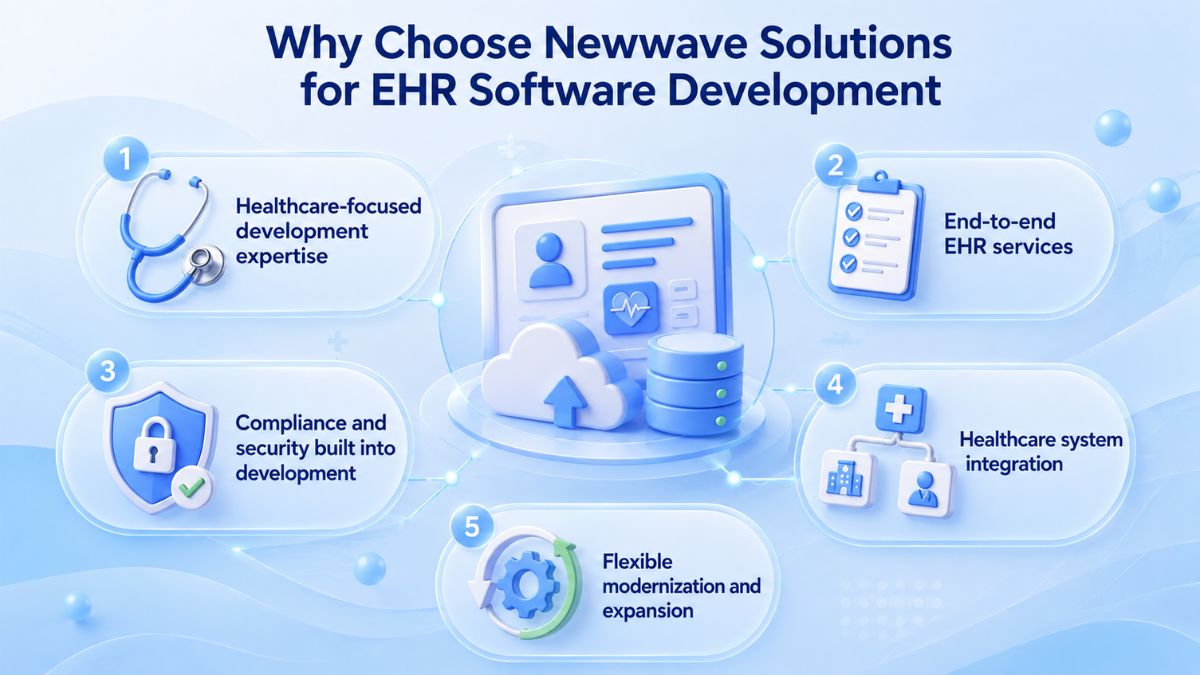
By choosing Newwave Solutions for EHR software development, you can benefit from:
- Healthcare-focused development expertise: Experience across medical software and EMR solutions supports EHR projects where data accuracy, reliability, security, and interoperability are core requirements.
- End-to-end EHR services: Access development, implementation, customization, migration, integration, analytics, maintenance, updates, and staff training within one delivery scope.
- Compliance and security built into development: EHR solutions are designed around standards and requirements including HIPAA, HL7, FHIR, and GDPR, with controls such as encryption, secure APIs, two-factor authentication, role-based access, and audit logs.
- Healthcare system integration: Our EHR software can be connected with EMR, CRM, Laboratory Information Systems, billing tools, and other systems to bring healthcare data into a more connected environment.
- Flexible modernization and expansion: Newwave Solutions supports legacy EHR modernization, cloud migration, historical data migration, ongoing upgrades, and feature expansion as requirements change.
Contact Newwave Solutions to discuss your requirements and define the right development approach for your project.
Conclusion
The right EHR strategy starts with fit. A strong EHR software development plan should reflect how clinicians work, how patient data moves across systems, and which compliance and security requirements apply. It should also balance customization needs against implementation time, cost, and long-term maintenance.
Before moving forward, compare custom, ready-made, and hybrid options against your actual workflows and integration demands. Newwave Solutions can support that evaluation and help translate those requirements into a secure, interoperable EHR solution, whether you are developing a new system, extending an existing one, or modernizing legacy software.
FAQs
1. How long does it take to develop an EHR system?
A custom EHR can take roughly 4–6 months for a basic MVP and 12–24 months for an enterprise-grade system. The timeline depends on feature scope, clinical workflow complexity, integrations, compliance requirements, data migration, and testing.
2. What are some of the top examples of EHR software?
Commonly used EHR vendors include Epic, Oracle Health (Cerner), MEDITECH, athenahealth, Veradigm, and Altera Digital Health. The right option depends on the organization’s size, workflows, integration needs, and deployment requirements.
3. What are common functions of EHR systems?
Some common EHR functions include centralized patient records, clinical documentation, prescription management, appointment scheduling, billing and claims processing, and health information exchange. These functions help healthcare teams manage patient information and connect clinical and administrative workflows in one system.
4. What technologies are commonly used in EHR software development?
Common technologies include React.js, Angular, or Vue.js for frontend development; Node.js, Django, or Ruby on Rails for backend development; and databases such as PostgreSQL, MongoDB, and MySQL. EHR integrations may also use HL7, FHIR, and RESTful APIs, while cloud infrastructure can run on AWS, Microsoft Azure, or Google Cloud.
5. How does EHR software work?
EHR software stores patient health information in a centralized digital record that authorized healthcare professionals can access and update. It can also exchange information with connected systems such as laboratories, pharmacies, imaging platforms, and other healthcare applications through interoperability standards such as HL7 and FHIR.
Source:
Office of the National Coordinator for Health Information Technology. (n.d.). Benefits of EHRs. HealthIT.gov. https://healthit.gov/health-it-basics/benefits-ehrs/
Centers for Disease Control and Prevention. (n.d.). NEHRS results and publications. National Center for Health Statistics. https://www.cdc.gov/nchs/nehrs/results/index.html
Agency for Healthcare Research and Quality. (n.d.). Primary care practice facilitation curriculum module 26: An introduction to electronic health records and meaningful use.
To Quang Duy is the CEO of Newwave Solutions, a leading Vietnamese software company. He is recognized as a standout technology consultant. Connect with him on LinkedIn and Twitter.



Read More Guides


Get stories in your inbox twice a month.
Let’s Build Something Extraordinary
Sign up for a 30 min no-obligation strategic session with us. Transform your Ideas into scalable reality.
Leave a Reply