


What Is VMware? Benefits, Use Cases & Core Services
Virtualization has become the backbone of modern IT, and understanding what is VMware is essential for any enterprise aiming to optimize its infrastructure. VMware delivers technologies like vSphere, vSAN, and NSX that allow businesses to consolidate servers, scale efficiently, and strengthen security. In this guide, we will break down VMware’s core technologies, benefits, and real-world use cases to show how they shape enterprise IT today.
What is VMware, and what does it do?
VMware is a leading provider of virtualization and cloud infrastructure technologies that allow businesses to run multiple virtual machines (VMs) on a single physical server. Its core features include hypervisors like ESXi, virtualization management with vSphere, and advanced tools for storage, networking, and desktop virtualization, such as vSAN, NSX, and Horizon.
In practice, VMware enables enterprises to reduce hardware costs, improve server utilization, scale applications easily, and secure workloads through isolation—all while preparing IT environments for hybrid and multi-cloud strategies.
Example: Dell Technologies leverages VMware’s vSphere and vSAN technology to optimize its global data centers. By virtualizing thousands of servers and consolidating workloads, Dell reduced infrastructure costs significantly while achieving higher performance and agility. This implementation allowed the company to scale operations quickly, improve disaster recovery readiness, and deliver better services to clients worldwide.
What is VMware used for?
Below are some of the main features to answer the question about “What does VMware do?”:
- Server Virtualization – VMware enables multiple operating systems and applications to run on a single physical server, reducing hardware needs and maximizing efficiency.
- Data Center Consolidation – Enterprises use VMware to consolidate physical infrastructure, cutting down space, power, and maintenance requirements.
- Cloud Integration – VMware supports hybrid and multi-cloud environments, making it easier to move workloads between on-premises systems and public clouds.
- Storage Virtualization – With VMware vSAN, businesses pool and manage storage resources more efficiently for scalability and high availability.
- Network Virtualization – VMware NSX allows enterprises to create secure, software-defined networks independent of physical hardware.
- Disaster Recovery and Business Continuity – VMware provides replication, failover, and high availability features that safeguard critical systems against outages.
- Remote Work Enablement – With VMware Horizon, organizations deliver secure virtual desktops and applications to employees across locations.
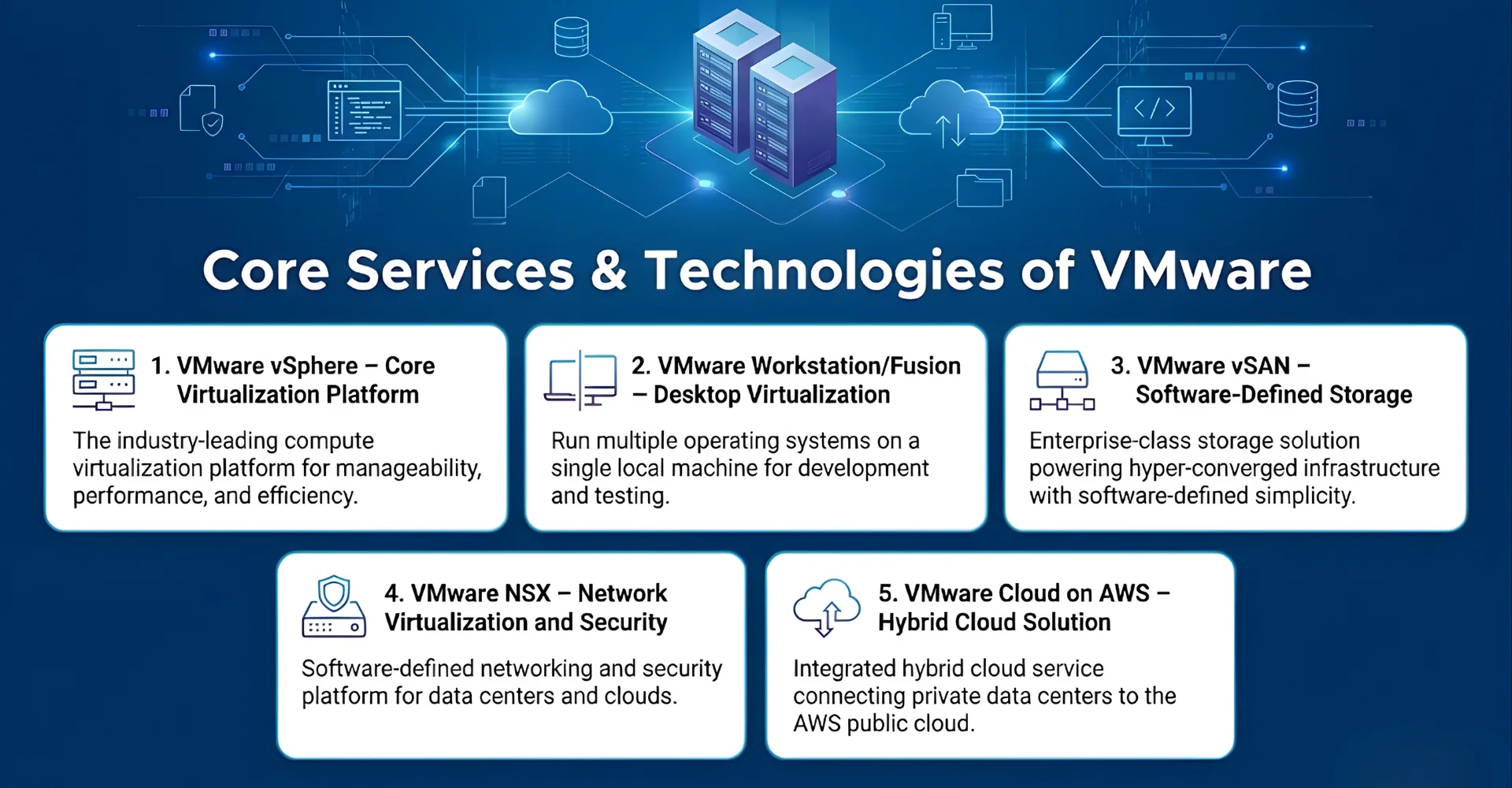
5 Core Services & Technologies of VMware
VMware delivers several essential technologies that help enterprises, IT teams, and developers build flexible, secure, and efficient digital infrastructures. From virtualization and storage to networking and hybrid cloud, VMware’s solutions are designed to reduce costs, enhance scalability, and simplify IT management. Let’s look at the 5 key services that make VMware a leader in enterprise technology.
1. VMware vSphere – Core Virtualization Platform
VMware vSphere is the company’s flagship server virtualization suite that uses the ESXi hypervisor to run multiple virtual machines on a single physical server. Its key functions include resource allocation, workload management, and built-in high availability to minimize downtime. The benefits of this technology are clear: reduced hardware costs, improved server utilization, and better disaster recovery.
For example, large enterprises often use vSphere to consolidate hundreds of physical servers into a few virtualized hosts, cutting energy and maintenance expenses significantly.
2. VMware Workstation/Fusion – Desktop Virtualization
VMware Workstation (for Windows/Linux) and VMware Fusion (for macOS) are desktop virtualization tools that let users run multiple operating systems on a single machine. Developers and QA teams often use these platforms to test applications across different environments without needing separate hardware. The main benefits include flexibility, cost savings, and faster testing cycles.
For instance, a software developer can run both Linux and Windows environments on one laptop to ensure cross-platform compatibility of their application.
3. VMware vSAN – Software-Defined Storage
VMware vSAN is a storage virtualization solution that pools local or direct-attached storage devices across a cluster of servers to create a shared storage resource. Its key functions include automated provisioning, scalability, and high availability. The benefit is that businesses no longer need expensive external storage systems; instead, they use existing hardware more efficiently.
Retailers, for example, rely on vSAN to support e-commerce platforms by ensuring that transaction data is always available, even during hardware failures.
4. VMware NSX – Network Virtualization and Security
VMware NSX provides network virtualization by decoupling network functions from physical hardware. Its key functions include micro-segmentation, software-defined firewalls, and policy-driven automation. The main benefits are enhanced security, faster network provisioning, and reduced dependence on costly hardware.
Financial institutions often use NSX to create isolated, secure environments for sensitive transactions, protecting data from cyber threats while meeting regulatory compliance requirements.
5. VMware Cloud on AWS – Hybrid Cloud Solution
VMware Cloud on AWS is a hybrid cloud service that extends on-premises VMware environments to Amazon Web Services. Its core functions include seamless workload migration, disaster recovery, and hybrid application deployment. The benefit lies in flexibility—enterprises can keep critical workloads on-premises while scaling others into the cloud as needed.
For example, global enterprises use VMware Cloud on AWS to handle seasonal demand spikes, ensuring smooth performance without investing in new physical infrastructure.
7 Key Benefits of VMware Technologies
When asking what is VMware, the answer extends beyond virtualization—it is a set of technologies that empowers businesses to optimize IT, cut costs, and scale operations. Companies across industries can take advantage of VMware’s capabilities to achieve efficiency, security, and flexibility in their digital transformation journeys.
Let’s explore the detailed benefits that B2B can achieve when applying VMware technologies to their business:
- Cost Efficiency – VMware reduces the need for multiple physical servers by consolidating workloads, which lowers hardware and energy expenses.
- Scalability and Flexibility – Businesses can easily allocate or remove resources as demand changes, ensuring agility for growth.
- Business Continuity – VMware provides built-in backup, replication, and failover, minimizing downtime during outages or disasters.
- Enhanced Security – With workload isolation and tools like NSX for micro-segmentation, VMware improves defense against cyber threats.
- Multi-Cloud Readiness – VMware Cloud enables seamless workload migration across AWS, Azure, and Google Cloud, supporting hybrid strategies.
- Operational Efficiency – Centralized management tools like vCenter simplify administration and reduce IT complexity.
- Support for Remote Work – VMware Horizon delivers secure virtual desktops and apps, empowering businesses to support distributed teams effectively.
4 Use Cases of VMware across Industries
1. Enterprise IT & Data Centers
VMware technologies like vSphere and vSAN are widely used in enterprise IT and data centers to virtualize servers, optimize resource allocation, and reduce hardware footprints. By consolidating workloads, enterprises achieve cost savings, improved uptime, and easier disaster recovery. NSX further strengthens data center security by enabling micro-segmentation and automated network policies.
Example: AT&T adopted VMware’s virtualization stack, including vSphere and NSX, to modernize its data centers. This move improved efficiency, reduced operational costs, and enabled faster service delivery to customers while meeting stringent security requirements.
2. Software Development & Testing
Developers and QA teams rely on VMware Workstation and Fusion to run multiple operating systems on a single machine, making it easier to test cross-platform applications. With vSphere, teams can spin up test environments quickly and scale them as needed, shortening development cycles. These technologies enable faster innovation while reducing the cost of maintaining separate hardware setups.
Example: Adobe leverages VMware’s virtualization tools to support software development and testing environments across different platforms. This strategy helped them accelerate release cycles, ensure compatibility, and streamline testing processes worldwide.
3. Healthcare
In the healthcare/ healthcare software development sector, VMware solutions like vSAN and Horizon support secure patient data storage and enable remote access to critical applications. NSX ensures compliance by isolating sensitive workloads and protecting patient records against cyber threats. These technologies enhance operational efficiency while maintaining data privacy and HIPAA compliance.
Example: Mayo Clinic uses VMware’s vSAN and Horizon solutions to manage large volumes of patient data and provide doctors with secure access to applications. This implementation improved data availability, reduced downtime, and enhanced overall patient care delivery.
4. Education & Training
Educational institutions use VMware Horizon to deliver virtual desktops and labs to students, enabling remote and hybrid learning environments. Meanwhile, vSphere allows IT teams to run multiple virtual servers for learning management systems, reducing infrastructure costs. This combination makes education more accessible, scalable, and cost-effective.
Example: University of Pisa implemented VMware Horizon to provide students with remote access to lab environments and learning resources. As a result, the university reduced hardware costs, improved student engagement, and ensured continuity in education even during remote learning transitions.
How to use VMware from scratch
For many businesses and individuals, the biggest challenge with VMware is simply knowing where to start. The variety of products and features can feel overwhelming, especially if you’re unfamiliar with virtualization. From years of experience, I’ve put together a straightforward, step-by-step guide to help you get started smoothly—including how to download VMware and how to install VMware tools for full functionality.
- Step 1: Identify Your Needs – First, determine whether you require desktop virtualization, server virtualization, or cloud-based solutions. For example, developers may prefer VMware Workstation, while enterprises often start with vSphere and ESXi for data centers. This step ensures you choose the right solution tailored to your use case.
- Step 2: Choose the Right VMware Product – Once your needs are clear, explore VMware’s official site and select the appropriate product, such as VMware Workstation, Fusion, or ESXi. Each product page provides licensing details and download links to guide you. Making the right choice early prevents unnecessary costs and technical challenges.
- Step 3: Download and Install VMware Software – Go to VMware’s website, select your chosen product, and proceed with the installer to complete setup on your machine or server. During installation, you may also need to install VMware tools, which enhance performance, enable better graphics, and allow smoother integration between host and guest systems. At the end of this step, you’ll have a fully functional VMware environment ready to configure.
- Step 4: Configure Virtual Machines (VMs) – Create your first virtual machine by allocating CPU, RAM, storage, and installing an operating system of your choice. VMware’s interface provides templates and wizards to make this process user-friendly. Once configured, your VM will run just like a physical computer, isolated from other workloads.
- Step 5: Scale and Manage Your Environment – For enterprises, VMware vCenter is the tool of choice to manage multiple virtual machines and servers at scale. It allows centralized control, performance monitoring, and automation for larger IT environments. By this stage, you’ll have a scalable, efficient virtualization setup that can expand as your business grows.
5 Common Challenges of VMware Technologies
While VMware delivers powerful solutions for virtualization, storage, networking, and cloud integration, users and businesses may encounter obstacles that affect performance and cost. To ensure smooth adoption and efficient usage, it is important to understand the main challenges and know how to address them effectively.
- Licensing and Cost Complexity: VMware’s licensing model can be difficult to understand and may increase expenses for large-scale deployments. This often leads to budget overruns in enterprise IT projects.
>>> Solution: Conduct a detailed cost analysis beforehand, use VMware’s pricing calculators, and consider subscription-based models to align costs with actual usage.
- Management Complexity: Managing multiple VMware products, such as vSphere, vSAN, and NSX, can become overwhelming for IT teams. The complexity may slow down operations and increase training needs.
>>> Solution: Invest in VMware management tools like vCenter, provide staff training, and automate common workflows where possible.
- Performance Overhead: If not properly configured, virtualization can introduce performance overhead compared to bare-metal servers. This impacts application speed and responsiveness.
>>> Solution: Optimize hardware allocation, regularly monitor VM performance, and apply VMware’s best practices for resource management.
- Skills Gap in IT Teams: VMware technologies require specialized knowledge that many organizations lack internally. Without expertise, deployments may face errors or inefficiencies.
>>> Solution: Upskill in-house IT staff through VMware certifications or partner with experienced service providers for setup and maintenance.
- Integration with Legacy Systems: Migrating older infrastructure to VMware-based environments can be complex and time-consuming. Poor integration can lead to downtime or compatibility issues.
>>> Solution: Start with pilot projects, use VMware migration tools, and gradually phase in VMware technologies while maintaining business continuity.
Partner with Newwave Solutions for VMware implementation
If your enterprise aims to adopt VMware’s virtualization solutions but lacks the necessary experience or internal resources, Newwave Solutions stands ready to provide comprehensive assistance throughout the entire process.
With over 14 years of delivering IT outsourcing services to clients worldwide, more than 800 successful IT projects under our belt, and a team of 300+ highly skilled developers, designers, testers, and other specialists, we offer full-cycle support to seamlessly integrate VMware products into your business systems for optimal performance.
Beyond just installation and VMware deployment, Newwave Solutions also delivers high-quality IT outsourcing services such as custom software development services, mobile app development solutions, UI/UX design services, and QA testing support tailored to your needs. Whichever IT solution you require, we have it covered right here.
FAQs
1. What is VMware virtualization used for?
VMware virtualization is used to run multiple virtual machines (VMs) on a single physical server or computer. This reduces hardware costs, improves resource utilization, and makes IT environments more flexible and easier to manage.
2. Is VMware only for large enterprises?
No, VMware is not limited to large enterprises. While it is widely used in big data centers, VMware also offers solutions like Workstation and Fusion for developers, small businesses, and even individuals who need cost-effective virtualization.
3. How to install VMware?
You can install VMware by first downloading the right product (Workstation, Fusion, or ESXi) from the VMware website. After running the installer, you can also install VMware Tools, which improves VM performance and integration with the host system.
4. How does VMware improve security?
VMware enhances security through workload isolation, meaning each VM is separated from others, reducing the risk of system-wide breaches. Tools like VMware NSX add advanced features such as micro-segmentation and software-defined firewalls to protect data and applications.
5. Can VMware integrate with cloud providers?
Yes, VMware integrates with major cloud providers like AWS, Microsoft Azure, and Google Cloud through VMware Cloud solutions. This allows enterprises to run hybrid or multi-cloud environments where workloads can move seamlessly between on-premises systems and the public cloud.
6. How do I use VMware?
To use VMware, start by identifying your needs (desktop, server, or cloud virtualization) and selecting the right product. After installation, configure your virtual machines, allocate resources, and manage them with tools like vCenter for enterprise setups. For beginners, VMware Workstation or Fusion is the easiest entry point.
Conclusion
In summary, what is VMware can be answered by looking at its role as a technology leader in virtualization, storage, networking, and cloud solutions. From vSphere to NSX, VMware provides enterprises with the tools to scale, secure, and modernize their IT operations.
Don’t forget to contact Newwave Solutions for smooth VMware service integration into your business operating system!
To Quang Duy is the CEO of Newwave Solutions, a leading Vietnamese software company. He is recognized as a standout technology consultant. Connect with him on LinkedIn and Twitter.



Read More Guides



Get stories in your inbox twice a month.
Let’s Connect
Let us know what you need, and out professionals will collaborate with you to find a solution that enables growth.
Leave a Reply