


What is Ionic Framework? Open-Source UI for Hybrid & Cross-Platform Apps
As cross-platform app development becomes a priority for businesses, open-source solutions are playing a central role in reducing costs and speeding up delivery. The Ionic framework is one such toolkit that uses web technologies like HTML, CSS, and JavaScript to help companies build apps for multiple platforms with a single codebase. This Newwave Solutions’ article explores what is Ionic framework, its features, and how it can support businesses in creating and maintaining efficient, scalable mobile applications.
What Is Ionic Framework?
Ionic is an open-source UI toolkit designed to build cross-platform applications using familiar web technologies such as HTML, CSS, and JavaScript. It allows businesses to create mobile, web, and desktop apps from a single codebase, cutting down on development time and costs. With flexible options that suit different business sizes and project scopes, the Ionic framework pricing makes it an accessible choice for startups, SMEs, and enterprises seeking to scale efficiently.

Examples: A well-known example is MarketWatch, which rebuilt its mobile app with Ionic to deliver real-time financial news and market data across iOS and Android. This move helped them maintain a single codebase, speed up release cycles, and achieve a consistent user experience across platforms.
How does the Ionic Framework function?
The Ionic framework works by combining standard web technologies with modern frontend libraries and native integration tools to deliver cross-platform apps.
- Web technologies (HTML, CSS, JavaScript): Serve as the foundation for creating user interfaces and app logic.
- Integration with Angular, React, and Vue: Enables developers to build with their preferred frontend ecosystem.
- Capacitor for native device functionality: Provides access to device hardware like camera, GPS, and payment systems.
- Single codebase deployment: Allows apps to run seamlessly across iOS, Android, web, and desktop without rebuilding from scratch.
What is Ionic framework used for?
- Cross-platform mobile apps: Ionic enables enterprises to deliver native-like experiences on iOS and Android using just one codebase.
- Enterprise dashboards: Companies can build responsive dashboards and internal tools with real-time data visualization for better decision-making.
- Progressive Web Apps (PWAs): Organizations can reach users directly in browsers with app-like speed, performance, and offline support.
- IoT control apps: Businesses can create mobile-first apps to monitor, control, and manage IoT-enabled devices effectively.
- E-commerce apps: Ionic allows the development of scalable shopping platforms with integrated payment gateways and secure checkout flows.
6 Key Features of the Ionic Framework
Building mobile apps across platforms can be time-consuming without the right tools. The key features of the Ionic Framework streamline development with reusable components, native integrations, and strong ecosystem support. Let’s explore the detailed, crucial features of the framework below:
- Pre-built UI components for faster app development: The Ionic app framework offers an extensive library of ready-made UI elements, such as buttons, modals, forms, and navigation bars, which reduce design time and maintain consistency across platforms.
- Capacitor & Cordova plugins for native device integration: Developers can access device hardware like cameras, GPS, biometrics, and push notifications through plugins, making hybrid apps feel more like native apps.
- Cross-platform deployment from a single codebase: The Ionic mobile framework allows businesses to build once and deploy across iOS, Android, web, and even desktop, cutting down development and maintenance costs.
- Strong integration with Angular, React, and Vue ecosystems: Ionic works seamlessly with these frontend frameworks, enabling teams to continue using their preferred stacks without steep learning curves.
- Open-source with a large global community: Being open-source ensures continuous updates, free resources, and a collaborative ecosystem where developers share solutions and plugins.
- Enterprise support via Ionic’s paid offerings: Organizations can access advanced security, dedicated support, and cloud services like Appflow for streamlined CI/CD pipelines.
Pros & Cons of Ionic
No framework is perfect, and businesses often weigh speed against performance. Exploring the pros and cons of the Ionic Framework below helps you decide if it’s the right choice for your app strategy:
|
Pros |
Cons |
| Cost efficiency – Building with Ionic requires fewer resources since one codebase serves multiple platforms, lowering development costs. | Heavier apps than native – Ionic apps may be larger in size compared to fully native apps, which can affect storage-sensitive users. |
| Reduced time-to-market – Pre-built UI components and a single codebase help businesses launch apps faster than with separate native builds. | Performance trade-offs for complex 3D/AR apps – Apps with advanced 3D graphics or AR often run less smoothly compared to native implementations. |
| Native API integration – With Capacitor and Cordova, developers can access device hardware features directly, enabling near-native experiences. | Dependency on plugins – Heavy reliance on third-party plugins can create limitations if the plugin is outdated or not well-supported. |
| Strong UI toolkit – Ionic delivers pixel-perfect design across platforms, ensuring a consistent user experience. | |
| Scalability – Suitable for startups and enterprises alike, Ionic apps can scale easily from MVPs to enterprise-grade solutions. |
Verdict: Ionic is an excellent choice for businesses that need scalable, multi-device applications quickly and cost-effectively. However, organizations focused on high-performance gaming or advanced 3D/AR experiences may benefit more from fully native frameworks.
5 Common Use Cases of Ionic
From e-commerce to fintech, industries worldwide are adopting hybrid development for faster scaling. The most common use cases of the Ionic Framework below can reveal how organizations apply it to solve sector-specific challenges.
1. Retail & E-commerce
Ionic supports mobile storefronts and product catalog apps by enabling retailers to create cross-platform shopping experiences with smooth navigation and secure payments. Businesses using this type of ecommerce development service can benefit from faster rollouts and seamless syncing between online and in-store systems.
For example, Untappd, a social app for beer enthusiasts, used Ionic to deliver a hybrid app that works reliably across iOS and Android. The result was faster deployment cycles and wider user reach without duplicating development efforts.
2. Healthcare
Healthcare software development service providers use Ionic to develop patient-facing portals and appointment booking apps, combining HIPAA compliance with intuitive user interfaces. The framework helps integrate secure data exchange with responsive design for patient engagement.
For instance, Diesel Laptops (a diagnostics and healthcare-equipment-related platform) leveraged Ionic to simplify app development, enabling them to deliver tools that scale securely across different devices for patients and providers.
3. Logistics & Transportation
Fleet management and driver apps built with Ionic allow logistics companies to handle real-time updates, offline sync, and route optimization. Ionic’s cross-platform strength makes it cost-effective for equipping a distributed workforce.
A brand like Sworkit (while fitness-focused, its use case demonstrates Ionic’s offline sync and smooth hybrid model) shows how apps with continuous connectivity can thrive with Ionic. In logistics, similar offline-first capabilities ensure drivers can operate even without internet access.
4. Banking & Fintech
Financial institutions use Ionic to build secure mobile wallets, account management apps, and payment systems that work across devices. Its native plugin support ensures encryption and authentication features are handled safely.
For example, TD Ameritrade adopted hybrid technologies like Ionic to maintain cross-platform consistency, helping customers access trading platforms securely from mobile without compromising speed or user experience.
Discover quality Fintech software development solutions to build secure , convenient financial services for your corporation.
5. Startups & SaaS
Startups often turn to Ionic to build MVPs quickly and scale into full SaaS platforms without rebuilding the app. This reduces upfront costs and accelerates entry to market.
For instance, MarketWatch utilized Ionic to rebuild its financial news app, speeding up release cycles and enabling a smooth user experience across iOS and Android. This approach mirrors how SaaS startups scale quickly with minimal resources.
Ionic Framework vs Other Cross-Platform Frameworks (Flutter, React Native, Xamarin)
|
Criteria |
Ionic Framework | React Native |
Flutter |
| Cross-platform deployment | Uses a single web-based codebase that runs on iOS, Android, Web, and Desktop. | Targets mobile platforms with near-native performance. | Focuses on mobile and desktop with its own rendering engine. |
| UI customization | Offers pre-built UI components that resemble native styles. | Requires third-party libraries for advanced UI. | Provides full control of UI through its widget system. |
| Plugin ecosystem | Relies on Capacitor and Cordova plugins for native functionality. | Strong ecosystem with native modules. | Growing plugin ecosystem, but still smaller than React Native. |
| Web integration | Seamlessly integrates with existing web apps and PWAs. | Web support is limited and requires additional setup. | Web is supported, but performance may lag for heavy apps. |
| Development speed | Faster for teams familiar with web technologies like HTML, CSS, and JavaScript. | Moderate, requires knowledge of React and native APIs. | Slower due to Dart language adoption curve. |
| Enterprise support | Paid enterprise services are available from the Ionic team for support and security. | Backed by Meta with community and some enterprise adoption. | Backed by Google with growing enterprise adoption. |
| Maintenance effort | Simple updates through npm and Ionic CLI are good for long-term cost control. | Requires ongoing updates to match native platform changes. | Frequent updates from Google require teams to adapt quickly. |
- Ionic is the strongest option for enterprises needing fast deployment of hybrid apps across mobile, web, and desktop while keeping costs under control.
- React Native shines for projects where native performance and mobile focus are non-negotiable, especially in consumer-facing apps with heavy interaction.
- Flutter stands out for highly customized UI and visually rich experiences, making it a favorite for startups or design-intensive solutions.
Enterprises often combine these frameworks based on project needs, but Ionic remains an attractive choice for B2B organizations seeking speed, scalability, and unified development workflows.
How to Set Up & Use Ionic Framework
Many businesses struggle with the first steps of adopting a new framework like Ionic, especially when it involves cross-platform mobile apps. Based on years of implementation with enterprise clients, here is a simplified setup guide:
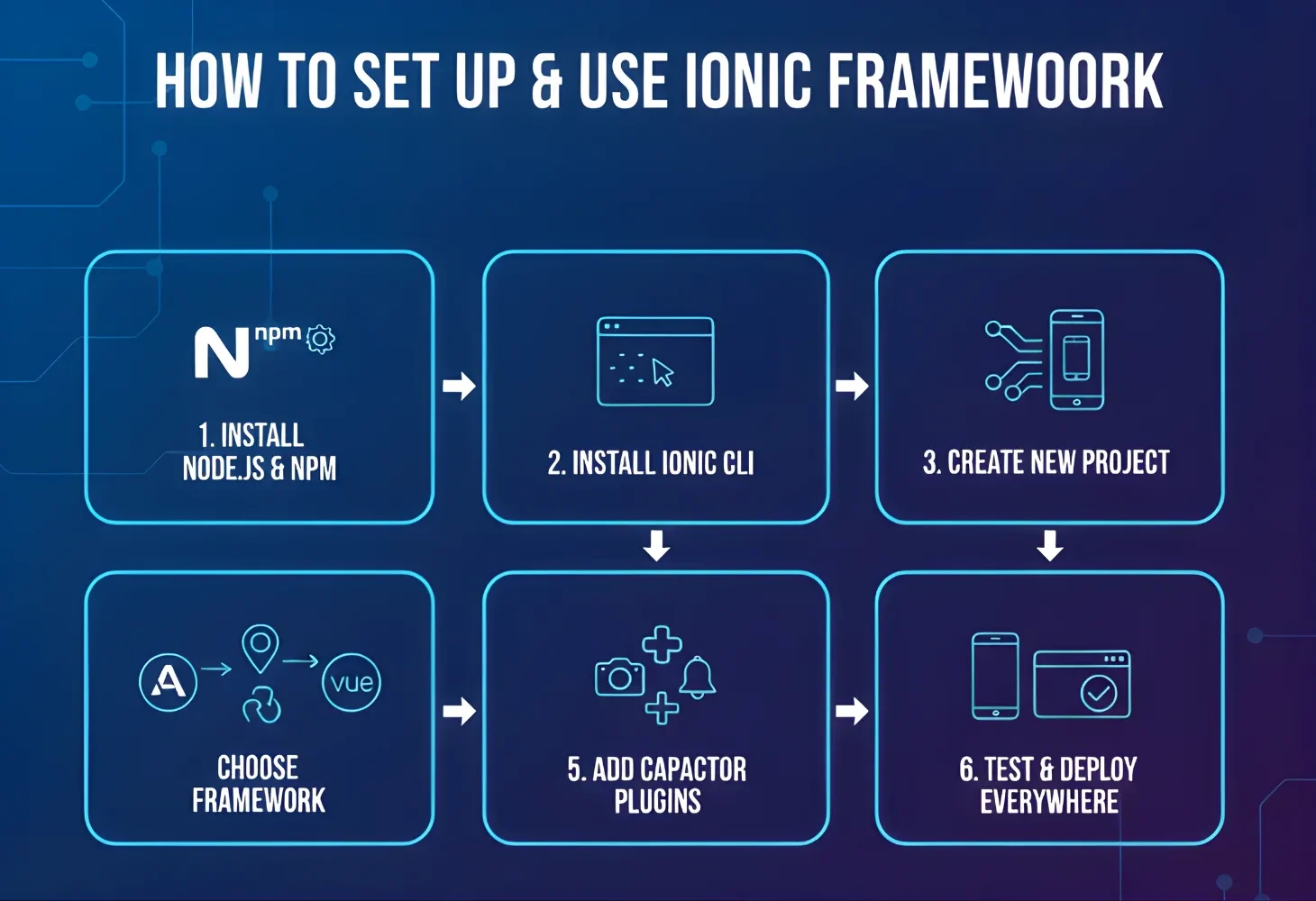
- Step 1: Install Node.js and npm on your system to provide the runtime and package management required for Ionic.
- Step 2: Install the Ionic CLI using npm so you can access Ionic’s development commands from your terminal.
- Step 3: Create a new Ionic project by running ionic start appname and selecting a starter template that fits your project’s needs.
- Step 4: Choose your preferred frontend framework, such as Angular, React, or Vue, to align with your team’s expertise.
- Step 5: Add Capacitor plugins for native functionality like camera access, GPS, notifications, or payment gateways.
- Step 6: Test your app on different devices using the Ionic DevApp or emulators, then deploy seamlessly across iOS, Android, and the Web.
This step-by-step flow shows how to set up the Ionic framework and demonstrates how to use the Ionic framework effectively for cross-platform projects.
Ionic’s Role in Digital Transformation
Enterprises are increasingly searching for ways to unify web and mobile strategies without duplicating effort. Ionic plays a pivotal role in digital transformation by enabling businesses to modernize legacy systems with hybrid apps, build cross-platform solutions with one codebase, and empower even smaller teams or citizen developers to deliver high-impact apps.
For example, Untappd, a social platform for beer enthusiasts, used Ionic to scale its hybrid app across iOS and Android while keeping its web-based foundation. This allowed the brand to accelerate delivery cycles, reduce development costs, and provide users with a consistent experience across platforms—clear evidence of how Ionic can drive real-world digital transformation.
FAQs
1. What is the Ionic framework?
The Ionic framework is an open-source UI toolkit that lets developers build cross-platform apps for iOS, Android, web, and desktop using web technologies like HTML, CSS, and JavaScript. It focuses on creating native-like experiences from a single codebase.
2. What is the Ionic framework table?
The Ionic framework table is a UI component that allows developers to display, organize, and manage tabular data within apps. It supports features like sorting, filtering, and pagination to improve user interaction.
3. Is Ionic free to use?
Yes, Ionic is free and open-source for core development. Enterprises can choose paid plans for advanced features, security, and official support.
4. Can Ionic apps match native app performance?
Ionic apps deliver near-native performance for most use cases, especially business and consumer apps. However, for graphics-heavy apps like 3D games, pure native frameworks may perform better.
5. Does Ionic support PWAs?
Yes, Ionic fully supports Progressive Web Apps (PWAs). Developers can build apps that run directly in browsers with offline support and app-like functionality.
6. Can Ionic be used for enterprise-grade apps?
Absolutely. Ionic provides enterprise support, native integrations, and scalable architecture, making it suitable for secure and large-scale business applications.
Conclusion
To answer what is Ionic framework, it is an open-source solution built to streamline cross-platform app development with a single codebase, offering flexibility, speed, and cost efficiency. To maximize its benefits, businesses should focus on pairing Ionic with the right architecture, integrations, and maintenance practices.
Don’t worry if you lack coding/ IT expertise to deploy the Ionic framework into your app development process, since Newwave Solutions can provide complete support from scratch through the professional UI UX design services. With 14+ years of IT field experience, 800+ successful projects, and 300+ expert developers, we guarantee the effective implementation of Ionic and other UI/ UX design toolkits into your business model.
Schedule us a meeting and together we can elevate your product experience!
To Quang Duy is the CEO of Newwave Solutions, a leading Vietnamese software company. He is recognized as a standout technology consultant. Connect with him on LinkedIn and Twitter.



Read More Guides
Get stories in your inbox twice a month.
Let’s Build Something Extraordinary
Sign up for a 30 min no-obligation strategic session with us. Transform your Ideas into scalable reality.
Leave a Reply