


Manual Rewrite vs Automated Migration: Optimal Choice for Legacy Systems?
Legacy systems that once supported stable business operations are now creating long-term risks as technology standards continue to evolve. This reality has pushed enterprises to evaluate manual rewrite vs automated migration as two primary approaches for modernizing aging platforms, each with its own advantages and compromises. Understanding how these methods differ will help your organization select the right migration strategy to upgrade legacy systems efficiently and safely.
Why Modernize Legacy Systems?
Legacy systems refer to outdated software platforms or applications that continue to run critical business operations but are built on obsolete technologies. In many enterprises today, these systems still handle accounting, inventory, sales, or internal workflows, even though they increasingly struggle with security risks, integration limitations, and maintenance challenges.
As business and technology requirements evolve, organizations are forced to consider migrating or upgrading legacy systems for several key reasons:
- Rising security and compliance risks due to unsupported platforms and missing security updates.
- Operational instability and downtime exposure when legacy systems run on modern infrastructure.
- Limited scalability and flexibility that slows business growth and digital initiatives.
- High maintenance costs and technical debt caused by complex, aging codebases.
- Integration barriers with modern APIs, cloud services, and enterprise platforms.
Because of these pressures, the migration strategy an organization chooses plays a decisive role in determining whether legacy modernization succeeds or fails.
What Is Manual Rewrite and Automated Migration?
First of all, let’s explore the basic concepts of both methods to understand the core functionality of each one:
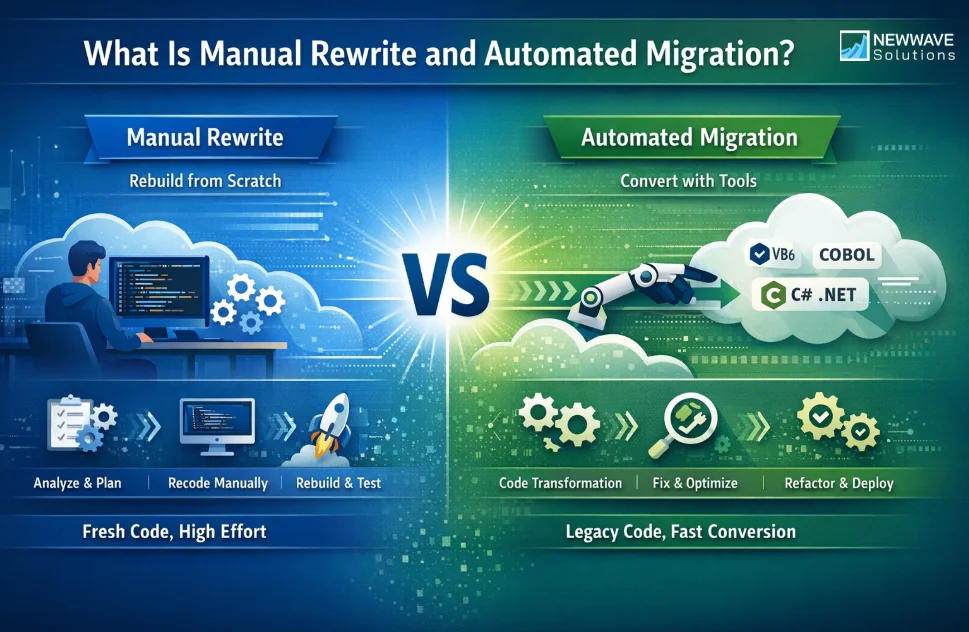
What Is Manual Rewrite?
Manual rewrite is an approach to legacy system modernization where the application is rebuilt from scratch on a new platform using fresh code. In this model, development teams analyze the existing system’s functionality and business logic, then reimplement those features manually using modern technologies.
The basic process of manual rewrite typically includes:
- System analysis and requirements discovery, where teams document existing features and hidden business rules.
- Architecture redesign, which defines a new system structure and technology stack.
- Code redevelopment, where all application logic is rewritten manually.
- Testing and validation, ensuring the new system behaves as expected compared to the legacy system.
- Deployment and stabilization, where issues are resolved after the new system goes live.
Pros & Cons of Manual Rewrite
Pros:
- Clean and modern system architecture without legacy constraints.
- Full control over technology stack and design decisions.
- Opportunity to remove outdated features and technical debt.
- Better alignment with long-term product vision.
- Easier adoption of modern frameworks and cloud-native patterns.
Cons:
- Very high development time and cost.
- Significant risk of losing or misinterpreting legacy business logic.
- Long delivery timelines that delay business value.
What Is Automated Migration?
Automated migration is an approach that converts legacy code into a modern platform using specialized tools instead of rewriting everything manually. These tools analyze existing code, transform it into a target language or framework, and assist teams in resolving compatibility issues.
Unlike basic Microsoft conversion utilities, modern automated migration solutions go beyond syntax translation by supporting logic preservation, error handling, and post-conversion refactoring, significantly reducing manual rewrite effort.
Pros & Cons of Automated Migration
Pros:
- Faster migration timelines compared to manual rewrite.
- Preservation of proven legacy business logic.
- Lower operational and project risk for critical systems.
- Reduced dependency on individual developer expertise.
- More predictable cost and delivery outcomes.
Cons:
- Output quality depends heavily on the migration tool used.
- Requires validation and review to ensure correctness.
- Limited flexibility for radical architectural redesign.
Manual Rewrite vs Automated Migration: Core Differences
Let’s explore the key differences between manual rewrite and automated migration and find out the ideal method for your upcoming migration:
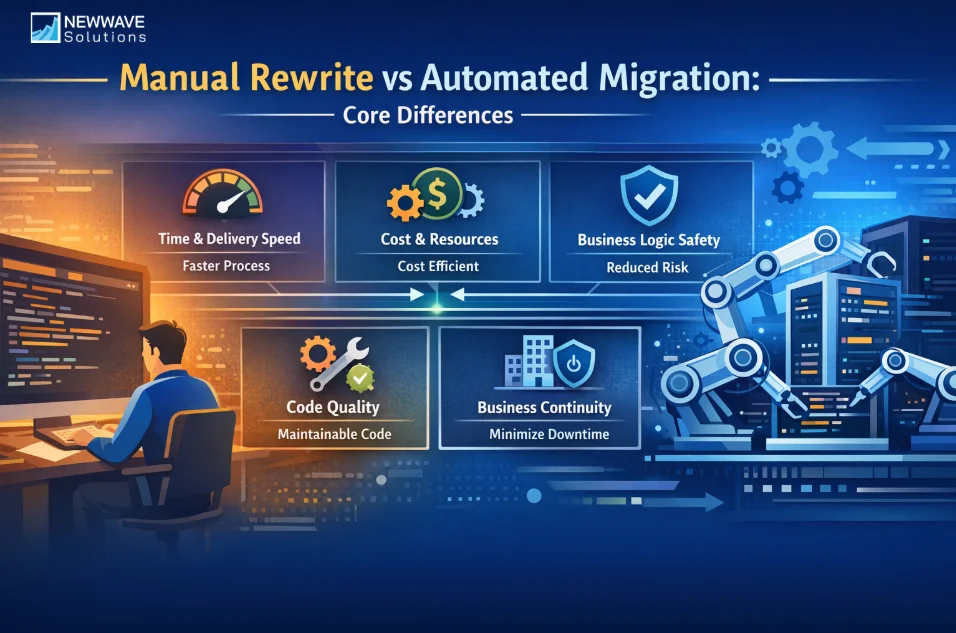
Time and Delivery Speed
With manual rewrite, development teams must analyze the entire legacy system, redesign the architecture, and rebuild all functionalities from scratch. This process often takes a long time, especially when hidden business rules or undocumented logic exist within the legacy codebase.
Automated migration significantly shortens delivery timelines by converting large portions of existing code and logic into the target platform. Engineers can focus on validation and improvement rather than rewriting every component manually.
>>>Verdict: Automated migration is generally the more time-efficient option, particularly for large or complex legacy systems.
Cost and Resource Requirements
Manual rewrite requires substantial engineering resources over an extended period, which can increase both development cost and opportunity cost. In many cases, projects also require senior engineers to deeply understand legacy logic, further increasing resource pressure.
Automated migration reduces overall effort by reusing existing logic and automating repetitive tasks. While tooling and validation still require investment, the total cost is often more predictable and manageable.
>>>Verdict: Automated migration typically offers better cost control and resource efficiency than manual rewrite.
Risk to Business Logic and Operations
Manual rewrite introduces a higher risk of misinterpreting or losing critical business logic during redevelopment. Even well-documented systems can suffer functional gaps when logic is rebuilt manually.
Automated migration preserves proven legacy logic by transforming existing code rather than reimplementing it. This approach helps reduce operational risk and minimizes disruption to business processes.
>>>Verdict: Automated migration is generally safer for systems with complex or business-critical logic.
Code Quality and Maintainability
Manual rewrite allows teams to redesign code with modern standards and clean architecture from the start. However, achieving high quality depends heavily on consistent design decisions and long-term discipline.
Automated migration produces an initial codebase based on existing logic, which can then be refactored and optimized using modern practices. While not a complete redesign, this approach balances continuity with maintainability.
>>>Verdict: Manual rewrite offers maximum architectural freedom, but automated migration provides a more practical balance for most enterprise systems.
Impact on Business Continuity
Manual rewrite projects often require long parallel runs or extended transition periods before the new system is ready. This can increase downtime risk and delay business benefits.
Automated migration supports incremental upgrades, allowing systems to be modernized in stages while remaining operational. This reduces disruption and helps maintain continuity.
>>>Verdict: Automated migration is better suited for organizations that need to minimize downtime and operational risk.
Manual Rewrite vs Automated Migration: When to use What?
After understanding the core differences between manual rewrite and automated migration, the right choice depends on factors such as system size, business complexity, and modernization goals. The following scenarios provide practical guidance on when each approach is more appropriate.
When to Use Manual Rewrite
- The system is relatively small with simple logic and limited business dependencies.
- The organization plans to completely redesign the product or system architecture.
- Legacy business logic does not need to be preserved.
- Long-term innovation is prioritized over short-term continuity.
- The business can tolerate longer timelines and higher upfront investment.
When to Use Automated Migration
- The system is large and contains complex, business-critical logic.
- The organization needs to reduce downtime and operational risk during migration.
- Business continuity is a top priority throughout modernization.
- The goal is to upgrade incrementally rather than rebuild everything at once.
- Engineering resources are limited, and efficiency is required.
Why Enterprises Are Shifting Toward AI-Assisted Automated Migration
In today’s environment, many enterprises are moving away from manual rewrite toward automated migration as a more practical modernization strategy. The following reasons explain why AI-assisted automated migration is becoming the preferred approach.
- Enterprises need faster modernization timelines without sacrificing system stability.
- Preserving proven business logic has become more important than full redevelopment.
- AI-assisted tools help reduce repetitive engineering effort and human error.
- Predictable cost and risk management are critical for large-scale systems.
- Incremental migration aligns better with ongoing business operations.
- Skilled legacy developers are becoming harder to secure for long-term projects.
How CodeShift VB Supports Automated VB6 to VB.NET Migration
If your organization chooses automated migration instead of manual rewrite, selecting the right migration solution becomes a critical success factor. You need a tool that not only performs automated conversion but also effectively supports developers throughout the migration lifecycle. While basic utilities such as Microsoft’s .NET Upgrade Assistant or third-party tools like VB Migration Partner and Gap Velocity AI offer conversion capabilities, CodeShift VB stands out as a more comprehensive and competitive solution in terms of quality, efficiency, and engineering support.
CodeShift VB is not simply a standalone conversion tool, but an AI-assisted solution designed to accelerate and improve VB6 to VB.NET migration projects. The platform continuously integrates modern AI and LLM technologies to assist engineers in auditing, validating, and refining migration outcomes in a structured and controlled manner.
Key Features of CodeShift VB
- Deep Understanding of Both VB6 and VB.NET: The LLM models integrated within CodeShift VB are trained on extensive source code and technical documentation datasets. Instead of merely translating syntax, the solution interprets code semantics and structural intent, enabling engineers to migrate systems with greater contextual awareness.
- Large-Scale and Complex Codebase Analysis: CodeShift VB supports analysis of large and complex VB6 projects, significantly reducing the manual effort required from engineering teams. The solution detects repetitive patterns, duplicated logic, and high-risk areas, allowing developers to prioritize validation and remediation effectively.
- Effective Compile Error Support and Refactoring Assistance: The AI-assisted components within CodeShift VB provide guided suggestions for resolving compile-time errors and recommend refactoring aligned with .NET best practices. This support enables engineers to identify root causes and apply corrections more efficiently compared to manual troubleshooting alone.
- Business Logic Interpretation and Explanation: A key differentiator of CodeShift VB is its ability to interpret complex legacy business logic and present it in clear, natural language explanations. This capability helps developers understand long-standing systems more quickly and ensures that validated business rules are preserved throughout migration.
- Parallel Documentation Generation During Migration: CodeShift VB generates technical documentation alongside the migration process, including module descriptions, functionality summaries, and VB6 to VB.NET mapping references. This documentation enhances long-term maintainability and reduces dependency on individual engineers after project completion.
Consider CodeShift VB to ensure your automated migration process runs smoothly while reducing engineering workload and supporting repetitive, time-consuming tasks in a structured and efficient manner.
Conclusion
Choosing between manual rewrite and automated migration ultimately depends on factors such as system size, business complexity, risk tolerance, available resources, and long-term modernization goals. While manual rewrite may suit small or fully redesigned systems, automated migration offers a more practical and lower-risk path for most enterprises operating large and business-critical VB6 applications.
For the majority of VB6 modernization initiatives, automated migration provides a balanced approach that preserves proven business logic while improving efficiency and reducing disruption.
If your organization is evaluating how to upgrade legacy systems safely and effectively, consider solutions such as CodeShift VB to help reduce migration risk and support your engineering team throughout the process. Approach Newwave Solutions to receive a detailed assessment of your current system and tailored guidance on the most appropriate modernization strategy for your business.
To Quang Duy is the CEO of Newwave Solutions, a leading Vietnamese software company. He is recognized as a standout technology consultant. Connect with him on LinkedIn and Twitter.



Read More Guides

Get stories in your inbox twice a month.
Let’s Build Something Extraordinary
Sign up for a 30 min no-obligation strategic session with us. Transform your Ideas into scalable reality.
Leave a Reply