


The 2026 Guide to Migrate VB6 to VB.NET: Proven Steps, Challenges, and Modern AI Tools
Migrate VB 6.0 to VB.NET is not a simple version upgrade. Since VB6 relies on COM architecture while VB.NET runs on the modern .NET ecosystem, the migration process requires code assessment, architecture refactoring, business logic preservation, testing, and deployment planning. For organizations that are navigating this migration journey, this article delivers end-to-end insights covering migration steps, common challenges, and effective tools to ensure a smooth and reliable transition.
Why Migrate from VB6 to .NET?
Thousands of enterprises still run VB6 applications that handle core operations such as accounting, inventory, sales, and manufacturing workflows. However, since VB6 is no longer an actively supported Microsoft platform, continued reliance on it creates growing exposure across security, talent availability, and long terms scalability. Therefore, the reasons below explain why the decision to migrate VB6 to VB.NET is more urgent than ever.
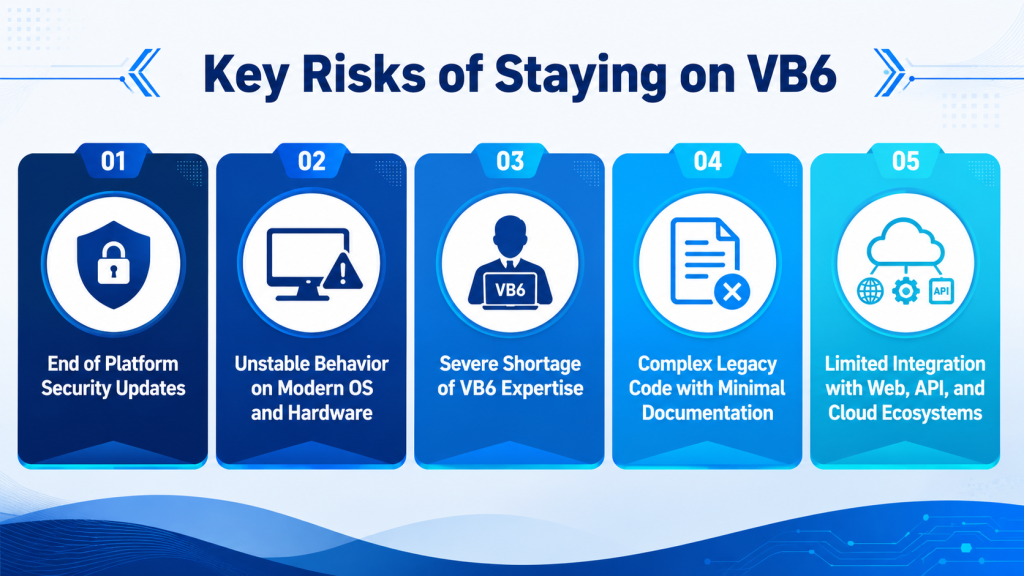
- End of platform security updates: VB6 no longer receives modern security hardening. This increases vulnerability and compliance risks, especially for systems handling financial or customer data.
- Unstable behavior on modern OS and hardware: VB6 applications may run unpredictably on newer Windows versions and architectures. This can increase downtime risk and weaken operational continuity.
- Severe shortage of VB6 expertise: The VB6 talent pool is shrinking, making maintenance harder and more expensive. One developer leaving can quickly create serious delivery and support risks.
- Complex legacy code with minimal documentation: VB6 systems often contain tightly coupled logic that is difficult to read, test, and modify. Poor documentation also slows troubleshooting and raises the risk of workflow disruption.
- Limited integration with web, API, and cloud ecosystems: VB6 was not built for modern APIs, cloud services, or digital platforms. As a result, integration becomes slower, riskier, and more costly.
Why choose VB.NET for this upgrade?
VB.NET is a modern evolution within the .NET ecosystem, and it is designed as a long-term replacement path for VB6 while supporting enterprise-grade development requirements. Therefore, many organizations choose VB.NET because it enables modernization without forcing businesses to abandon proven business logic.
- Microsoft-Supported Platform: Long-term stability with ongoing ecosystem support.
- Modern OS and 64-bit Compatibility: Reliable operation on current Windows environments.
- Improved Maintainability: Cleaner structure that simplifies updates and enhancements.
- Easier Integration Capability: Native support for APIs, web, and cloud services.
- Future-Ready Architecture: A solid foundation for ongoing modernization strategies.
- Preserved Business Logic: Retained workflows proven through years of operation.
Step-by-Step Guide to a Successful VB6 to .NET Migration
A reliable VB6 modernization effort typically follows a structured flow, moving from discovery and planning to conversion, remediation, and enterprise-grade validation. Therefore, the steps below provide a clear path to migrate VB6 to VB.NET with better control over risk, quality, and continuity.
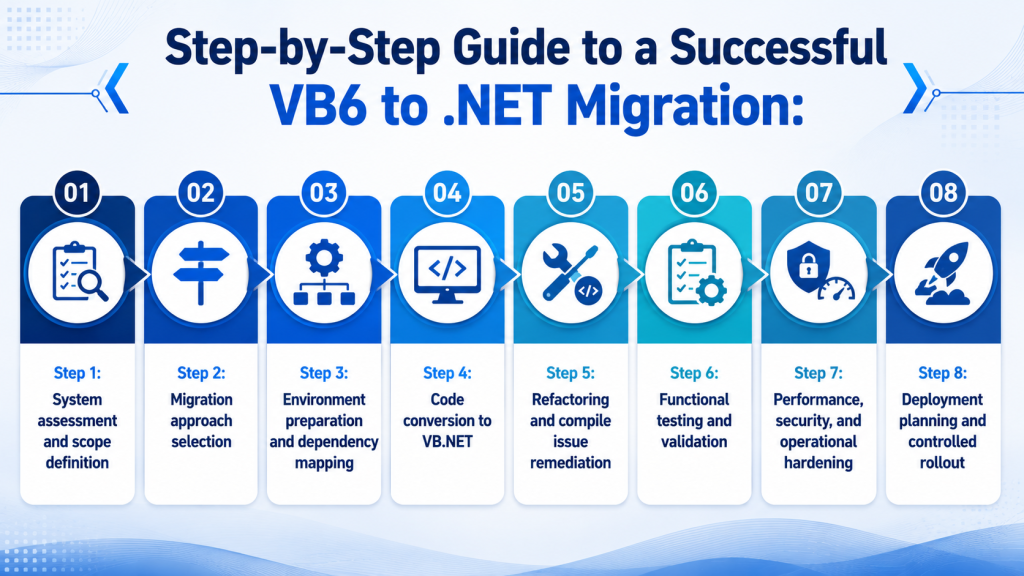
- Step 1: System assessment and scope definition – The migration process begins with a thorough assessment of the existing VB6 system, including modules, dependencies, and mission-critical workflows. At this stage, stakeholders define scope, risk tolerance, success metrics, and constraints to avoid unexpected disruption later in the project.
- Step 2: Migration approach selection – Once the system landscape is clear, technical leaders determine whether a manual rewrite, automated conversion, or hybrid approach is most appropriate. This decision depends heavily on ActiveX usage, Win32 API calls, third-party libraries, and the level of business logic preservation required.
- Step 3: Environment preparation and dependency mapping – Before any conversion takes place, teams prepare the target VB.NET environment, including build pipelines, version control, and testing frameworks. At the same time, external dependencies such as databases, COM components, and integration endpoints are carefully mapped to reduce downstream friction.
- Step 4: Code conversion to VB.NET – The VB6 codebase is then converted into VB.NET using a consistent and controlled conversion approach. By standardizing conversion patterns early, teams can minimize inconsistencies and accelerate later remediation and optimization efforts.
- Step 5: Refactoring and compile issue remediation – After conversion, development teams focus on resolving compile errors, replacing unsupported components, and refactoring high-risk legacy patterns. This phase improves code clarity and maintainability, ensuring that the migrated system does not inherit long-term technical debt.
- Step 6: Functional testing and validation – Quality assurance teams validate that all critical workflows behave exactly as expected in the new VB.NET environment. Regression testing is essential at this stage to confirm that financial rules, inventory logic, and transactional processes remain intact.
- Step 7: Performance, security, and operational hardening – Before release, the system undergoes performance benchmarking, security validation, logging setup, and monitoring configuration. These activities ensure that the migrated application meets enterprise-grade operational standards.
- Step 8: Deployment planning and controlled rollout – Finally, the system is deployed through a phased rollout strategy with rollback options and user acceptance checkpoints. This controlled approach minimizes downtime and protects ongoing business operations during the transition.
Recommended Tools for VB6 to VB.NET Migration
If your organization chooses an automated approach to migrate VB6 to VB.NET, several tools on the market can help accelerate the conversion process. However, each tool differs significantly in accuracy, scope, and ability to preserve business logic, so understanding their strengths and limitations is essential before making a decision.
|
Migration tool |
Key features |
Best for |
| CodeShift VB | AI assisted VB6 to VB.NET conversion, compile error stabilization, reusable fix patterns, engineer led validation, change tracking. | Enterprise VB6 systems that need controlled migration, business logic preservation, and lower migration risk. |
| Microsoft .NET Upgrade Assistant | Supports .NET project modernization, dependency analysis, project file updates, and automated code fixes. Microsoft now marks it as deprecated in favor of Copilot modernization tools. | Existing .NET applications that need to move to newer .NET versions, rather than full VB6 to VB.NET migration. |
| CodeConvert.ai | Converts code between languages through an AI based online interface. It is simple to access and useful for quick code translation. | Small code snippets, early experiments, or reference conversion. Not ideal for complex enterprise migration. |
1. CodeShift VB
CodeShift VB is an AI-powered modernization platform designed to automate and accelerate the process to migrate VB6 to VB.NET for enterprise systems. The solution combines pattern-based conversion with an intelligent AI fix loop that continuously analyzes, compiles, and resolves errors, significantly reducing manual effort during migration.
Most importantly, CodeShift VB operates entirely in an on-premise environment, ensuring zero source code upload and full data isolation, which makes it particularly suitable for enterprises with strict security, compliance, and governance requirements.
Unlike traditional conversion tools that focus primarily on syntax translation, CodeShift VB is built to understand legacy code structure, dependencies, and business logic. As a result, development teams can modernize complex VB6 systems while maintaining full control over quality, traceability, and long-term maintainability.
Pros
- 90% Compile Errors Automatically Resolved: CodeShift VB has demonstrated the ability to automatically fix up to 90% of compile errors through its AI fix loop, which repeatedly analyzes and corrects issues until the project reaches a stable build state.
- Reduced Operational Risk for Legacy Systems: By minimizing manual intervention and supporting controlled rollback through Git-based traceability, CodeShift VB lowers the risk of system instability during migration.
- Shorter Migration Time and Lower Total Cost: Automated conversion and error remediation significantly reduce the time and effort required compared to manual rewrites, leading to measurable savings in both delivery timeline and migration cost.
- Preserved Business Logic with Developer Control: The AI handles repetitive and error-prone migration tasks, allowing developers to focus on understanding, validating, and refining mission-critical business rules instead of fixing syntax issues.
- Improved Code Quality and Maintainability: CodeShift VB not only converts code but also supports refactoring and structural improvements, resulting in cleaner, more maintainable VB.NET codebases.
- Strong Foundation for Future Modernization: After migration, systems are better positioned for further modernization initiatives such as API enablement, cloud adoption, and modular architecture evolution.
Cons
- Relatively New Compared to Legacy Migration Tools: As a newer solution, CodeShift VB may not yet have the same historical footprint as long-established migration tools.
- Requires Structured Validation and Testing: Enterprises should allocate sufficient testing and validation effort to ensure migration quality, especially for highly complex or business-critical systems.
Overall, CodeShift VB is particularly well-suited for large enterprises running complex VB6 applications that have evolved over many years and contain deeply embedded business logic. With its secure on-premise deployment model, AI-assisted error resolution, and full traceability, CodeShift VB provides a controlled and scalable path to migrate VB6 to VB.NET without compromising system integrity or data security.
2. Microsoft .NET Upgrade Assistant
Microsoft .NET Upgrade Assistant is a free tool provided by Microsoft to help assess legacy projects and guide developers through upgrade steps. The tool is widely used as an initial assessment aid and can integrate with modern development workflows, including support for GitHub Copilot in refactoring scenarios.
Pros
- Officially supported by Microsoft
- Free to use and actively maintained
- Helpful for initial project assessment
Cons
- Limited support for complex VB6-specific patterns
- Requires significant manual intervention
- Not designed for full-scale enterprise VB6 migration
3. CodeConvert.ai (Third-Party Tool)
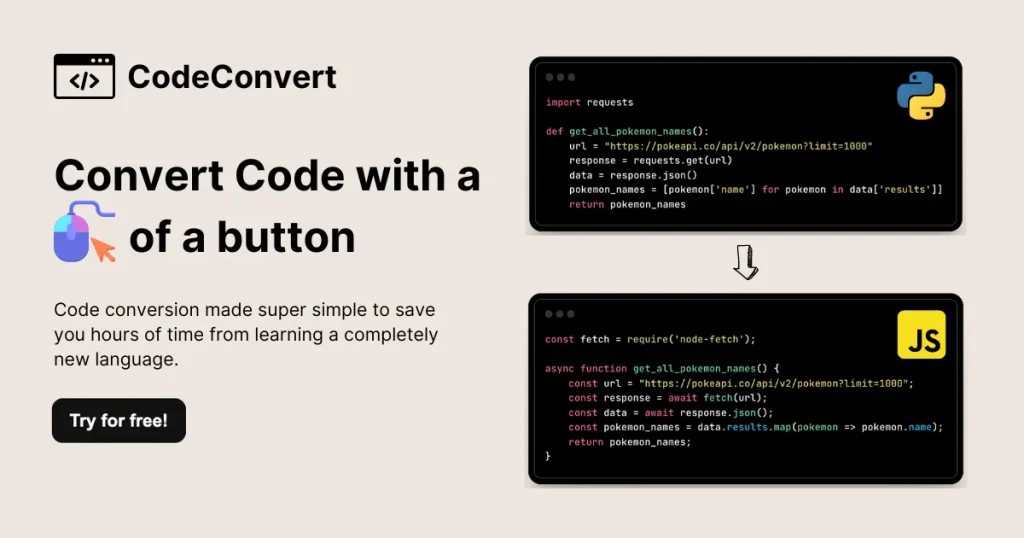
CodeConvert.ai is an AI-powered online code conversion tool that supports VB6 to VB.NET transformation at a snippet or file level. The tool is commonly used for quick experimentation rather than full enterprise migrations.
Pros
- Fast and easy to use
- Useful for small code samples or prototyping
Cons
- Not suitable for full project migration
- No dependency analysis or system-level context
- Data privacy and source code exposure concerns
Cost Estimation for VB6 to VB.net Migration Projects
VB6 to VB.NET migration projects can range from $15,000 for small applications to $1,000,000+ for complex enterprise systems. The final cost depends on code size, system complexity, third party dependencies, database structure, testing scope, and the level of refactoring required.
|
Project size |
Description | Cost estimate |
Timeline |
| Small Application
(< 50,000 LOC) |
Relatively straightforward applications with limited business logic, few integrations, and minimal external dependencies. | $15,000 to $50,000 | 1 to 3 months |
| Medium Application
(50,000 to 250,000 LOC) |
Business critical systems that often require database modernization, API replacement, and targeted code refactoring. | $50,000 to $250,000 | 3 to 6 months |
| Large Enterprise System
(> 250,000 LOC) |
Complex enterprise platforms with extensive business logic, multiple modules, third party integrations, and interdependent applications. | $250,000 to $1,000,000+ | 6 to 12+ months |
Key cost drivers
Several factors can significantly influence the overall cost and effort required for a VB6 migration project. The most common cost drivers include:
- Codebase size and complexity: More forms, modules, custom controls, and tightly coupled logic require deeper analysis and more manual adjustment.
- Migration approach: Automated conversion is usually faster, while refactoring or re architecture increases cost but improves long term maintainability.
- Third party dependencies: Legacy COM components, unsupported libraries, and external integrations often require replacement or custom redevelopment.
- Database and integration scope: Complex data structures, reporting tools, APIs, and external systems add more testing and validation effort.
- Testing and business logic validation: Critical workflows must be tested carefully to ensure the migrated system works the same as the original VB6 application.
- UI and performance requirements: Keeping the old interface is usually cheaper, while redesigning the UI or optimizing performance adds extra development time.
Case Studies of Successful VB6 to VB.NET Migration
1. Siemens Healthineers
Siemens Healthineers publicly documented the modernization of legacy VB6-based internal tools to the .NET platform to support long-term maintainability and compliance. The migration focused on preserving critical workflows while aligning the system with modern Windows environments.
As a result, the organization improved system stability and reduced dependency on outdated technologies. The key lesson from this migration was the importance of phased conversion and rigorous validation of business logic.
2. HP Enterprise Services
HP Enterprise Services migrated several VB6-based enterprise applications to VB.NET as part of a broader modernization initiative. The transition allowed HP to standardize development practices and integrate legacy systems with newer enterprise platforms.
Following the migration, HP achieved better scalability and easier maintenance across its application portfolio. This case highlights how VB.NET enables long-term modernization without a full system rewrite.
3. ABB Group
ABB Group modernized internal VB6 applications used for industrial operations and reporting by migrating them to VB.NET. The migration was driven by the need for improved reliability and compatibility with modern operating systems.
The successful transition reduced operational risk and extended the lifecycle of critical systems. ABB’s experience shows that preserving proven business logic while upgrading the platform is often more effective than rebuilding from scratch.
Common Challenges in VB6 Modernization
A VB6 modernization project is rarely straightforward, as most migration tools and methods can introduce syntax issues, compatibility gaps, and business logic deviations. Therefore, before you decide to migrate VB6 to VB.NET, it is critical to understand the most common challenges that may impact stability, cost, and delivery timelines.
- Compile Errors After Conversion: Automated conversion often produces code that does not compile due to unsupported syntax or deprecated constructs. These errors can significantly slow down delivery if not handled systematically.
- ActiveX and COM Component Dependencies: Many VB6 applications rely on ActiveX controls and COM components that are not natively supported in VB.NET. Replacing or refactoring these components requires careful planning and testing.
- Win32 API Compatibility Issues: Direct calls to Win32 APIs may behave differently or require rewrites in a managed .NET environment. Incorrect handling can lead to runtime instability or security risks.
- Hidden Dependency Chains: Legacy VB6 systems often contain undocumented dependencies between modules, libraries, and external services. These hidden links can cause unexpected failures during or after migration.
- Business Logic Preservation Risks: Complex business rules embedded across forms and modules may be altered unintentionally during conversion. Even small logic deviations can have serious operational consequences.
Useful Tips for VB Migration Smoothly
A successful VB6 migration requires more than code conversion. Careful planning, phased execution, and thorough validation can significantly reduce project risk while helping preserve critical business functionality throughout the transition.
- Always start with a full dependency audit before converting any code.
- Avoid migrating the entire system at once and prioritize business-critical modules first.
- Use automated conversion tools to accelerate migration, but plan manual validation for high-risk logic.
- Establish regression test cases early to verify business behavior after each migration phase.
- Refactor incrementally to improve maintainability instead of replicating legacy patterns.
- Maintain version control and rollback options throughout the migration process.
How AI Accelerates VB6 to VB.NET Migration
Traditional VB6 to VB.NET migration is often slow, costly, and difficult to control because much of the work depends on manual code review, line by line conversion, repeated compile fixes, and deep knowledge of legacy logic.
For large systems with limited documentation, this approach can create long timelines and higher delivery risk. AI offers a more efficient path by supporting faster code analysis, smarter conversion, and more consistent validation across the migration lifecycle.
- Automated code analysis: AI can scan VB6 codebases to identify forms, modules, dependencies, unused code, risky logic, and areas that need manual review.
- Faster code conversion: AI assisted tools can help translate VB6 syntax, controls, and patterns into VB.NET compatible structures more quickly than fully manual rewriting.
- Compile error resolution: AI can detect recurring compile issues and suggest fix patterns, helping teams reduce repetitive correction work.
- Business logic preservation: AI can compare legacy behavior with migrated logic to help identify inconsistencies before they affect production workflows.
- Dependency mapping: AI can support the detection of COM components, third party libraries, database calls, and external integrations that may need replacement or refactoring.
- Test case generation: AI can help create regression test scenarios based on existing code paths, user flows, and critical business rules.
- Documentation support: AI can summarize legacy modules, explain complex code sections, and create clearer technical documentation for future maintenance.
- Incremental refactoring guidance: AI can highlight outdated patterns and suggest safer modernization steps without forcing a complete system rewrite
AI can accelerate code analysis, conversion, testing, and remediation, but successful VB6 migration still requires a structured approach that combines automation with engineering expertise. Legacy enterprise applications often contain complex business logic, custom integrations, and hidden dependencies that need careful validation beyond automated conversion.
At Newwave Solutions, we leverage CodeShift VB to help organizations modernize legacy VB6 systems with greater speed and confidence. Rather than relying solely on automated conversion, CodeShift VB combines AI assisted code transformation, compile error stabilization, reusable fix patterns, and expert validation to reduce migration risk while preserving critical business functionality.
Key advantages of our CodeShift VB’s solutions include:
- AI powered code conversion to accelerate VB6 to VB.NET migration.
- Automated compile error remediation based on proven correction patterns.
- Business logic preservation through systematic validation and testing.
- Dependency analysis and modernization support for legacy components and integrations.
- Engineer led quality assurance to verify functionality beyond automated tools.
- Migration reporting and traceability for greater project visibility and governance.
Whether you are maintaining a small VB6 application or planning to modernize a large enterprise platform, we provide a practical and lower risk path to migrate VB6 to VB NET while reducing manual effort, shortening project timelines, and improving long term maintainability.
Ready to modernize your VB6 application? Contact Newwave Solutions today to explore how CodeShift VB can accelerate your migration journey.
Conclusion
In summary, the decision to migrate VB6 to VB.NET requires careful planning, a clear understanding of technical challenges, and a structured migration approach to protect system stability and business continuity. While traditional migration tools often fall short in handling complex legacy code, advanced third-party solutions such as CodeShift VB stand out by deeply understanding legacy logic, improving automated migration quality, and effectively supporting compile error fixes and refactoring.
To receive tailored guidance for your enterprise migration needs, we recommend leaving your contact information with Newwave Solutions through the official form to explore a secure and efficient VB6 to VB.NET transition strategy through our CodeShift VB solution.
FAQs
1. Is Visual Basic still used in 2026?
Yes. Visual Basic is still used in 2026, mainly for maintaining legacy business applications, internal tools, and Windows desktop systems. However, new enterprise projects are more commonly built with C#, .NET, web, or cloud native technologies.
2. Are VB6 and VB.NET the same?
No. VB6 and VB.NET are different technologies. VB6 is based on the older COM architecture, while VB.NET runs on the modern .NET ecosystem with object oriented programming, stronger security, and better integration options.
3. Is VB6 end of life?
Yes. The VB6 IDE has been unsupported since April 8, 2008, although Microsoft still supports the VB6 runtime for compatibility on supported Windows versions. This means existing apps may still run, but VB6 is no longer a modern development platform.
4. Does VB.NET have a future?
VB.NET is still supported as part of the .NET ecosystem, but its future is more maintenance focused than innovation driven. Microsoft states that .NET libraries will continue to support Visual Basic, but the language is not expected to expand into new workloads.
5. How long does aVB6 to VB.NET migration take?
The timeline depends on application size, code complexity, and dependency requirements. Small applications may take a few weeks, while large enterprise systems with extensive integrations can require several months or longer to complete.
To Quang Duy is the CEO of Newwave Solutions, a leading Vietnamese software company. He is recognized as a standout technology consultant. Connect with him on LinkedIn and Twitter.



Read More Guides




Get stories in your inbox twice a month.
Let’s Build Something Extraordinary
Sign up for a 30 min no-obligation strategic session with us. Transform your Ideas into scalable reality.
Leave a Reply