


Top 5 VB6 To VB.NET Migration Tools For Effective System Upgrade
Since legacy VB6 systems continue to create security, scalability, and maintenance risks, many enterprises are now seriously evaluating how to modernize their core applications by moving to VB.NET. However, beyond defining a migration strategy, selecting the right VB6 to VB NET migration tool plays a critical role, as it directly impacts migration quality, delivery speed, and total cost of ownership. If your organization is uncertain about which solution best fits your VB.NET conversion needs, this article provides a curated top list of available tools, highlighting their strengths, limitations, and ideal use cases.
What Is a VB6 to VB NET Migration Tool?
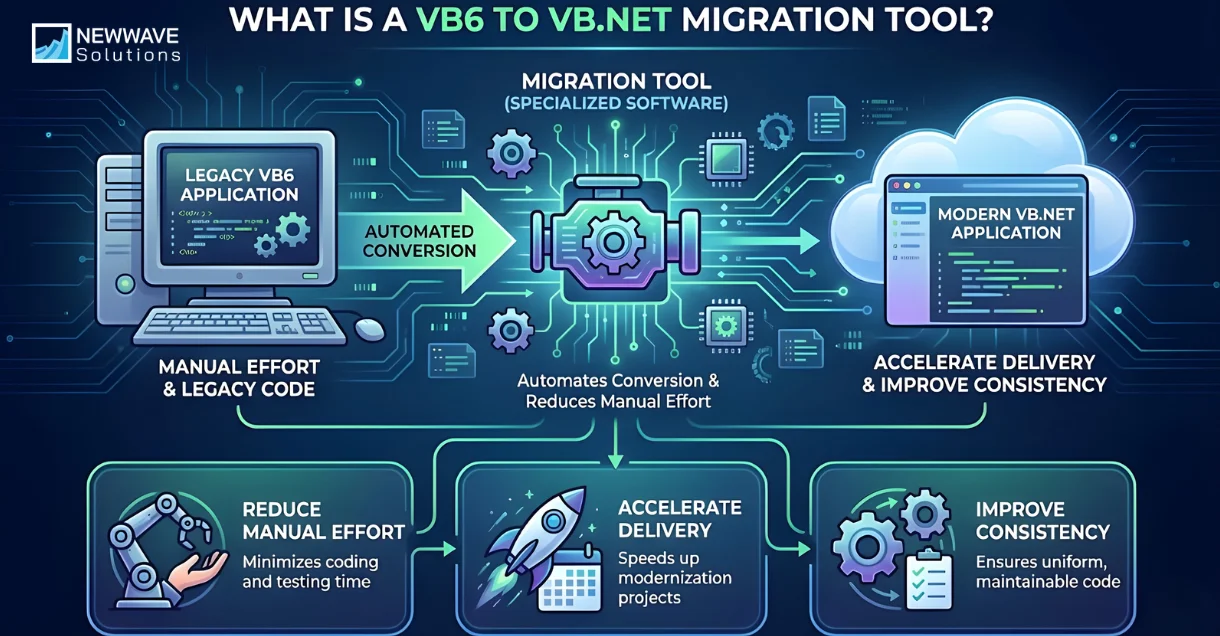
A VB6 to VB.NET migration tool is a specialized software solution designed to automate the conversion of legacy VB6 applications into VB.NET code. These tools are widely used in enterprise modernization projects to reduce manual effort, accelerate delivery, and improve consistency when compared to full manual rewrites.
In practice, a VB6 to VB NET migration tool sits between two strategic choices during modernization, which are manual code rewrite and automated migration, offering a scalable option that balances speed, risk control, and cost efficiency.
Example: SiS, an Austrian IT services provider, successfully migrated a 950,000-line VB6 ERP system to .NET using VB Migration Partner from Code Architects, completing the project in 9 months with 3 developers. The tool converted code chunks in 2.5 hours with minimal manual fixes, saving 750,000 Euros versus a 3-5 million Euro custom ERP alternative while preserving all original features for ongoing maintenance.
Why use the Automated Migration Tool instead of the Traditional Migration
When deciding between manual migration and automated conversion, enterprises often discover that traditional rewrite approaches introduce hidden risks and inefficiencies. By examining the limitations of manual VB6 migration below, it becomes clear why using a VB6 to VB.NET migration tool is often the more practical and reliable choice:
- Large codebase size and delivery pressure: A legacy VB6 system with tens of thousands of lines of code requires significant time and manpower to rewrite manually, which often leads to delayed timelines and inflated migration costs.
- Heavy dependence on individual developer expertise: Manual migration relies strongly on personal experience and system knowledge, creating delivery risk when key contributors leave or become unavailable.
- High risk of compile errors and business logic deviations: Rewriting code by hand increases the likelihood of introducing syntax errors and unintended logic changes that may disrupt critical business operations.
- Low code readability after migration: Manual conversions often produce inconsistent coding patterns, which then require extensive refactoring to achieve maintainable VB.NET standards.
- Insufficient documentation for the new system: Traditional migration approaches rarely generate structured technical documentation, making future maintenance and onboarding more difficult.
5 Best VB6 to VB.NET Migration Tools Available
1. CodeShift VB
CodeShift VB is an automated modernization tool purpose-built to migrate VB6 applications to VB.NET for complex enterprise systems. The platform combines pattern-based conversion with an intelligent AI-driven error handling mechanism to optimize migration time, cost, and operational risk. Unlike generic converters, CodeShift VB deploys its AI engine entirely on-premise, ensuring zero source code upload and full data isolation, which is especially critical for enterprises with strict security and governance requirements.
With CodeShift VB, AI is applied selectively to the most time-consuming and error-prone stages of VB6 migration, such as compile error resolution, repetitive refactoring tasks, and structural code improvements. As a result, development teams can modernize legacy systems more efficiently while retaining full technical control over business-critical decisions.
Business Value Delivered by CodeShift VB:
- Reduced Operational Risk for Legacy Systems: Controlled automation and traceability help minimize disruption to mission-critical applications during migration.
- Shorter Migration Time and Lower Project Cost: Automated conversion and error remediation significantly reduce manual workload and overall delivery effort.
- Improved Code Quality and Maintainability: Refactoring support and cleaner output structures lead to more sustainable VB.NET codebases.
- Preserved Mission-Critical Business Logic: Proven workflows and rules remain intact while repetitive technical work is offloaded to AI.
- Strong Foundation for Future Modernization: Migrated systems are better prepared for API enablement, cloud adoption, and further architectural evolution.
Key features
- Enhanced Automated Migration Quality: Pattern-based conversion combined with AI-assisted remediation improves accuracy beyond basic syntax translation.
- Compile Error Detection and Resolution Support: The AI fix loop continuously analyzes and resolves a high percentage of compile-time issues.
- Refactoring and Code Optimization Assistance: The platform supports structural improvements that reduce technical debt after migration.
- Rapid Legacy System Understanding: CodeShift VB helps teams quickly identify system structure, dependencies, and logic flows.
- Parallel Documentation Generation: Technical documentation is produced alongside migration, improving long-term maintainability.
Pros
- AI-driven handling of repetitive and high-effort migration tasks
- Developers remain focused on business logic and critical technical decisions
- Higher post-migration code quality with fewer defects
- Reduced delivery timeline and optimized migration cost
- Built-in documentation support throughout the migration process
- Lower operational risk for business-critical legacy systems
- Clear modernization pathway beyond initial VB.NET upgrade
Cons
- Relatively new platform compared to long-established migration tools
- An AI-based model may occasionally require developer validation when legacy logic is unclear
Best For
- Enterprises running business-critical VB6 systems such as accounting, inventory management, sales platforms, or internal manufacturing applications
- Organizations seeking enterprise-safe, AI-assisted migration with strict security and control requirements
- Teams aiming to modernize VB6 systems while preserving proven business logic and operational stability
2. VB Migration Partner
VB Migration Partner is a commercial VB6 to VB.NET migration tool developed by a specialized third-party vendor focused exclusively on legacy Visual Basic modernization. The tool is relatively well-known in the VB6 migration niche and is designed to automate syntax conversion while supporting a structured convert–test–fix workflow. Many organizations use it as an intermediate step to reduce manual rewrite effort rather than as a fully automated modernization solution.
Key Features
- Automated VB6 to VB.NET code conversion
- Pragma-based conversion control
- Convert–test–fix migration methodology
- Support for large VB6 codebases
- Detailed migration reports
Pros
- High syntax-level conversion accuracy
- Mature product with long market presence
- Structured conversion workflow
- Suitable for large legacy projects
Cons
- Limited understanding of complex business logic
- Heavy post-conversion manual effort
- Steep learning curve for configuration
- Licensing costs can be high for large teams
Best For
- Enterprises with large VB6 systems and strong in-house VB.NET expertise
- Teams planning a semi-automated migration with extensive manual validation
- Organizations prioritizing syntax accuracy over logic refactoring
3. Microsoft Visual Studio Upgrade Wizard
Microsoft Visual Studio Upgrade Wizard is a legacy feature included in older versions of Visual Studio, primarily up to Visual Studio 2008. The tool was designed to provide a basic starting point for migrating VB6 projects into early .NET formats, but it is no longer actively developed or supported. Today, it is mainly referenced for historical or experimental purposes.
Key Features
- Basic VB6 project conversion
- Integrated Visual Studio workflow
- Automatic syntax translation
- Project structure scaffolding
Pros
- Official Microsoft-origin tool
- Easy initial setup
- No licensing cost
- Integrated development environment
Cons
- No longer supported or maintained
- Poor compatibility with modern .NET versions
- Generates large volumes of non-compilable code
- Not suitable for enterprise migration
Best For
- Small experimental projects
- Learning or assessment purposes only
- Legacy environments already using old Visual Studio versions
4. Visual Basic Upgrade Companion (VBUC) by Mobilize.Net
Visual Basic Upgrade Companion, developed by Mobilize.Net (now part of Gapvelocity), is a commercial migration tool designed to convert VB6 applications into VB.NET or C#. The tool is widely recognized for supporting enterprise modernization projects and for leveraging rule-based and AI-assisted techniques to improve code readability. It is often used by organizations planning structured modernization rather than simple code translation.
Key Features
- VB6 to VB.NET and C# conversion
- Rule-based and AI-assisted code transformation
- Support for modern .NET platforms
- Dependency analysis and reporting
- Migration project management tooling
Pros
- Supports multiple target languages
- Generates relatively readable output code
- Strong enterprise adoption history
- Detailed migration assessment capabilities
Cons
- High licensing and consulting cost
- Requires significant configuration and tuning
- Long onboarding time for teams
- Still requires substantial manual remediation
Best For
- Large enterprises with a budget for commercial tooling and consulting
- Organizations migrating multiple legacy systems over time
- Teams seeking structured modernization governance
5. CodeConvert.ai
CodeConvert.ai is an AI-powered online code conversion tool that supports VB6 to VB.NET conversion at the file or snippet level. The tool is designed for quick transformations rather than full system migration and is often used for experimentation or learning. It does not provide project-wide dependency analysis or enterprise governance features.
Key Features
- AI-based code snippet conversion
- Browser-based usage
- Multiple language conversion support
- Fast turnaround for small files
Pros
- Very easy to use
- No local setup required
- Fast conversion results
- Suitable for learning and prototyping
Cons
- Not designed for full system migration
- No dependency or project-level context
- Source code privacy concerns
- No traceability or rollback support
Best For
- Developers converting small VB6 code fragments
- Proof-of-concept or experimentation scenarios
- Non-sensitive code samples
When to Use an Automated Migration Tool
An automated migration tool is most effective in specific enterprise scenarios where scale, risk control, and consistency matter more than manual flexibility. The following use cases clearly indicate that adopting a VB6 to VB NET migration tool is the right strategic choice.
- Large and complex VB6 codebases: Organizations managing tens of thousands of lines of legacy code benefit from automation to maintain consistency and reduce delivery timelines.
- Business-critical legacy systems: Automated tools help preserve proven workflows and minimize operational disruption when applications support finance, operations, or production systems.
- Limited availability of VB6 expertise: When experienced VB6 developers are scarce, automation reduces reliance on individual knowledge and stabilizes delivery outcomes.
- Strict migration timelines and budget constraints: Enterprises facing fixed deadlines or budget limits can use automated tools to control cost and accelerate execution.
- Requirement for traceability and rollback: Automated migration tools often support version control, auditability, and rollback mechanisms, which are essential for regulated environments.
- Need for repeatable and scalable modernization: Companies modernizing multiple VB6 applications benefit from standardized, repeatable migration workflows enabled by automation.
Tips for Choosing an Appropriate VB Migration Tool
After reviewing the available migration tools, selecting the right solution can still be challenging due to differences in scope, accuracy, and enterprise readiness. The following tips can help organizations choose a tool that best aligns with their technical requirements, budget, and modernization goals.
- Prioritize tools that preserve business logic rather than focusing only on syntax conversion.
- Evaluate how the tool handles compile errors, refactoring, and post-conversion remediation.
- Assess security models, especially whether source code is processed on-premise or uploaded externally.
- Consider scalability and support for large, complex enterprise systems.
- Compare total migration cost, including manual effort required after conversion.
- Review tool maturity, roadmap, and vendor support capabilities.
Conclusion
We have managed to investigate the most common VB6 to VB NET migration tool options available today, offering objective insights to help enterprises evaluate each solution based on cost, technical requirements, and modernization goals. In practice, choosing the right tool requires organizations to carefully balance expectations, internal capabilities, and long-term system strategy rather than relying on a one-size-fits-all approach.
From a broader perspective, CodeShift VB is emerging as a leading option by addressing the combined limitations of traditional migration tools, particularly through its AI-assisted approach that improves quality and productivity at scale.
To determine whether CodeShift VB is the right fit for your VB6 to VB.NET migration needs, we encourage you to contact us asap so our team can assess your system and provide tailored guidance aligned with your business objectives.
To Quang Duy is the CEO of Newwave Solutions, a leading Vietnamese software company. He is recognized as a standout technology consultant. Connect with him on LinkedIn and Twitter.



Read More Guides



Get stories in your inbox twice a month.
Let’s Build Something Extraordinary
Sign up for a 30 min no-obligation strategic session with us. Transform your Ideas into scalable reality.
Leave a Reply