


Cloud Cost Optimization: Strategies, Tools & Best Practices
Where should a business start when its cloud bill keeps rising: cut resources, buy commitments, or change the way infrastructure is managed? Cloud cost optimization gives that decision a clearer structure by linking spending data with actual workload demand instead of treating every cost increase as a simple budgeting problem.
The right answer depends on what is creating the spend. Idle resources may need to be removed, overprovisioned workloads may need rightsizing, and predictable usage may justify different pricing models. This article looks at the main cost drivers, practical optimization strategies, common implementation mistakes, and a step-by-step way to turn cost data into ongoing action.
Key Takeaways
|
What Is Cloud Cost Optimization?
Cloud cost optimization is the practice of controlling cloud spending so that organizations pay for the resources they actually need while still meeting workload requirements. The aim is not to minimize the cloud bill at any cost. It is to keep spending aligned with actual usage without creating problems for performance, service quality, security, compliance, or future growth.
This usually means finding where money is being spent inefficiently. Common examples include resources that are provisioned with more capacity than necessary, instances that continue running after they are no longer needed, or architectures that consume more cloud resources than the workload requires.

Cloud cost optimization vs. simple cost cutting
Cost cutting focuses mainly on reducing expenditure. Cloud cost optimization takes a broader view because lowering spend can create new problems if resources are removed or reduced without considering workload requirements.
For example, shrinking capacity may lower the monthly bill, but it is not an effective decision if the remaining resources cannot support required performance. A better approach is to use billing and usage data to determine which costs are unnecessary and which resources still serve an operational purpose.
This also makes cloud cost optimization an ongoing activity rather than a one-time reduction exercise. Workload demand changes, new resources are provisioned, and cloud providers introduce different pricing and service options. Cost decisions therefore need to be reviewed as the environment changes.
What cloud cost optimization actually covers
In practice, cloud cost management involves two closely connected areas.
- Cloud purchasing and financial control: Teams need rules for how cloud services are purchased and monitored. This includes setting budgets, reviewing billing data, investigating unexpected cost changes, and evaluating available discounts or advance-purchase options where they fit expected usage.
- Cloud resource and capacity management: Organizations also need to track whether the resources they already pay for are being used effectively. Regular usage reviews can identify excess capacity, idle infrastructure, resources that should be shut down, or software subscriptions that are no longer needed.
Benefits of Cloud Cost Optimization for Businesses
Cloud cost optimization gives businesses more control over how infrastructure spending relates to actual usage. The value is not limited to lowering the monthly cloud bill. Better cost management can also improve capacity planning, budget accuracy, operational oversight, and the way resources are allocated across workloads.
Lower cloud spending
Unused and oversized resources can continue generating charges even when they contribute little to current operations. Flexera’s 2026 State of the Cloud report estimates that organizations waste 29% of their cloud spend, showing how much room there can be for better resource management.
Businesses can address this by identifying idle infrastructure, reducing excess capacity, and reviewing how cloud services are purchased. The resulting usage data can also inform future purchasing decisions, making it easier to avoid repeating the same spending patterns.
Lower operational risk and greater resilience
A better-controlled cloud environment can make day-to-day operations easier to manage. When infrastructure is easier to track, teams have a clearer view of what is running, where dependencies exist, and which systems require closer attention.
This can also support business continuity. More consistent infrastructure management and deployment processes can make it easier to restore services after disruptions and reduce the chance that operational complexity slows recovery. The benefit is therefore not only financial: stronger cloud cost discipline can contribute to a more manageable and resilient operating environment.
More efficient use of cloud capacity
Cloud capacity often becomes inefficient when teams provision resources for expected demand but never revisit those assumptions. Over time, this can leave compute, storage, or other services consuming capacity that is no longer necessary.
Consolidating underused resources and rightsizing services allows businesses to match provisioned capacity more closely with actual requirements. Instead of treating all deployed infrastructure as fixed, teams can regularly review what is still needed, what can be reduced, and what can be removed entirely.
Better resource efficiency and performance
Cost reduction should not come at the expense of workload performance. Rightsizing and autoscaling provide a more balanced approach by adjusting resource allocation according to observed demand.
Rightsizing uses operational data to identify resources that are consistently overprovisioned or underused. Autoscaling addresses workloads whose demand changes over time by increasing or reducing capacity as needed. Together, these practices can limit unnecessary consumption while still giving applications enough resources to meet their performance requirements.
Better operational metrics also make it easier to set appropriate performance thresholds. Teams can make resource decisions based on workload behavior rather than relying only on static capacity assumptions.
More predictable cloud budgets
Cloud spending is harder to forecast when teams cannot clearly see which services, workloads, or departments are driving costs. Cost monitoring and historical usage analysis give finance and technical teams a stronger basis for planning future expenditure.
This creates a two-way relationship between budgeting and cloud cost optimization. Budgets establish spending boundaries, while ongoing cost analysis shows whether those boundaries remain realistic as usage changes. Monitoring tools can also surface unusual increases earlier, giving teams a chance to investigate the cause before the additional spend becomes part of the normal run rate.

What Actually Drives Uncontrolled Cloud Spend
Cloud spending becomes difficult to manage when purchasing, provisioning, billing, and ownership are spread across many services and teams. The issue is often less about one expensive resource and more about losing track of how different usage patterns, pricing models, and purchasing decisions add up over time.
- Complex cloud pricing and billing: Cloud services can be charged through subscriptions, consumption-based pricing, provisioned capacity, reservations, or commitments. When a bill contains hundreds or thousands of line items, it becomes harder to separate necessary spending from avoidable cost.
- Limited cost visibility and attribution: Costs are harder to control when businesses cannot clearly connect spending to a specific team, workload, application, or business unit. Without that context, finance teams may see where costs are rising but still lack the technical detail needed to explain why.
- Decentralized provisioning and cloud sprawl: Self-service cloud access allows teams to provision resources quickly, but those resources may stay active longer than needed or be duplicated across projects. Without clear ownership and lifecycle controls, this can gradually expand the cloud footprint and increase spending.
- Multi-cloud complexity: Using several cloud providers adds another layer of difficulty because each platform may use different pricing structures, billing terminology, and service models. This makes cost comparison, reporting, and governance more complicated across environments.
For a broader view of what contributes to spending before, during, and after migration, see our guide to cloud migration costs.
Cloud Cost Optimization Strategies for Business
Effective cloud cost optimization strategies address more than individual billing spikes. Businesses need to understand where money is going, remove resources that no longer serve a purpose, align capacity with demand, and put controls in place so unnecessary spending does not return.
The following cloud cost optimization best practices cover both technical resource management and the financial decisions behind cloud usage.
Improve cloud cost visibility and control
Start by breaking cloud spending down by service, workload, team, project, or environment. Consistent tagging makes that allocation easier, while budgets and alerts provide early warning when spending moves outside expected ranges.
Cost monitoring should also look for unusual changes rather than only reviewing the final monthly bill. An unexpected increase in compute, storage, data transfer, or another service can then be investigated before it becomes recurring spend.

Eliminate idle and unnecessary resources
Cloud resources are easy to provision and just as easy to forget. Instances created for completed projects, unattached storage volumes, unused load balancers, old backups, and development environments left running can continue generating charges without supporting active workloads.
Set clear criteria for what qualifies as idle, then remove, archive, consolidate, or shut down resources when those conditions are met. Non-production environments can also be scheduled around actual working periods rather than remaining active continuously.
Rightsize resources to match workload demand
A resource can still be necessary while being larger or more expensive than the workload requires. Rightsizing starts with usage data such as CPU, memory, and disk I/O, then compares current configuration with observed workload behavior.
The objective is not simply to move every workload to a smaller instance. A workload may instead need a different instance family or configuration that better matches how it uses compute, memory, or storage. Usage should therefore be assessed over a meaningful period before changes are made.
Use cloud pricing and discounts strategically
Different purchasing models fit different workload patterns. On-demand capacity provides flexibility, while reservations and committed-use plans can be more suitable where baseline usage is predictable. Spot capacity can lower the cost of workloads that can tolerate interruptions.
The commitment should follow the workload, not the other way around. Long-term discounts can become inefficient when usage changes, so businesses should understand expected demand and required flexibility before committing capacity.
Optimize storage and data transfer costs
Storage costs can grow when data stays in expensive tiers long after access drops or when disks remain larger than the workload requires. Move infrequently used data to lower-cost tiers, archive or remove outdated data, and use lifecycle rules to handle these changes automatically. Block storage should also be reviewed for unused disks, sizing, and I/O requirements.
Data transfer needs a different approach. Charges can build as data moves across regions, cloud services, or external environments. Reducing unnecessary movement starts with architecture: keep connected resources closer where practical, then use methods such as compression or CDNs to reduce transfer volume when appropriate.
Design and automate infrastructure for cost efficiency
Some waste begins before a workload reaches production. Applications that do not make effective use of scaling or managed cloud capabilities may require more fixed capacity than necessary.
Infrastructure as code can standardize how resources are provisioned, while predefined scaling rules can adjust capacity as demand changes. Cost controls can also be introduced during provisioning so teams consider the financial impact of infrastructure choices before resources are created.
Architecture has a major influence on these decisions. For more detail on designing, deploying, and operating applications in cloud environments, see our guide to cloud application development.
Build continuous cost governance and accountability
Cloud spending crosses technical and financial responsibilities, so ownership needs to be clear. Teams should know which workloads and resources they are responsible for, while shared budgets, reporting, and review processes give finance, engineering, and operations a common view of spending.
Regular reviews also prevent cloud cost optimization from becoming an occasional cleanup exercise. As applications, traffic, teams, and infrastructure change, cost assumptions need to be revisited and policies adjusted accordingly.
Account for cloud support plan costs
Support subscriptions can become another recurring cloud expense. Major cloud providers offer multiple support tiers with different service levels, response times, and technical assistance, so applying the highest level everywhere may create costs that are not necessary for every account.
Review support requirements by environment and workload. Production systems may justify stronger support coverage, while development or testing accounts may not require the same service level.
Embed cost awareness into the software development lifecycle
Cloud cost decisions begin well before production. During planning, teams can estimate expected resource needs and relate them to project budgets. Development and testing environments can then be configured around their actual usage rather than treated like permanent production infrastructure.
The same discipline should continue through deployment and maintenance. Pricing choices, scaling behavior, monitoring, and recurring cost reviews can be considered at the stage where each decision is made. This makes cost management part of the development process instead of an issue addressed only after the bill arrives.
Right-Sizing Spend for AI and GPU Workloads
AI is adding a new source of pressure to cloud cost optimization. Flexera’s 2026 State of the Cloud Report, based on a survey of 753 cloud decision-makers, found that estimated wasted cloud spend rose to 29%. This was the first increase after five years of decline. Flexera links the reversal to the rapid growth of cloud-based AI workloads and notes that their usage can be harder to forecast than traditional cloud services.
That unpredictability changes how teams should approach capacity planning. A fixed allocation based on past usage may not reflect how AI demand develops as projects move from experimentation into regular use. Cost decisions therefore need to account for changing consumption patterns, not just current infrastructure size.
The report also points to stronger centralized oversight as AI adoption expands. In 2026, 71% of surveyed organizations had a Cloud Center of Excellence or equivalent, while 63% relied on a FinOps team. These structures can bring cloud usage, cost, and business value into the same decision process rather than treating AI spending as an isolated technical expense.
The Role of FinOps in Long-Term Cloud Cost Control
Cloud cost optimization becomes harder to sustain when finance, engineering, and IT make decisions separately. FinOps addresses this by creating a shared operating model for cloud financial management.
FinOps brings financial accountability into day-to-day cloud decisions and connects technical usage with cost and business value. Instead of treating cost as a finance-only concern, teams review usage, spending, and business value together.
The process starts with accurate cost allocation. Teams need current data on which services, applications, or groups are driving spend before they can set realistic budgets or compare actual costs with forecasts.
Once spending is understood, teams can act on recurring inefficiencies. This may involve adjusting resource capacity, shutting down unused infrastructure, or selecting commitment-based pricing where usage is predictable. Reporting and automation can shorten the gap between identifying an issue and responding to it.
Long-term control comes from repeating that cycle. FinOps teams continuously compare cost, speed, and quality with business objectives, then adjust cloud decisions as workloads and priorities change. In this way, cloud cost optimization becomes an ongoing management discipline rather than a periodic cost-cutting exercise.
Cloud Cost Optimization Tools: What Do They Actually Do?
Cloud cost optimization tools give teams a clearer view of spending, usage, and resource configuration. Some are built into the cloud platform itself, while others are designed to work across several providers.
- AWS Cloud Financial Management tools: Support billing analysis, cost tracking, budgeting, and spend monitoring within AWS environments.
- Microsoft Azure Cost Management: Provides cost analysis, budgeting, and monitoring for Azure usage and related spending.
- Google Cloud Cost Management: Helps teams review billing data, monitor usage, and analyze cost patterns across Google Cloud services.
- Independent multicloud platforms: Combine cost and usage data from multiple cloud providers into one reporting layer. Some platforms also go beyond reporting by automatically adjusting compute, storage, or network resources based on defined policies.
The right tool depends on the operating model. A company concentrated on one provider may get enough value from native cost-management capabilities, while a multicloud environment may require broader reporting and control. For more context, see our guide to single cloud vs multi cloud architecture.
How to Measure Cloud Cost Optimization Success
A lower cloud bill does not automatically mean cloud cost optimization is working. Cost should be evaluated together with the resources being consumed and the service levels those resources support. Cutting spend while reducing capacity too far or hurting availability would not represent a successful outcome.
Useful measurements include:
- Cloud spend: Track total spending and the cost of individual cloud services to see where savings are actually occurring.
- Capacity: Compare provisioned resources with what workloads require to identify excess or insufficient capacity.
- Utilization: Measure how much of the available compute, storage, or other resources is being used rather than paid for but left idle.
- Performance: Check that cost changes do not reduce the performance required by applications and workloads.
- Availability: Monitor service availability alongside cost reductions so financial savings are not achieved at the expense of reliability.
These metrics can also be reviewed by team, workload, service, or relevant resource group to show where cost and resource efficiency are improving and where further attention is needed.

Cloud Cost Management Mistakes That Increase Spending
Cloud cost optimization can lose effectiveness when teams act on incomplete information or focus too narrowly on a few visible expenses. These mistakes often reduce short-term waste but leave the underlying cost drivers unresolved.
1. Looking only at compute
Compute instances are easy to notice, but they are not the only source of cloud spending. Storage volumes, snapshots, databases, and data transfer can also contribute significantly to the bill. Reviewing these categories together provides a more complete picture of where waste is occurring.
2. Cutting costs before understanding the spend
Removing resources or reducing capacity too early can create operational problems if teams do not first understand usage, ownership, and workload importance. A better starting point is to map spending to the resources and teams responsible for it, then identify which costs are genuinely unnecessary.
3. Over-relying on provider recommendations
Native recommendations from AWS, Azure, or Google Cloud can highlight potential savings, but they should not be treated as final decisions. A suggested change may not account for every workload requirement or business constraint. Teams still need to evaluate the recommendation against performance, availability, and application needs before acting.
4. Treating optimization as a one-time cleanup
Cloud environments continue to change after an optimization project ends. New services are deployed, traffic patterns shift, and teams create additional resources. Without ongoing monitoring and review, previously reduced costs can rise again. Cloud cost optimization therefore needs to become part of normal cloud operations rather than an occasional exercise.
5. Weak tagging and cost ownership
Inconsistent tags make it difficult to connect spending with a specific team, application, project, or environment. The problem becomes harder as the cloud estate grows. Clear ownership is equally important because teams need to know who is responsible for reviewing and managing each part of the spend.
6. Ignoring non-production environments
Development, staging, and testing environments can generate unnecessary costs when they remain active outside their actual usage periods or are provisioned with more capacity than required. Including non-production resources in regular cost reviews prevents these environments from becoming a persistent source of waste.
How to Start Cloud Cost Optimization: A Practical 6-Step Plan
A practical cloud cost optimization program should move from cost attribution to visibility, then into targeted action. The following 6 steps create that sequence without trying to solve every cost issue at once.
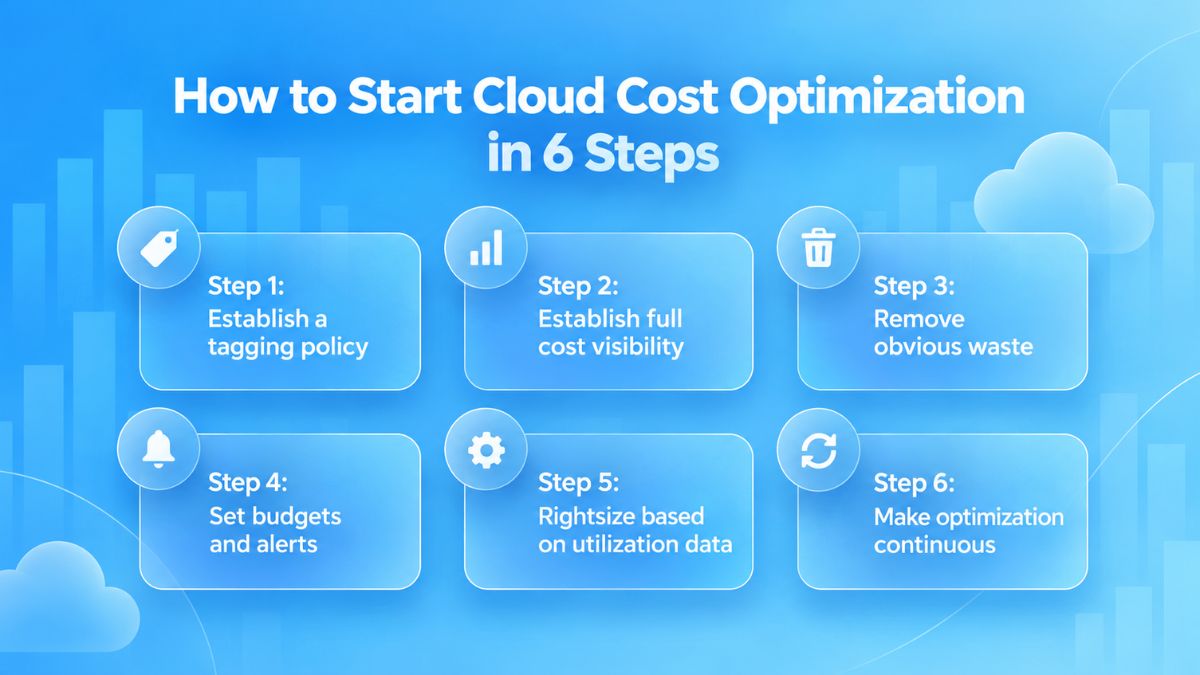
Step 1: Establish a tagging policy
Define a consistent tagging standard before the cloud environment becomes harder to manage. Tags can identify the team, application, project, or environment associated with each resource.
This gives later cost analysis a usable structure. It also makes ownership clearer when a specific workload begins generating more spend than expected.
Step 2: Establish full cost visibility
Bring billing and usage data together so teams can see where cloud spend is concentrated. Review costs by service, workload, account, environment, and owner rather than relying only on the total monthly bill.
The objective is to understand the main cost drivers before making changes. This reduces the risk of cutting resources that are still important to application performance or operations.
Step 3: Remove obvious waste
Once spend is mapped, address resources that no longer serve a clear purpose. Common examples include obsolete backups, idle infrastructure, unattached storage, or unused development and testing environments.
These areas are useful starting points because the issue is usually unnecessary consumption rather than the design of the workload itself.
Step 4: Set budgets and alerts
Create spending limits for relevant teams, accounts, workloads, or environments. Alerts can then flag unusual increases or approaching budget thresholds before they appear as unexpected charges at the end of the billing cycle.
Budgets do not reduce cloud costs on their own. They create an early warning mechanism that gives teams time to investigate changes in usage.
Step 5: Rightsize based on utilization data
After removing clearly unused resources, look at the capacity that is still active and compare it with actual usage over time. For example, a virtual machine may have been provisioned with more CPU and memory than the application regularly consumes. Historical utilization data can show whether that extra capacity is consistently sitting unused or is needed only during occasional demand peaks.
Use those findings to adjust instance sizes or other resource configurations to better reflect actual workload demand. Rightsizing should still account for the performance and availability requirements of the application.
Step 6: Make optimization continuous
Cloud environments keep changing as applications evolve, new resources are provisioned, and workload demand shifts. A one-time review therefore has limited value.
Build recurring cost reviews into normal engineering and operations processes. Automation can also support repeatable tasks such as resource cleanup or usage-based adjustments. Over time, this turns cloud cost optimization from an occasional savings exercise into an ongoing management practice.
How Newwave Solutions Can Help Improve Cloud Cost Efficiency
At Newwave Solutions, we provide end-to-end cloud migration services across AWS, Azure, and Google Cloud. Our role goes beyond moving workloads to a new environment. We assess the current infrastructure, design the target architecture, execute the migration, and continue optimizing resources after go-live. Cost efficiency is considered throughout that process, alongside performance, scalability, security, and reliability.
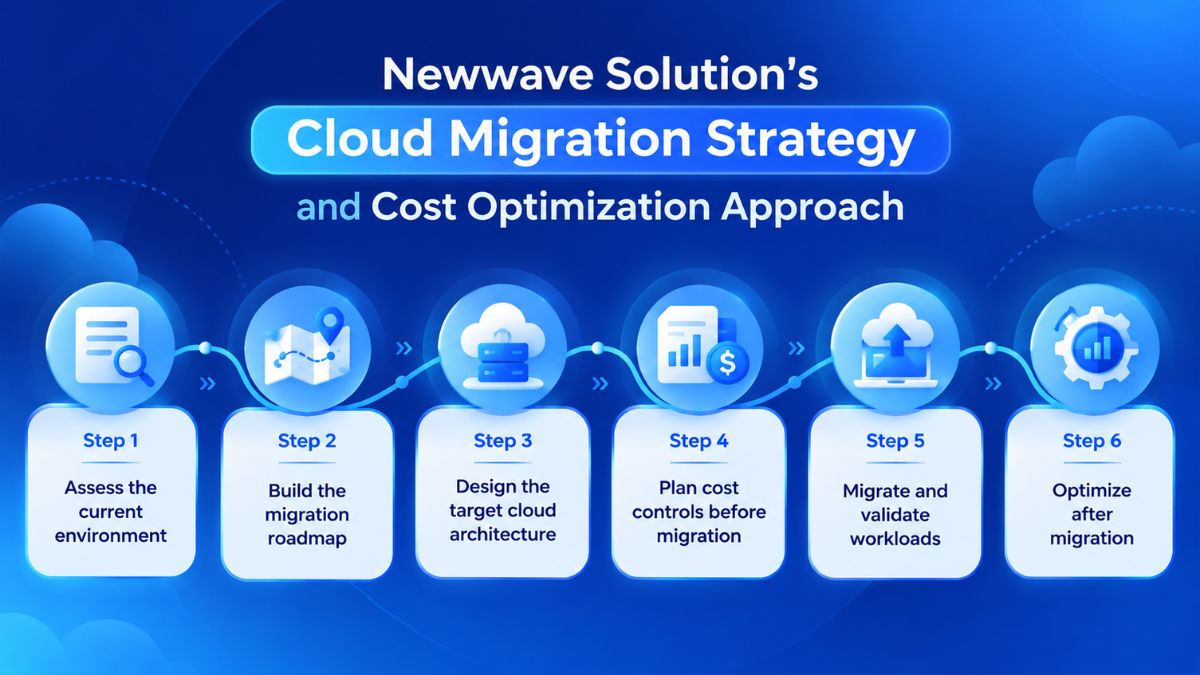
Our cloud migration approach can include:
- Assess the current environment: Review applications, infrastructure, data, dependencies, and resource usage to identify migration constraints and areas where existing capacity may be inefficient.
- Build the migration roadmap: Prioritize workloads and migration waves based on technical dependencies and business requirements. At this stage, we can also evaluate which workloads may benefit from different migration approaches, such as rehosting, refactoring, or rearchitecting.
- Design the target cloud architecture: Size compute, storage, and network resources to meet workload needs without unnecessary capacity.
- Plan cost controls before migration: Establish resource sizing, usage visibility, tagging, and budget controls so cloud spending can be tracked from the beginning instead of reviewed only after deployment.
- Migrate and validate workloads: Move applications, data, and infrastructure in controlled phases, then test performance, integrations, security, and data integrity before production handover.
- Optimize after migration: Monitor usage and performance, adjust resources where capacity no longer matches demand, remove unnecessary infrastructure, and review cloud spending as workloads evolve. We also include ongoing resource, performance, and cost optimization as part of post-migration support.
If you are planning a cloud migration and want cost efficiency built into the process from the start, Newwave Solutions can help assess your environment and define the right migration approach. Contact us to discuss your cloud migration and optimization requirements.
Conclusion
Cloud bills become easier to control once teams can explain where the money is going and who owns each part of it. From there, cloud cost optimization becomes a regular engineering decision: remove resources with no clear purpose, resize what is consistently overprovisioned, and keep checking whether usage still matches the assumptions behind the architecture.
A useful next step is to pick one workload with meaningful spend and trace its cost from infrastructure to business use. That usually exposes where deeper changes are worth investigating. If a migration or architecture review is already planned, Newwave Solutions can help assess the current environment and factor cost efficiency into the migration approach from the beginning.
FAQs
1. How do you optimize cost in cloud?
Start by making cloud spending visible by service, workload, environment, and owner. From there, remove idle resources, rightsize overprovisioned capacity, review storage and data transfer costs, use suitable pricing models, and set budgets or alerts. Cloud cost optimization should continue as workloads and usage change rather than being treated as a one-time exercise.
2. What are the four pillars of cost optimization in the cloud?
A practical way to structure cloud cost optimization is around four areas: cost visibility and ownership, resource efficiency, pricing and architecture decisions, and continuous governance. Together, these cover how spending is understood, where waste is reduced, how cloud resources are designed and purchased, and how costs are controlled over time.
3. Why is the cloud so expensive?
Cloud costs often rise because spending is distributed across many services, teams, and pricing models. Overprovisioned resources, idle infrastructure, unused storage, data transfer, and environments that remain active longer than needed can all increase the bill.
4. Which tools are commonly used for cloud cost optimization?
AWS, Microsoft Azure, and Google Cloud provide native cost-management tools for their own environments. Businesses can also use independent multicloud platforms that consolidate cost data across multiple providers. Some tools extend beyond reporting by supporting recommendations or automated adjustments to cloud resources.
5. How can automation be used to optimize cloud spending?
Automation can handle recurring cost-control actions that would otherwise require manual review. Depending on the environment, this may include shutting down non-production resources outside usage periods, applying lifecycle rules to storage, scaling capacity as demand changes, or triggering alerts when spending moves beyond defined thresholds.
To Quang Duy is the CEO of Newwave Solutions, a leading Vietnamese software company. He is recognized as a standout technology consultant. Connect with him on LinkedIn and Twitter.



Read More Guides


Get stories in your inbox twice a month.
Let’s Build Something Extraordinary
Sign up for a 30 min no-obligation strategic session with us. Transform your Ideas into scalable reality.
Leave a Reply