


AI in Quality Assurance: How It Works, Use Cases & Benefits
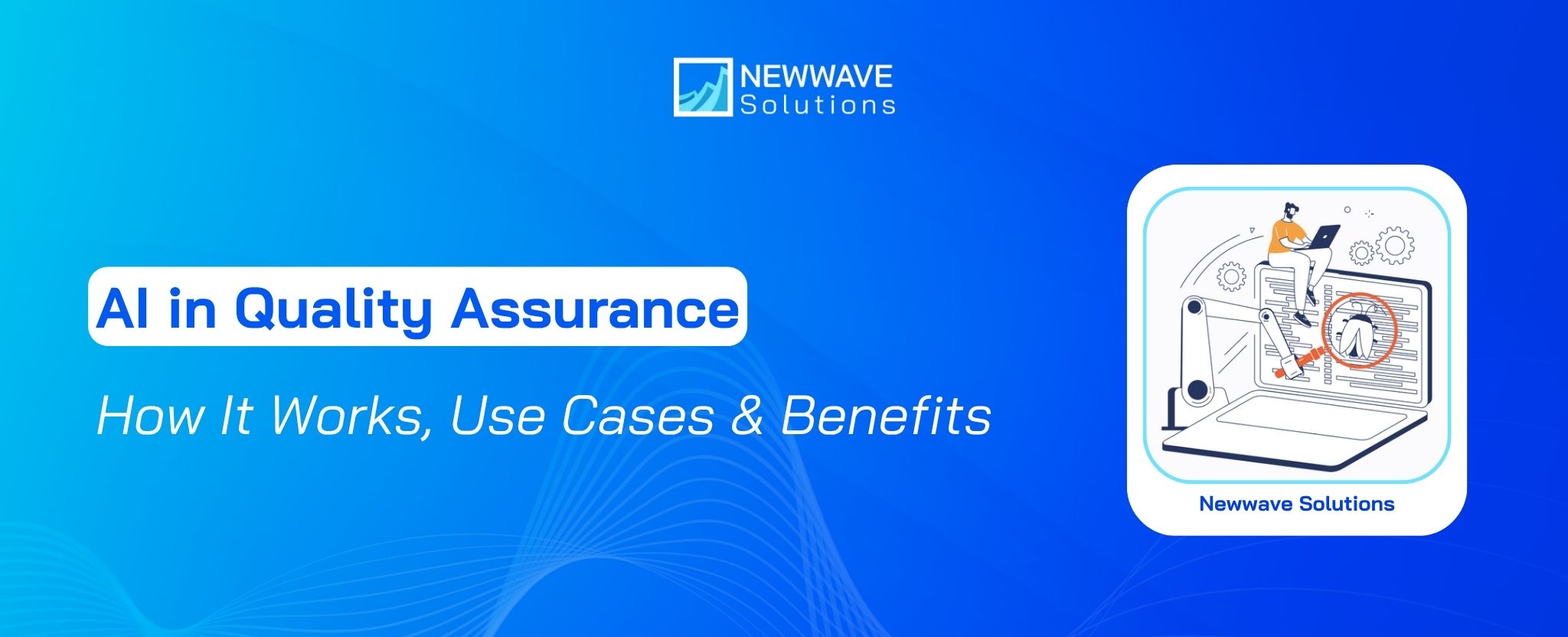
A code change reaches the CI/CD pipeline, but the regression suite has grown too large to run efficiently. Some tests break after UI updates, higher-risk areas are not always tested first, and QA engineers still spend hours reviewing failures and maintaining scripts. This is where AI in quality assurance can improve the process by helping prioritize tests, generate test cases, analyze failure patterns, and reduce repetitive maintenance work.
This article explains how AI works in QA, where it delivers practical value, and what teams should consider before adopting it. By understanding its main use cases, benefits, limitations, and implementation requirements, QA teams and engineering leaders can better assess where AI fits into their current testing process and which areas are worth prioritizing first.
Key Takeaways
|
What is AI in Quality Assurance?
AI in quality assurance means using artificial intelligence to support and improve QA activities. In software testing, AI can analyze testing data, detect patterns, generate test cases, and identify areas that may require closer attention.
Common AI technologies used in QA include:
- Machine learning: Uses historical test results, defect records, and code changes to identify recurring patterns or areas with higher defect risk.
- Natural language processing (NLP): Processes written requirements or specifications and can support tasks such as generating test scenarios from text-based inputs.
- Computer vision: Compares visual elements across application versions to identify interface changes, layout issues, or other visual differences that may require review.
- Generative AI: Creates test cases, test steps, or testing suggestions from requirements, code, or natural-language instructions.
How autonomous testing differs from traditional test automation
Traditional test automation follows predefined scripts and rules. Engineers decide what to test, write the test logic, and update those scripts when the application changes. Autonomous testing introduces a more adaptive layer, where AI can use requirements, code changes, and historical testing data to generate, prioritize, or adjust parts of the testing process.
| Scenario | Traditional Test Automation | AI-Assisted Testing |
|---|---|---|
| UI locator change | The script fails when the predefined locator no longer matches and requires an engineer to update it. | AI can use other element attributes or context to re-locate the element, continue the test, and flag the change for review. |
| New requirement | Engineers interpret the requirement, design the test case, and update or write the automation script manually. | AI can generate suggested test cases or steps from the requirement for QA engineers to review and refine. |
| Regression after code change | The existing regression suite runs according to predefined rules or the current test plan. | AI can use code changes, historical failures, and previous test results to prioritize the tests most relevant to the update. |
| High-risk areas | QA teams decide where to focus based on predefined priorities and manual analysis. | Machine learning can use defect history, code changes, and testing data to flag areas that may require closer testing. |
| Ambiguous test result | Engineers review the result and decide the next action based on product context and testing judgment. | AI can assist with analysis, while QA professionals review uncertain outputs and make context-dependent decisions. |
How AI Works in Software Quality Assurance
In software QA, AI works by turning testing data into decisions and actions. An AI-assisted system can examine historical test results and other available QA data, look for patterns, and use those patterns to support testing activities.
A simple way to understand the mechanism is as a continuous loop:
- Testing input: The system receives information generated during the QA process, such as previous test results, defect records, or current testing data.
- AI analysis: Machine learning and data analytics process those inputs to identify recurring patterns, anomalies, or signals that may indicate a quality issue.
- Testing action: Based on that analysis, AI can support activities such as bug detection, code testing, or checking whether software behaves as expected before release.
- Feedback and history: New test outcomes become part of the available history. Over time, this gives the system more evidence to refine future predictions and assessments.
The same feedback-driven approach also applies across the AI in software development lifecycle, where testing data can inform development and release activities throughout the process.
Benefits of Integrating AI in Quality Assurance
AI can improve quality assurance by making testing processes more responsive, scalable, and data-driven. As software grows more complex and releases speed up, AI gives QA teams extra capacity to prioritize testing effort and catch quality risks.
Reduce testing time for repetitive QA tasks
Regression checks, repeated validation, and routine test maintenance can consume a large share of QA effort as software changes. For example, when a UI update breaks an existing test locator, an AI-assisted tool can identify the changed element, adjust the locator, and flag the update for QA review.
This reduces the amount of manual effort spent on recurring tasks and gives QA teams more time for activities that still require judgment, such as reviewing unusual behavior or validating complex scenarios.
Shorten testing and feedback cycles
When a code change enters testing, teams need to know quickly whether it has introduced a new problem. AI can analyze test outputs, code changes, and failure patterns without waiting for the same level of manual inspection required in a conventional workflow.
Earlier feedback makes it easier to identify issues while development work is still in progress. This can reduce the delay between a change being introduced and the QA team deciding whether that change is ready to move forward.
Expand test coverage
As applications grow, QA teams may struggle to give the same level of attention to every feature, path, and change within a fixed testing window. AI can help by highlighting under-tested areas and directing effort toward scenarios that carry greater risk or have received less coverage.
This allows teams to use their existing testing capacity more selectively, rather than spreading effort evenly across the entire application. The result can be broader and more balanced coverage, while QA engineers remain responsible for deciding whether the suggested areas and scenarios are relevant to the product and release scope.
Detect defects earlier
Finding defects earlier gives QA and development teams more time to address them before they affect later testing or release activities. For example, catching an issue during an early validation stage can prevent the same problem from carrying into regression testing, release preparation, or downstream fixes.
Earlier detection can also reduce the amount of rework required after defects have moved further into the release process, helping teams avoid repeated corrections across multiple stages.
Improve testing efficiency in CI/CD
AI-assisted QA can be integrated into CI/CD pipelines so that code changes trigger automated testing and validation as part of the delivery flow. Repetitive checks can run continuously, while AI can support prioritization and analysis when new test results become available.
This keeps testing closer to development rather than treating it as a separate final phase. It also fits into the broader shift toward AI-augmented software development, where AI is used across development and delivery activities to reduce repetitive work and provide faster technical feedback.

Key Use Cases of AI in Quality Assurance
AI in quality assurance can improve how testing work is planned and executed across the development cycle. Using project and testing data, AI can support faster decisions and reduce the effort required for selected QA activities.
AI-assisted test automation
AI-assisted automation can make test execution more adaptive when the application changes. For example, if a UI element is moved or renamed, an AI-enabled tool may identify the updated element and keep the test running rather than stopping at the first broken locator.
This can make automated test suites more resilient across frequent product updates and reduce interruptions caused by routine application changes. The practical gain is a testing workflow that requires fewer manual fixes just to keep existing automation operational.
Risk-based test prioritization
Not every test carries the same business or technical importance. AI can assess broader groups of signals, such as product priorities, recent application changes, and historical testing outcomes, to estimate which areas may carry more risk.
From this information, the system can assist the QA team in deciding which areas deserve attention first. Human expertise still matters when setting the final testing strategy, but AI can make the prioritization process faster when the number of tests and inputs becomes difficult to review manually.
Automated test case generation
AI tools can create test cases from available application information, reducing the effort involved in building every scenario manually. This becomes more relevant as software grows in complexity and the number of possible test conditions increases.
Generated tests can also contribute to broader coverage by adding scenarios that the team may not have had time to write during a short release cycle. QA engineers still need to review these outputs and decide whether the generated cases are relevant to the product requirements and testing goals.

Predictive defect detection
Predictive defect detection uses patterns in existing QA and project data to estimate where new defects are more likely to appear. The model can highlight parts of the application that may warrant closer inspection before problems surface during later testing.
For QA teams, this adds an early risk signal that can guide deeper validation. It is especially useful when testing capacity is limited and teams need a clearer basis for deciding which parts of the product deserve more attention.
Challenges and Limitations of AI in Quality Assurance
The quality of the data, the effort needed to maintain AI systems, team readiness, and the level of human review all affect how reliably AI can fit into a QA process. These factors should be assessed before expanding AI across testing workflows.
Data quality and historical data availability
A QA team may have years of test results and defect logs, but gaps, inconsistent labels, or incomplete records can make that history difficult to use effectively. When AI draws on this material for prioritization or defect prediction, weak data can distort the signals it learns from.
Teams should review how testing data is collected, stored, and maintained before expanding AI into higher-impact QA decisions. Clean, consistent records give the system a stronger basis for analysis and make its outputs easier for engineers to evaluate.
AI model and tool maintenance
AI-based QA systems need to be checked as products, test suites, and usage patterns change. A model that worked well with earlier data may become less useful when new features, workflows, or defect patterns appear.
These changes can affect how the system interprets testing signals. Teams therefore need people who can people who can review model behavior, adjust settings, and investigate unreliable outputs.
Human oversight is still required
AI-generated tests, predictions, and recommendations can miss product context, unusual user behavior, or business rules that are not fully represented in the data. These gaps can lead to outputs that look reasonable but are still incomplete or misleading.
QA professionals are needed to interpret those outputs, challenge questionable results, and judge whether a detected issue is actually relevant to the product and release.
Team adoption and skills
Changes to established QA workflows can create resistance, particularly when employees are accustomed to manual checks. Successful adoption therefore depends partly on how well teams understand the purpose of the AI system and how their responsibilities may change.
Training also matters. QA professionals need enough familiarity with the new tools to use their outputs correctly, recognize questionable results, and know when further review is necessary.

Implementation effort and upfront costs
Adopting AI in QA can require changes across tools, workflows, and team responsibilities. The AI solution needs to work with the existing automation framework, test management process, CI/CD pipeline, reporting setup, and available testing data.
Teams may also need to configure integrations, prepare data, validate AI-generated outputs, and define human review points before the system can be used reliably in daily testing.
These activities create upfront costs beyond software licensing. Budget may also need to cover infrastructure, integration work, data preparation, training, and engineering time spent on setup and validation.
How to Implement AI in Your QA Process
Implementing AI in quality assurance works best when the technology is tied to a specific testing problem. The goal is to improve an existing QA workflow without losing the control and judgment that engineers provide.
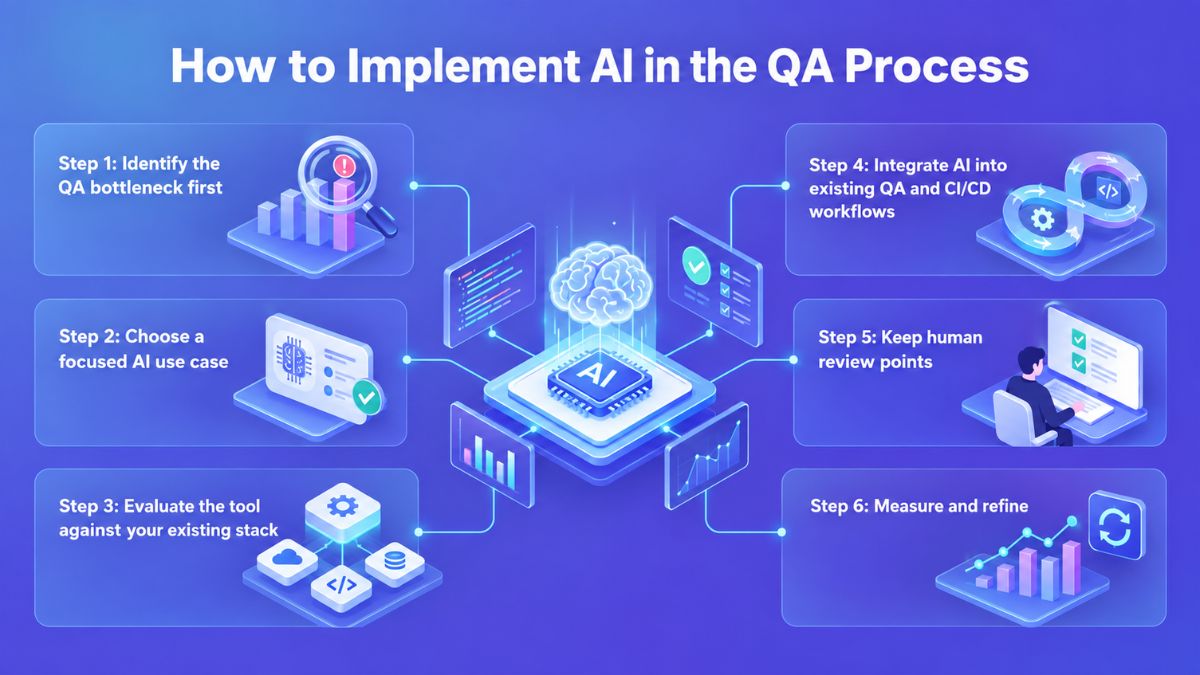
Step 1: Identify the QA bottleneck first
Start by locating where the current QA process consumes the most time or produces the most quality gaps. This could be regression testing, test maintenance, defect analysis, or test-case creation. A clear bottleneck gives the team a practical basis for deciding where quality assurance AI can create measurable improvement.
Step 2: Choose a focused AI use case
Once the bottleneck is clear, select one AI capability that directly addresses it. A focused implementation makes it easier to evaluate whether the technology is solving the original problem and avoids introducing unnecessary complexity across the entire QA process.
For example, if maintaining large numbers of regression tests is slowing releases, the initial use case could focus specifically on test maintenance. The scope can expand later once the team has enough evidence from actual usage.
Step 3: Evaluate the tool against your existing stack
An AI tool needs to work within the technical environment your QA team already uses. Check its compatibility with testing frameworks, CI/CD infrastructure, development environments, and available data sources. The team’s existing skills also matter because a technically capable tool can still create friction if engineers cannot use or maintain it effectively.
Step 4: Integrate AI into existing QA and CI/CD workflows
AI becomes more useful when its output reaches the workflow where testing decisions are already made. Integration with CI/CD can provide continuous quality feedback during development instead of creating a separate testing activity. This also gives teams a clearer view of where AI-generated results fit into release and defect-management processes.
Step 5: Keep human review points
Not every AI output should move directly into production testing or release decisions. Teams should set review checkpoints based on the impact and uncertainty of each AI-generated result. Human oversight is particularly important for generated tests and risk predictions, where incorrect outputs could affect testing priorities or product quality.
Step 6: Measure and refine
Evaluate the implementation against metrics that reflect the original QA problem. Depending on the use case, this may include testing effort, , defect detection accuracy, or test maintenance. The results should guide further adjustments and determine whether expanding the use of AI is justified.
To strengthen the connection between AI-powered QA and continuous delivery, explore our DevOps software development for more insights into integrating testing, automation, and CI/CD workflows.
Top AI Testing Tools and Platforms
The right AI tool depends on the testing challenges a team needs to address and how well the tool fits its existing QA environment. The following options cover different needs, from generating tests and reducing maintenance effort to validating visual changes and prioritizing high-risk areas.
Test generation and execution tools
These tools focus on reducing the manual work involved in turning requirements or natural-language descriptions into executable tests. They are particularly useful when QA teams need to expand coverage without increasing test-authoring effort at the same rate.
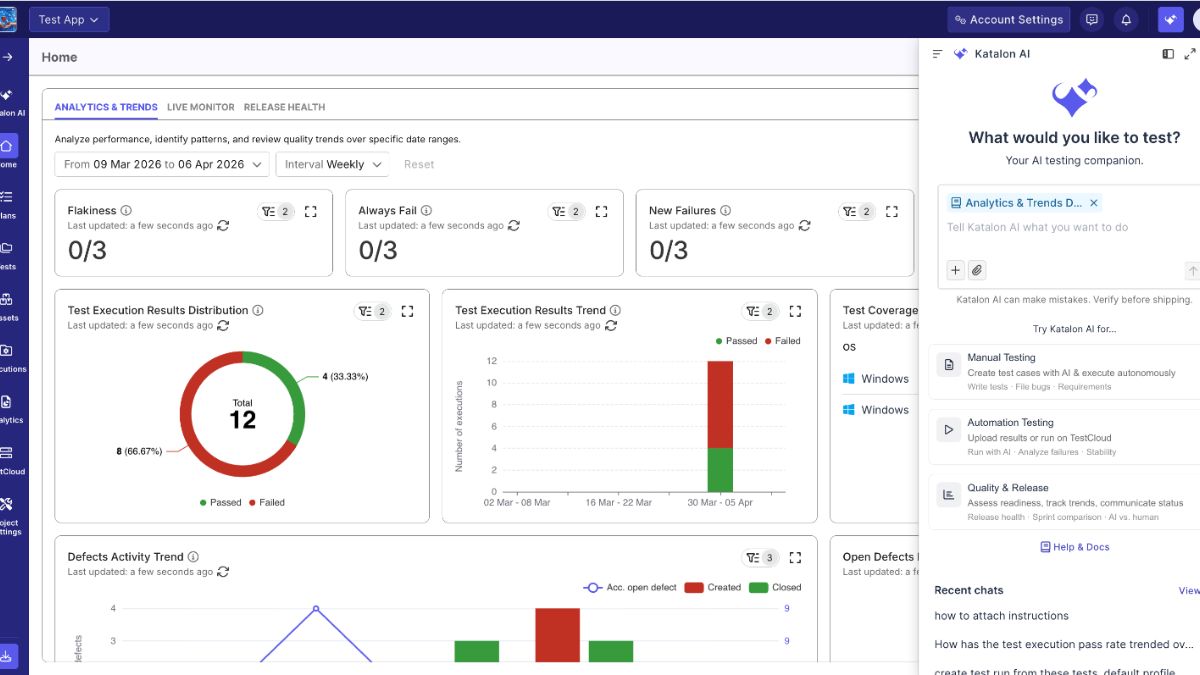
- Katalon: Its AI capabilities can generate test cases and test steps from requirements, while its platform also supports automated test execution and analysis.
- Tricentis Tosca: Tosca Agentic Test Automation lets testers describe test scenarios in natural language and generate corresponding test cases and steps. It can be useful for teams that want to make test creation more accessible while keeping it connected to an established automation environment.
- testRigor: The platform uses plain-English instructions to create, execute, and maintain end-to-end tests. Its approach reduces reliance on conventional Selenium or Playwright scripting, which can be valuable for teams with mixed technical skill levels.
Self-healing and test maintenance tools
AI in quality assurance can also target one of the recurring costs of automation: keeping existing tests functional as applications change. Self-healing tools identify changes in UI elements or test conditions and can adapt tests with less manual intervention.
- Testsigma: Its AI-powered auto-healing identifies outdated or broken element locators during execution and updates them when application changes are detected. This is designed to reduce failures caused by routine UI changes.
- Functionize: Functionize uses machine learning to recognize application elements through multiple attributes and adapt tests when the interface changes. It also provides root-cause analysis and suggested fixes for failed tests.
Visual testing tools
Visual testing addresses defects that functional assertions may not capture, such as unexpected changes to layouts, text positioning, or responsive presentation. These tools compare application visuals across versions and environments to surface changes that warrant human review.
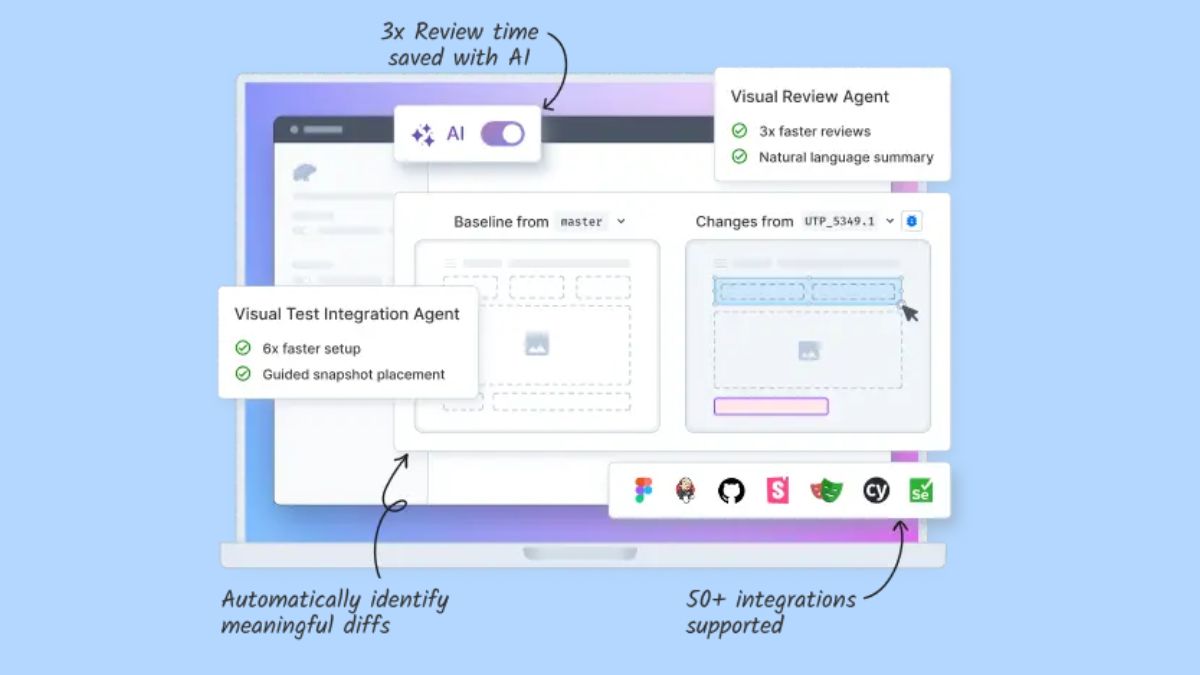
- Percy by BrowserStack: Percy captures application snapshots and compares them with approved baselines across browsers and responsive widths. Its Visual Review Agent can also use AI to summarize meaningful visual differences and reduce review noise.
- TestMu AI SmartUI: SmartUI supports visual regression testing by comparing screenshots across browsers and environments. It can identify changes involving elements such as layout, text, color, padding, and positioning.
Predictive and risk-based testing tools
Predictive testing shifts attention from running every available test to determining which tests are most relevant to a particular change. AI models can use signals such as previous test results, code changes, and defect history to help QA teams prioritize testing effort.
- Launchable: Its Predictive Test Selection uses machine learning to identify which tests are most relevant to a specific code change. The system uses historical test execution data and code-change information to create a smaller, targeted test set.
- SeaLights Test Optimization: SeaLights uses machine learning and AI for Test Impact Analysis, mapping code changes to relevant tests. Tests considered unlikely to be affected can be excluded from execution, allowing teams to focus validation on the areas connected to the change.
The Future of AI in Quality Assurance
AI in quality assurance is moving beyond assisting QA engineers with individual tasks. The next stage focuses on systems that can understand testing goals, make context-based decisions, and take on more of the testing lifecycle with less manual intervention.
From AI assistance to more autonomous testing
Current AI tools mainly support tasks such as test creation, execution, and analysis. As these systems learn from an organization’s testing history, they may increasingly suggest relevant test scenarios and generate executable tests with less manual input. This could reduce repetitive work while allowing QA teams to focus more on higher-value testing decisions.
Intent-driven testing
Testing is also moving toward a model where teams define the expected outcome, while AI determines how that goal should be tested. Instead of relying entirely on predefined scripts, AI could use application behavior, usage patterns, and testing requirements to identify relevant areas for validation. This approach may make testing more adaptable as products and user behavior change.
AI agents across more of the testing lifecycle
AI agents are already appearing in commercial testing tools, but their current role is still focused on specific parts of QA. Depending on the platform, an agent may help generate tests from natural-language input, review visual differences, or support analysis and execution within an existing testing workflow.
The next step is broader coordination across these activities, so one agent or a group of agents can connect test creation, execution, analysis, and follow-up actions more closely. Full autonomy is still developing, and fragmented testing data can limit how effectively these systems operate across an organization.
Conclusion
Adopting AI in quality assurance is ultimately a balance between greater automation and stronger control over software quality. AI can improve coverage, shorten feedback cycles, and direct testing effort toward higher-risk areas, but results depend on how well the technology fits the existing QA process. Data readiness, integration requirements, and human oversight should therefore shape the adoption decision from the start.
Newwave Solutions provides end-to-end QA testing services that combine manual and automated testing to help software teams improve product reliability, release quality, and testing efficiency.
For projects that also involve AI-enabled features or broader AI initiatives, our AI development services can support the technology layer while QA specialists focus on validating functionality, performance, and overall software quality. This allows businesses to strengthen both the product itself and the process used to verify it.
FAQs
1. How can AI be used in quality assurance?
AI can support QA by generating test cases, prioritizing higher-risk areas, analyzing test results, and assisting with repetitive testing tasks. It is especially useful for reducing manual effort in regression testing, defect analysis, and test maintenance.
2. How does AI enhance quality assurance processes?
AI can make QA more efficient by processing testing data faster and identifying patterns that may be difficult to detect manually. This can shorten feedback cycles, expand test coverage, and help teams focus effort on areas with greater defect risk.
3. Is QA getting replaced by AI?
AI is changing how QA work is performed, but it does not remove the need for QA professionals. Human judgment is still required to review AI outputs, handle complex or ambiguous issues, and make decisions that depend on product and business context.
4. What are the challenges with AI in quality assurance?
Common challenges include poor data quality, integration effort, upfront costs, tool maintenance, and the need for team training. AI outputs also require human oversight because generated tests, predictions, or recommendations may not always be accurate or relevant.
5. What are differences between autonomous testing and traditional automation testing?
Traditional automation relies mainly on predefined scripts and rules created by engineers, while autonomous testing can use AI to generate, prioritize, or adjust testing actions based on data and application changes. Autonomous testing is more adaptive, but it still requires human review for higher-risk or context-dependent decisions.
To Quang Duy is the CEO of Newwave Solutions, a leading Vietnamese software company. He is recognized as a standout technology consultant. Connect with him on LinkedIn and Twitter.



Read More Guides


Get stories in your inbox twice a month.
Let’s Build Something Extraordinary
Sign up for a 30 min no-obligation strategic session with us. Transform your Ideas into scalable reality.
Leave a Reply