


AI in Software Development Lifecycle: How AI is Transforming SDLC
AI in software development lifecycle is gaining attention as artificial intelligence becomes embedded across industries, from finance and healthcare to eCommerce and manufacturing. IBM reported that 42% of enterprise scale organizations had actively deployed AI in their businesses to simplify complex tasks and support business forecasting.
Software development is increasingly part of this transformation. AI can help reduce repetitive work, accelerate coding and testing, improve issue detection, and support decisions throughout the development process. In this article, we’ll explore AI applications across the SDLC, explain the key benefits, implementation strategies, and risks to consider.
Key Takeaways
|
What is Using AI in Software Development Lifecycle ?
AI in the software development lifecycle is the integration of AI tools and systems across each phase of the traditional SDLC to augment human developers. It is designed to improve development speed, software quality, and decision making by supporting activities from planning and coding to testing and other development tasks.
Rather than replacing developers, AI acts as a copilot that can take on repetitive work and support software creation. Agentic AI and LLM powered tools can assist with coding and make software development more accessible, allowing developers to spend more time on building systems and less time on routine tasks.
Benefits of Using AI in Software Development Lifecycle
Using AI software development lifecycle can improve how teams build, test, and manage software. These benefits help development teams spend less time on manual tasks and more time on complex technical and strategic work.
Improves development efficiency
AI can automate time-consuming activities such as code generation, code review, bug detection, and software testing. This reduces the amount of repetitive work developers need to perform manually and allows them to focus on more complex parts of a project.
For example, GitHub Copilot provides real-time code suggestions, including code snippets, function calls, and variable names. It can also interpret natural language comments and analyze existing code to generate suggestions that fit the current context.
AI also supports code quality and testing. Tools such as Amazon CodeGuru and DeepCode can scan code to identify errors, vulnerabilities, and possible improvements before deployment. AI-powered testing tools can further:
- Generate test cases by analyzing code, user stories, and historical data
- Detect patterns that may indicate potential defects
- Compare user interfaces across different platforms for visual testing
- Adapt tests when minor UI changes or code refactoring occur
By automating these activities, AI can speed up development workflows while helping teams improve software quality.

Supports data-informed decision-making
Powered by machine learning, deep learning algorithms, and neural networks, AI can analyze large volumes of software project data, identify patterns, and detect potential bottlenecks. These insights can support decisions around software features, resource allocation, risk management, and product strategy.
AI models trained on information such as system logs, previous performance metrics, and user feedback can also project possible outcomes of a new software release. This allows development teams to identify potential issues before deployment and take action to reduce the risk of post-release errors.
Strengthens team collaboration
AI can improve collaboration by reducing repetitive workloads and giving developers more time for architecture discussions, problem-solving, and coordination with other team members.
It can also support teamwork in several ways:
- Reducing repetitive workload: AI automates repetitive, tedious tasks; thus, developers can focus on strategic work, project architecture improvements, and cooperation with other team members.
- Improving communication: AI-powered chatbots can help bridge language barriers and support knowledge exchange among distributed teams.
- Supporting pair programming: AI can suggest code, identify potential issues, and recommend improvements based on established coding standards. This creates a more collaborative environment where developers can share knowledge, generate ideas, evaluate alternative approaches, and find the best solutions.
- Improving project visibility: AI-powered project management tools can provide a shared environment where frontend, backend, and DevOps teams monitor project progress, dependencies, and roadblocks.
Traditional SDLC vs AI-driven SDLC
Traditional and AI-driven software development life cycle approaches follow the same core stages, but they differ in how work is executed and decisions are supported. Below is a side-by-side comparison between 2 approaches:
|
Aspect |
Traditional SDLC |
AI-Driven SDLC |
| Requirements gathering | Relies on interviews and manual documentation, which gives teams direct human input but can lead to misinterpretation. | AI analyzes historical data and user feedback to support requirements analysis, although contextual nuances may still be missed. |
| Design | Manual modeling provides teams with greater control, but the process can be time-consuming and relatively static. | AI can generate design patterns and suggest architectures, but recommendations may be affected by overfitting. |
| Development | Developers rely on domain knowledge and write code manually, which can slow development and leave more room for errors. | AI-assisted coding tools such as GitHub Copilot can improve coding speed and consistency, although output quality depends on model training. |
| Testing | QA teams create manual and automated tests, which can require significant time and provide limited coverage. | AI can automatically generate test cases and identify edge cases, but some results may lack transparency or traceability. |
| Deployment | Uses established deployment processes, but manual steps can introduce additional risk. | AI can optimize deployment pipelines and forecast potential failures, although model drift may affect prediction accuracy. |
| Monitoring and maintenance | Depends largely on logs and manual alerts, which can make root cause analysis slower. | AI can detect anomalies and automate incident response, but false positives remain possible. |
| Security integration | Security may be introduced late in development, increasing the risk of fragmented fixes. | AI can continuously scan code for vulnerabilities, but it may still fail to detect zero-day vulnerabilities or novel attacks. |
| Decision-making | Human experts provide contextual judgment, although decisions can be inconsistent or affected by bias. | AI provides data-driven insights and greater consistency, but results can inherit data bias or lack explainability. |
| Efficiency | More manual work can make development workflows slower. | Greater automation can accelerate workflows across the development lifecycle. |
| Human oversight | Humans maintain full control and accountability throughout development. | AI reduces the amount of direct human input required for some activities, which can raise trust and compliance concerns. |
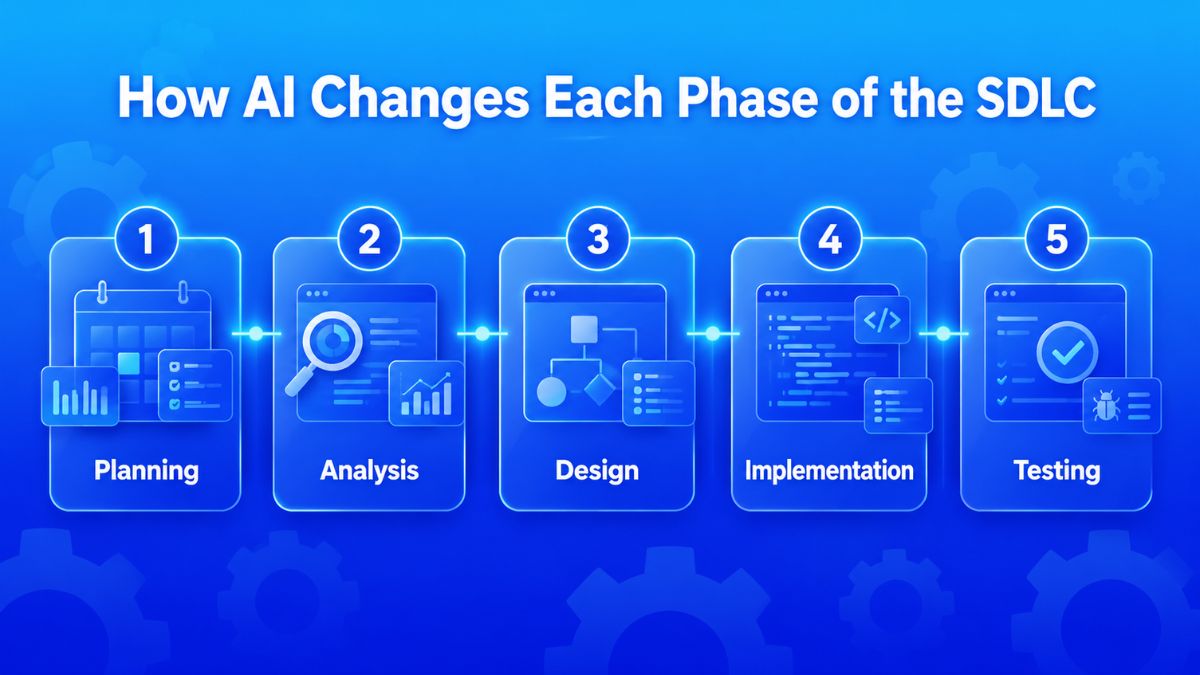
How AI Changes Each Phase of the SDLC
Using AI in software development lifecycle extends automation beyond coding. AI agents can assist with requirements, design, testing, deployment, and maintenance while keeping critical business and technical decisions under human control.
Phase 1: Planning
The planning phase establishes the overall direction of the project. Teams define what needs to be built, why it matters to the business, what resources are available, and whether the expected outcomes justify the required investment.
1. Translate business needs into project requirements
Stakeholders often describe what they want to achieve in business terms rather than technical specifications. The planning team therefore needs to convert those high level goals into clearer functional and non functional requirements that can guide later phases.
How AI tools can help:
An AI agent can turn vague requirements into more specific and actionable items. For example, if a stakeholder requests an online booking system that is “easy to use and secure,” the agent can break this down into interface requirements, authentication needs, data protection requirements, and storage specifications. This can reduce repeated clarification meetings and rework caused by unclear expectations.
2. Document proposed components and project intent
Teams need a shared source of truth describing what each proposed component should do, how it supports business needs, how it connects with the existing system, and where its functional boundaries lie.
How AI tools can help:
AI can process stakeholder discussions and convert them into structured documentation for a centralized repository. For example, if a client says that a reporting dashboard should be “fast,” the agent can convert that broad statement into more specific requirements around response time or throughput and update the documentation as reviewers provide feedback.
3. Plan review
Once the initial plan is created, teams review it to confirm that it supports business needs, stays within investment constraints, and gives the next stakeholders enough information to continue the project.
How AI tools can help:
An AI agent can compare the plan with the original requirements and flag missing items or inconsistencies before human review. It can also identify overlooked dependencies, check whether budget constraints are reflected, and create different summaries for executives and technical implementers.
Phase 2: Analysis
The analysis phase focuses on gathering stakeholder needs, organizing requirements, and translating approved requirements into detailed software specifications.
1. Stakeholder interviews and needs gathering
Teams conduct interviews, surveys, and workshops to understand user pain points, workflows, expectations, and business requirements.
How AI tools can help: An AI agent can transcribe and analyze interview recordings, identify recurring themes and requests, and surface needs that stakeholders may not have stated directly. It can also consolidate input from multiple sources and flag conflicting requirements before analysts spend time reviewing large amounts of notes manually.
2. Requirements analysis and prioritization
After gathering requirements, teams evaluate dependencies, feasibility, business value, and technical complexity. In Agile projects, requirements may also be organized into Epics and Features.
How AI tools can help: An AI agent can classify requirements into functional, non functional, and constraint categories, then map dependencies between them. It can support prioritization using predefined criteria such as cost, impact, or risk and compare requirements with historical project data to estimate effort or identify possible scope creep.
A parallel AI agent can also convert requirements into Epics and Features and populate a Jira board with corresponding tickets.
3. Software specification definition
Validated requirements are translated into detailed specifications covering system behavior, interfaces, data flows, and acceptance criteria. These specifications guide subsequent design, implementation, and testing activities.
How AI tools can help: An AI agent can generate draft specifications from approved requirements and help maintain consistent structure and completeness. It can identify ambiguous requirements, cross reference specifications with relevant standards or regulations, and generate test scenarios that can be added to acceptance criteria.
Phase 3: Design
The design phase defines the technical structure of the software, including architecture, databases, interfaces, and application components.
1. Software architecture design
Teams design how software components interact and how data and processing logic move across the system. Architecture diagrams are commonly used to align teams, including documentation approaches such as the C4 model.
How AI tools can help: An AI agent can suggest architectural patterns based on project requirements and constraints and highlight trade offs between alternatives. It can analyze individual software modules and generate diagrams that describe data flows and processing logic. AI can also review proposed architectures and identify possible bottlenecks or security vulnerabilities before implementation.
2. Database design and data modeling
Teams define database entities, relationships, schemas, and data flows required to support application functionality and performance.
How AI tools can help: An AI agent can generate initial data models from requirements documentation, recommend normalization approaches, and identify issues such as redundant data or missing relationships. It can also suggest indexing approaches based on expected query patterns and data volumes.
3. User interface and component design
Design teams create wireframes, mockups, user flows, and detailed specifications describing how application components should behave.
How AI tools can help:
An AI agent can generate UI wireframes based on requirements and accessibility standards. It can review designs for consistency, check alignment with brand guidelines, verify that required user flows are covered, and create component specifications that map to approved UI designs.
Phase 4: Implementation
The implementation phase turns approved designs and specifications into working software.
1. Code development and standards enforcement
Developers write application code, build features, integrate components, and follow agreed coding standards and conventions.
How AI tools can help: AI coding tools such as Cursor can generate code and suggest implementations based on design specifications. They can also detect deviations from coding standards, automate repetitive coding patterns, and help maintain consistent naming conventions across the codebase.

2. Test driven development
In test-driven development, automated tests are written before the corresponding functionality so expected behavior is defined before implementation.
How AI tools can help: An AI agent can generate unit and integration tests from requirements, acceptance criteria, and design specifications. As developers implement functionality, AI can check test coverage, suggest additional edge cases, and verify whether new code continues to pass existing tests.
3. Integration and version control management
Teams merge code from different developers, resolve conflicts, manage version control, and maintain stable continuous integration pipelines.
How AI tools can help: An AI agent can identify potential merge conflicts, suggest resolution approaches, and automate routine integration tasks. It can also monitor CI pipelines, analyze build failures, and recommend possible fixes when integration issues occur.
Phase 5: Testing
The testing phase verifies that the software works as intended and identifies defects before release.
1. Test planning and strategy
QA teams determine which tests are required (unit, integration, system, acceptance), establish coverage targets, identify higher risk areas, and allocate testing resources.
How AI tools can help: An AI agent can analyze requirements and code complexity to recommend a testing strategy. It can identify areas that may require more intensive testing, estimate testing effort using historical data, and generate test plans covering the required functional areas.
2. Test case development and execution
Teams create detailed test cases from requirements and design specifications and execute them to verify software behavior under different conditions.
How AI tools can help: An AI agent can automatically generate test cases and maintain traceability between tests and the specifications they validate. During execution, it can prioritize tests based on recent code changes, detect flaky tests, and parallelize test runs to shorten feedback cycles.
3. Defect identification and regression testing
Failed tests are investigated, defects are documented and assigned, and regression testing confirms that fixes have not introduced new issues.
How AI tools can help: An AI agent can analyze failed tests to identify likely root causes, point developers toward relevant code locations, and generate defect reports with supporting context. For regression testing, it can select tests based on the affected code changes, reducing unnecessary test execution while maintaining confidence in software stability.
Examples of Using AI in SDLC: Insights from Industry Leaders
Real-world examples below show how AI supports the software development lifecycle and enterprise workflow to improve efficiency, accuracy, and decision-making across development, analysis, and operations.
1. SAP: AI copilots for ERP development
In 2025, SAP announced plans to embed 400 AI use cases across its cloud portfolio, including Joule within SAP S/4HANA Cloud and related modules. reported a 20 to 25% reduction in coding and testing release cycle times, along with improved accuracy across finance, procurement, supply chain, and IT development through AI assisted automation and intelligent insights.

Business relevance:
SAP shows how AI in the software development lifecycle can support both development and surrounding enterprise processes. By reducing manual work and shortening coding and testing cycles, SAP proved howw AI copilots can improve efficiency while supporting accuracy across critical financial and operational workflows.
2. JPMorgan: COiN for Contract Analysis
JPMorgan used its Contract Intelligence platform, COiN, to apply natural language processing to commercial credit agreements. The platform reviewed 12,000 agreements in seconds and reduced more than 360,000 hours of manual review.

Business relevance: The case shows AI can analyze complex documents at scale, reducing manual review effort and freeing legal and compliance teams to focus on higher-value work.
3. Palantir with Mount Sinai and Cleveland Clinic: AI Powered Data Integration
Palantir worked with Mount Sinai and Cleveland Clinic to bring siloed clinical, operational, and financial information together through AI powered data integration platforms. The unified data supported predictive analytics for hospital staffing, patient throughput, and treatment outcomes.
Business relevance: This case shows how AI improves clarity across fragmented systems and supports decision making by turning integrated data into predictive insights for complex operations.
4. Siemens: AI-based predictive maintenance
Siemens combined AI and IoT technologies to analyze sensor data from industrial machinery. This helps to predict potential failures and support preventive maintenance.
Business relevance: The example shows how AI can create measurable operational value by predicting failures can help reduce downtime, avoid disruption, and extend asset life.
How to Integrate AI into Your Existing SDLC
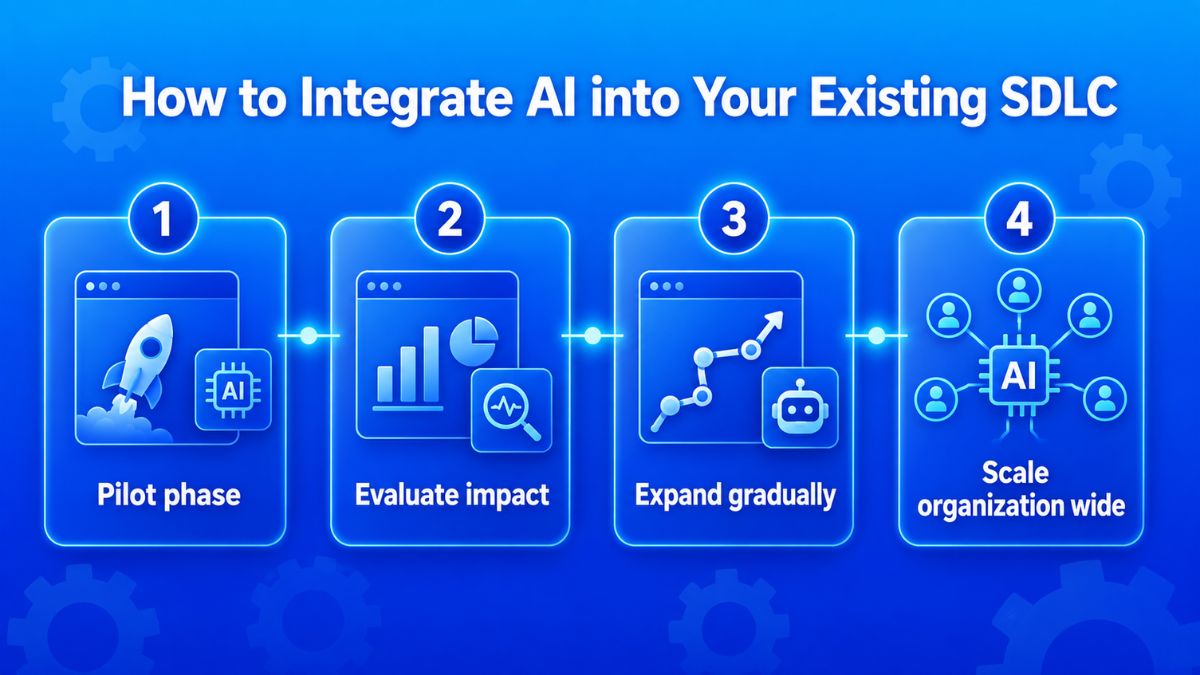
Integrating AI in the software development lifecycle can be approached like onboarding new team members: start small, build trust gradually, and expand adoption as teams become more comfortable using AI tools
Step-by-step incremental adoption
The following steps outline a gradual approach to introducing AI into your development workflow.
- Pilot phase: Select two to three developers to test AI coding assistants for 30 days.
- Evaluate impact: Measure productivity gains from the pilot and collect feedback from the developers involved.
- Expand gradually: Based on the pilot results, introduce AI tools to additional development teams.
- Scale organization wide: Once adoption expands beyond the initial teams, implement AI tools across all development teams.
Other best practices for successful implementation
Beyond incremental adoption, teams should also consider integration complexity, implementation pace, training, and the level of guidance AI tools require.
Consider AI tool integration complexity
Different AI tools vary significantly in how difficult they are to integrate into existing workflows, depending on their role and depth of system interaction.
|
AI tool category |
Complexity level | Integration time |
| Code completion | Low | 1-2 weeks |
| Code review | Medium | 3-4 weeks |
| Testing automation | Medium | 4-6 weeks |
| Architecture planning | High | 8-12 weeks |
Choose an implementation approach
Rapid implementation can provide immediate productivity gains and competitive advantages. Gradual adoption, by contrast, can reduce resistance and allow training to be integrated into the adoption process.
Provide ongoing AI training
Training can support teams as AI becomes part of the AI software development lifecycle. Examples include weekly AI Pair Programming sessions, monthly prompt engineering workshops, and quarterly evaluations of AI tools and updates.
Treat AI like a new team member
AI tools can be approached like junior developers joining a team. At first, they require guidance and oversight, but over time they become more autonomous and valuable. This approach emphasizes patience and proper mentorship rather than expecting immediate perfection from AI tools.
Top AI Challenges in Software Development and How to Overcome
While AI in the software development lifecycle can automate and support many development activities, adoption also introduces challenges related to skills, data, privacy, legacy integration, and the limitations of AI itself. Addressing these issues requires teams to combine technical preparation with appropriate human oversight.
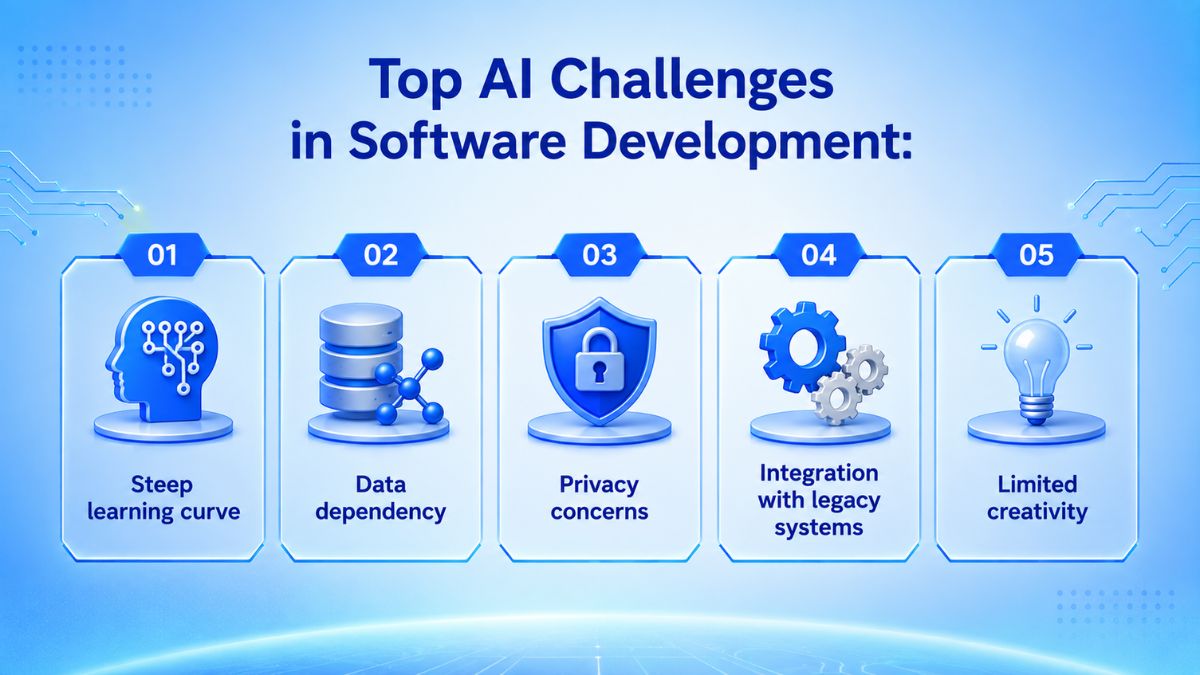
1. Steep learning curve
AI systems involve technologies such as machine learning, deep learning, and natural language processing. Developers may not already understand the algorithms and data science principles behind these technologies, creating a skills gap that companies may need to address through training.
Training can require significant time and resources, while the continued evolution of AI also makes ongoing learning and upskilling necessary.
How to overcome: Companies should consider training software engineers in relevant AI technologies and encourage continuous learning. Developers need to keep up with new developments, current practices, and emerging AI tools as the field evolves.
2. Data dependency
AI models depend heavily on their training data. Poor quality or insufficient data can contribute to bias and inaccurate predictions, so AI systems need access to large, diverse, and high-quality datasets. Clean data should be free from errors, outliers, missing values, and inconsistencies.
Obtaining enough high-quality data is not always straightforward. In many situations, organizations face multiple barriers that limit data availability:
- Data protection rules such as GDPR can limit or restrict the use of personal information for training AI systems, especially in privacy sensitive applications.
- Some datasets are difficult to access or come with high acquisition costs. For example, collecting sensitve patient information to develop diagnostic AI systems is challenging because of legal privacy constraints and ethical considerations.
- In certain industries, especially niche domains, there may simply not be enough existing data to build robust training sets.
How to overcome: Development teams can improve data quality through cleaning, labeling, and validation. When real data is unavailable, synthetic data generation can provide artificial data that reflects characteristics of real datasets.
3. Privacy concerns
Because AI models can process large amounts of information, using them during software development may expose sensitive data. For example, sending application code containing business specific information to an AI model running on an external server can put that code at risk of compromise.
How to overcome: Organizations should balance data accessibility with privacy protection by using strong encryption, anonymization techniques, and transparent data governance frameworks to safeguard sensitive data used by AI systems.
4. Integration with legacy systems
Integrating AI into existing software can be challenging because many legacy systems were not originally designed to support AI capabilities. To make AI work with these environments, development teams may need to adapt parts of the existing system rather than simply adding a new AI tool.
How to overcome: Depending on the system, teams can use several approaches:
- Update existing components: Upgrade specific parts of the legacy system so they can support the computational requirements of AI algorithms.
- Develop custom adapters: Build data format or API adapters that translate information between legacy software and AI components, allowing the two systems to communicate properly.
- Use middleware: Connect AI components and legacy systems through middleware without changing the core structure of the existing software environment.
Cloud services offer another option when extensive on-premise upgrades are not practical. AI as a Service platform allows companies to access AI capabilities through services such as Google Cloud AI, IBM Watson, Amazon Web Services, and Microsoft Azure AI.
5. Limited creativity
AI may struggle with complex or uncommon problems that require creative problem solving. Its outputs remain constrained by its training data, and AI may not fully understand the nuanced context and human aspects involved in software development.
How to overcome: Team should avoid relying too heavily on AI algorithms to guide their work. Human judgment and creative problem solving remain necessary, particularly when development tasks involve unusual situations or contextual considerations that AI cannot adequately handle.
Future Trends and Strategic Outlook
The future of AI in software development lifecycle points toward broader use of AI coding assistants while developers continue to play a central role. Gartner predicts that 75% of enterprise software engineers will use AI coding assistants by 2028, while another research suggests AI may not fully replace developers until 2040.
Together, these projections indicate a longer transition toward AI assisted development rather than immediate replacement.
Additionally, developing team should focus more on collaboration between developers and AI than direct replacement. Developers can use AI to support their work while still providing the context and ethical judgment that machines cannot replicate. Development environments may also become more adaptive by learning coding patterns, suggesting improvements, and catching errors earlier.
As AI becomes more autonomous, security will also need more attention. Organizations will need strong security frameworks to make sure AI generated code continues to meet enterprise standards.
How Newwave Solutions Supports Bussiness with Our AI-Driven Software Development
Newwave Solutions is a global technology partner with over 15 years of experience and a track record of serving 200+ clients across industries such as finance, healthcare, manufacturing, retail, and enterprise services.
With deep expertise in building customized software solutions, we have adopted AI in a practical and structured way across the entire software development life cycle.
Instead of applying AI in isolation, Newwave Solutions integrates AI capabilities into each phase of the SDLC to enhance efficiency, improve decision-making, and accelerate delivery while maintaining strong engineering governance and quality standards.
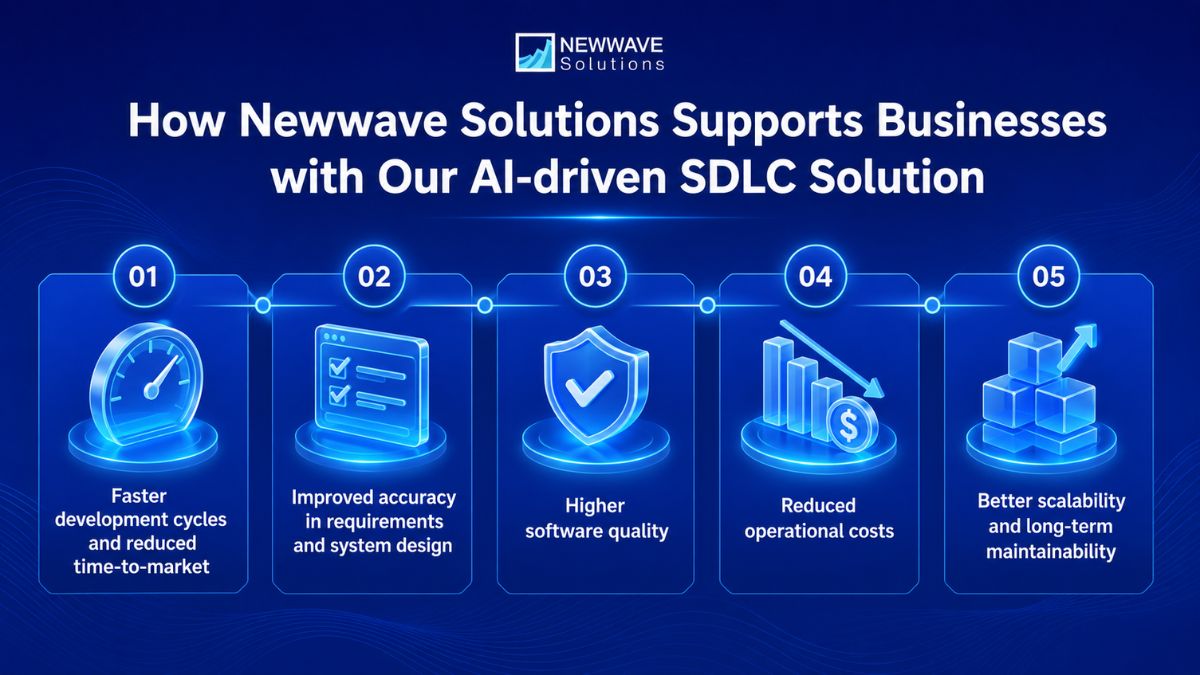
Business value gained from our AI-driven SDLC solution:
- Faster development cycles and reduced time-to-market by applying AI-assisted coding, automated code generation, and workflow optimization across key SDLC stages such as development and integration.
- Improved accuracy in requirements and system design through AI analysis of business inputs, extraction of structured requirements, and support for system modeling during the early planning phase.
- Higher software quality through enhanced testing and validation by leveraging AI to generate test cases, detect potential defects, and support automated quality checks during QA.
- Reduced operational costs through the automation of repetitive engineering tasks, including code review support, documentation generation, and routine development activities within the SDLC.
- Better scalability and long-term maintainability of customized systems by using AI-assisted architecture recommendations, refactoring support, and consistent documentation throughout development and maintenance phases.
Ready to build your next software product with an AI driven SDLC? Contact us to turn your business requirements into scalable, reliable software with AI supported engineering from planning through long term development.
Final Thoughts: Embracing AI Across the SDLC
Using AI in software development lifecycle is most effective when it strengthens the full development process rather than isolated tasks. AI can support faster planning, coding, testing, and maintenance, but successful adoption still depends on quality data, suitable integration, security controls, and human oversight.
For companies planning a custom software, an AI driven SDLC can provide a more efficient path from requirements to long term improvement. Newwave Solutions combines AI assisted development with engineering expertise to help businesses build scalable, reliable software across the SDLC. Schedule a consultation to explore how our team can support your next AI driven software project.
FAQs
1. What is the AI software development life cycle?
The AI software development life cycle refers to using AI capabilities across different SDLC stages, including planning, analysis, design, development, testing, deployment, and maintenance.
2. How is AI changing the software development lifecycle?
AI is making many SDLC activities faster and more automated by assisting teams with requirements, coding, testing, documentation, and analysis. It also allows developers to spend less time on repetitive work while applying human judgment to complex technical and business decisions.
3. How to use AI in SDLC process?
A practical approach is to start with a small pilot, measure the impact, gather developer feedback, and gradually expand AI adoption across additional teams. Organizations should also consider tool complexity, provide ongoing training, and maintain appropriate human oversight as AI becomes more integrated into development workflows.
4. What is the agentic SDLC?
An agentic SDLC uses AI agents to perform or support development activities with greater autonomy across different stages of the lifecycle. These agents can assist with tasks such as requirement analysis, coding, testing, documentation, and monitoring, while developers provide guidance, context, and oversight.
5. What is the best AI tool for software development?
There is no single best AI tool for every software development task because the right choice depends on the development activity and integration needs. Teams should evaluate tools based on their specific use cases, such as code completion, code review, testing automation, or architecture planning, as well as the complexity of integrating them into existing workflows.
To Quang Duy is the CEO of Newwave Solutions, a leading Vietnamese software company. He is recognized as a standout technology consultant. Connect with him on LinkedIn and Twitter.



Read More Guides
Get stories in your inbox twice a month.
Let’s Build Something Extraordinary
Sign up for a 30 min no-obligation strategic session with us. Transform your Ideas into scalable reality.
Leave a Reply